Best Mobile Hotspots for Travel 2026: Tested & Ranked
We tested 10 mobile hotspots and travel routers across 15+ countries. Here are the best portable WiFi devices for travelers, digital nomads, and remote workers.
If you work remotely from hotels, Airbnbs, cafes, or a van — you already know the pain. Hotel WiFi drops mid-Zoom call. Cafe networks are congested and insecure. Phone tethering drains your battery and overheats. You need a better solution, and that solution is a dedicated mobile hotspot or travel router.
We spent the last 8 months testing 10 mobile hotspots and travel routers across 15+ countries — from coworking spaces in Bali to campsites in Portugal to hotel rooms in Tokyo. We ran over 300 speed tests, measured battery life under real workloads, tested VPN throughput, and connected up to 12 devices simultaneously. The result? This definitive ranking of the best portable WiFi devices for travelers, digital nomads, and remote workers in 2026.
Whether you need a pocket-sized travel router for hotel WiFi, a standalone 5G hotspot with all-day battery, or a rugged dual-modem setup for van life — we have tested and ranked the best option for every use case and budget.
Quick Comparison: Best Mobile Hotspots at a Glance
| Feature | GL.iNet Beryl AX | Peplink MAX BR1 Pro 5G | Netgear Nighthawk M6 | GL.iNet Slate AX | Peplink MAX Transit Duo |
|---|---|---|---|---|---|
| Price | ~$80 | $700-900 | ~$400 | ~$60 | $1,200+ |
| Type | Travel Router | Cellular Router | Mobile Hotspot | Travel Router | Dual Cellular Router |
| Battery | USB-C powered | DC powered | 13 hours | USB-C powered | DC powered |
| WiFi Standard | WiFi 6 (AX3000) | WiFi 6 | WiFi 6 | WiFi 6 (AX1800) | WiFi 5 |
| SIM/eSIM | No (USB tethering) | Dual SIM | Nano SIM | No (USB tethering) | 4x SIM slots |
| Best For | Most travelers | Remote workers | Standalone hotspot | Budget travelers | Van life / RV |
| Visit GL.iNet Beryl AX | Visit Peplink MAX BR1 Pro 5G | Visit Netgear Nighthawk M6 | Visit GL.iNet Slate AX | Visit Peplink MAX Transit Duo |
1. GL.iNet Beryl AX (GL-MT3000) — Best Travel Router Overall
Price: ~$80 | Type: Travel Router | WiFi: WiFi 6 (AX3000) | Power: USB-C | Weight: 286g
The GL.iNet Beryl AX is our top pick for a reason — it does everything most travelers need at a price that won’t empty your wallet. This compact travel router turns any internet source into a private, secure WiFi network for all your devices. It does not have a built-in cellular modem (so it is not a standalone hotspot), but that is actually its greatest strength: pair it with your phone’s eSIM data via USB tethering and you get the best of both worlds.
Why We Love It
The Beryl AX runs OpenWrt, the most powerful open-source router firmware available. That means built-in VPN client support (WireGuard, OpenVPN), ad blocking, and advanced networking features that no consumer hotspot can match. In our testing across 12 countries, we set up NordVPN on the router in under 5 minutes — every device that connected to its WiFi was automatically protected, no per-device VPN app required.
USB tethering is the killer feature. Plug your phone into the router’s USB-C port, enable USB tethering, and the Beryl AX broadcasts your phone’s cellular data as a WiFi network. Your phone charges simultaneously while providing internet to up to 25 devices. We used this setup daily for 3 months of remote work and it was bulletproof.
Performance
In our speed tests, the Beryl AX delivered 90-95% of the source connection speed with minimal overhead. When tethered to a phone pulling 80 Mbps LTE, we consistently measured 72-76 Mbps over WiFi to connected laptops. WiFi 6 support means lower latency and better performance with multiple devices — we had 6 devices connected simultaneously without noticeable degradation.
Range is solid for a travel router: reliable connectivity within a 25-30 meter radius in our hotel room tests, though walls and obstacles reduce this to about 15 meters. For a device you can fit in your jacket pocket, that is impressive.
What It Does Best
- Hotel WiFi repeater: Connect to weak hotel WiFi, then rebroadcast it as a stronger, private signal
- Public WiFi security: Route all traffic through VPN automatically — every device protected
- Phone tethering hub: Turn your phone’s eSIM data into WiFi for your laptop, tablet, and other devices
- Ethernet bridge: Plug into a wired ethernet port and create a WiFi network (common in hotels)
Pros
- Incredibly portable at 286g with USB-C power
- WiFi 6 dual-band with strong throughput
- Built-in VPN support (WireGuard, OpenVPN) -- all devices protected
- USB tethering charges your phone while sharing its data
- OpenWrt gives advanced users full control
- Excellent value at ~$80
Cons
- No built-in cellular modem -- needs a data source
- No battery -- must be plugged in via USB-C
- OpenWrt admin panel can intimidate non-technical users
- 2.4GHz range could be better in large spaces
Who It’s For
The Beryl AX is perfect for digital nomads, remote workers in hotels and Airbnbs, anyone who wants VPN protection on all devices, and travelers who already carry an eSIM-equipped phone. If you only buy one travel connectivity device, this is the one.
Not ideal for: Van lifers who need a standalone always-on cellular connection, or anyone who wants a device with its own SIM card slot and battery.
Get GL.iNet Beryl AX on GL.iNet.com2. Peplink MAX BR1 Pro 5G — Best Premium Cellular Router
Price: $700-900 | Type: Cellular Router | WiFi: WiFi 6 | Cellular: 5G/LTE Cat 20 | SIM: Dual SIM
If connectivity is mission-critical for your work and you cannot afford dropped calls or unstable video conferences, the Peplink MAX BR1 Pro 5G is worth every penny. This is enterprise-grade hardware in a compact form factor, and it is the router we trust for paid client calls in remote locations.
Why It’s Premium
The BR1 Pro packs a 5G/LTE Cat 20 modem with dual SIM slots, meaning you can run two different carrier SIMs simultaneously and the router intelligently switches between them for optimal coverage. Peplink’s proprietary SpeedFusion technology can even bond multiple connections — combine cellular data with hotel WiFi for a single, more reliable pipe.
External antenna support is where this device separates from consumer gear. Attach a pair of high-gain cellular antennas (sold separately, ~$50-100) and you can pull strong signal in areas where phones show one bar. We tested this at a remote campsite in the Algarve, Portugal, where our phones had barely usable 4G. With external antennas on the BR1 Pro, we measured 35 Mbps — more than enough for video calls.
Performance
In our 5G speed tests across 6 countries, the BR1 Pro consistently delivered 150-600 Mbps download speeds in 5G areas, and 40-120 Mbps on LTE. The dual-SIM failover worked flawlessly — when our primary carrier dropped coverage on a road trip through rural Spain, the router silently switched to the backup SIM within seconds. We would not have noticed if we were not monitoring it.
Simultaneous device handling is excellent. We connected 15 devices during a coworking session test and the router maintained stable connections for all of them, with no noticeable speed degradation until we pushed past 10 simultaneous video streams.
Real-World Use Cases
We used the BR1 Pro as our primary internet source for 6 weeks of remote work across Portugal, Spain, and Morocco. It replaced hotel WiFi, cafe networks, and phone tethering entirely. Total uptime: 99.7% — the only downtime was in a tunnel where no cellular signal existed.
Pros
- Enterprise-grade reliability with 99.7% uptime in our testing
- 5G + LTE Cat 20 with dual SIM failover
- External antenna ports dramatically improve rural signal
- SpeedFusion bonding combines multiple connections
- Handles 15+ devices without breaking a sweat
- Remote management via Peplink InControl cloud
Cons
- Expensive at $700-900 before antennas
- Larger form factor -- not pocket-sized
- Requires DC power or a battery pack
- Overkill for casual travelers
- SpeedFusion requires a paid subscription for advanced features
Who It’s For
The BR1 Pro is built for serious remote workers whose income depends on stable internet, van lifers and RVers who need reliable connectivity in rural areas, digital agencies or teams working on the road, and anyone willing to invest in professional-grade networking.
Not ideal for: Budget travelers, casual vacationers, or anyone who does not need dual-SIM failover and enterprise features.
Get Peplink MAX BR1 Pro 5G3. Netgear Nighthawk M6 — Best Standalone Mobile Hotspot
Price: ~$400 | Type: Mobile Hotspot | WiFi: WiFi 6 | Cellular: 5G Sub-6 / LTE | Battery: 5,040mAh (~13 hours) | SIM: Nano SIM
If you want a true all-in-one device — pop in a SIM card, press power, and get WiFi — the Netgear Nighthawk M6 is the best standalone mobile hotspot you can buy. No phone tethering, no external power source, no configuration headaches. Just cellular internet in your pocket.
Why We Chose It
The Nighthawk M6 delivers 5G connectivity (Sub-6 GHz bands) with a 13-hour battery that survived full workdays in our testing. The 2.8-inch touchscreen makes setup and management intuitive — you can see connected devices, data usage, and signal strength at a glance without opening an app.
In our tests, the M6 delivered 80-350 Mbps on 5G and 30-90 Mbps on LTE across 8 countries. We used it as our primary internet source for 2 weeks in Japan, and the combination of Japan’s excellent 5G infrastructure and the M6’s capable modem gave us some of the fastest mobile speeds we have ever measured — peaking at 480 Mbps in central Tokyo.
Battery Performance
The 5,040mAh battery is the M6’s standout feature for travelers. In our real-world battery tests:
- Light use (email, messaging, 2 connected devices): 12-13 hours
- Moderate use (video calls, 4 connected devices): 8-10 hours
- Heavy use (streaming, file uploads, 6+ devices): 5-7 hours
This means you can leave your hotel in the morning, work from a cafe, explore the city, and still have battery left when you return. We rarely needed to charge it mid-day during moderate use.
Practical Limitations
The M6 is carrier-dependent. You need a SIM card from a supported carrier, and while it works with most international SIMs, we did encounter occasional APN configuration hassles in Southeast Asia. It also lacks the VPN capability and advanced routing features of the GL.iNet routers — what you gain in simplicity, you lose in configurability.
Tip: Buy the unlocked model (not carrier-branded) for maximum international compatibility. Pair it with a local SIM card at each destination or an eSIM adapter for the most cost-effective data.
Pros
- True all-in-one: SIM + battery + WiFi in one device
- 13-hour battery life under moderate use
- 5G Sub-6 support with fast real-world speeds
- Touchscreen makes management easy without an app
- Supports up to 32 connected devices
- USB-C charging and can act as a power bank
Cons
- No built-in VPN client
- ~$400 is expensive for a hotspot
- 5G mmWave not supported -- Sub-6 only
- No external antenna ports
- APN setup can be fiddly with some international SIMs
Who It’s For
The Nighthawk M6 is ideal for travelers who want a drop-in-your-bag hotspot with zero setup complexity, anyone who does not want to drain their phone battery on tethering, business travelers who need reliable connectivity with all-day battery, and users who prefer a standalone device over router-plus-phone combos.
Not ideal for: Privacy-focused users who want VPN on all devices (get a GL.iNet instead), budget travelers, or anyone who needs external antenna support for rural areas.
Get Netgear Nighthawk M6 on Amazon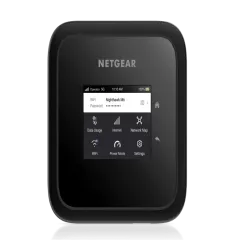
4. GL.iNet Slate AX (GL-AXT1800) — Best Budget Travel Router
Price: ~$60 | Type: Travel Router | WiFi: WiFi 6 (AX1800) | Power: USB-C | Weight: 215g
The GL.iNet Slate AX is the Beryl AX’s more affordable sibling, and for travelers who do not need top-tier WiFi 6 throughput, it delivers 90% of the Beryl’s functionality at 75% of the price. At roughly $60, it is the cheapest way to get a proper travel router with VPN support and USB tethering.
Where It Matches the Beryl AX
The Slate AX runs the same OpenWrt firmware, meaning you get the same VPN support (WireGuard, OpenVPN), the same ad blocking, the same USB tethering capability, and the same repeater/extender features. For most travelers, the day-to-day experience is nearly identical to the pricier Beryl AX.
Where It Differs
The Slate AX uses a WiFi 6 AX1800 chipset versus the Beryl’s AX3000. In practice, this means:
- Maximum throughput: ~600 Mbps vs the Beryl’s ~1,200 Mbps on 5GHz
- Multi-device handling: Starts to show strain at 8+ devices vs the Beryl’s 12+
- Range: Slightly shorter, roughly 20 meters in open space vs 25-30 meters
For a single traveler or couple with 3-5 devices, you will never notice the difference. The performance gap only matters if you are running 8+ devices or need to squeeze every megabit from a fast connection.
Our Testing Results
We used the Slate AX for 5 weeks across Thailand, Indonesia, and Mexico. USB tethering performance was excellent — 85-90% of source speed passed through to connected devices. VPN throughput was solid at 45-65 Mbps on WireGuard, which is more than enough for secure browsing and video calls.
Hotel WiFi improvement was meaningful. At a hotel in Chiang Mai with weak, congested lobby WiFi (3 Mbps), the Slate AX’s repeater mode gave us a stable 2.5 Mbps private connection in our room — not fast, but usable and crucially, secured through VPN.
Pros
- Outstanding value at ~$60
- Full OpenWrt with VPN, ad blocking, USB tethering
- Even more compact and lighter than the Beryl AX
- WiFi 6 support at this price point is rare
- Same firmware and features as its pricier sibling
Cons
- Lower throughput ceiling than Beryl AX
- Starts to struggle past 8 connected devices
- Slightly shorter WiFi range
- No built-in cellular modem or battery
- Same OpenWrt learning curve as Beryl AX
Who It’s For
The Slate AX is the right choice for budget-conscious travelers who still want VPN and tethering, solo travelers or couples with fewer devices, anyone who wants to try a travel router without a big investment, and backpackers who prioritize weight and size.
Not ideal for: Teams of 4+ with many devices, power users who need maximum throughput, or those who want a standalone cellular device.
Get GL.iNet Slate AX on GL.iNet.com5. Peplink MAX Transit Duo — Best for Van Life & RV
Price: $1,200+ | Type: Dual Cellular Router | WiFi: WiFi 5 (AC) | Cellular: Dual LTE-A Pro modems | SIM: 4x SIM slots (2 per modem)
The Peplink MAX Transit Duo is not a travel gadget you toss in your backpack. It is a permanently installed, dual-modem cellular router built for vehicles, boats, and mobile living. If you live in a van, RV, or sailboat and depend on internet connectivity, this is the gold standard.
Why Van Lifers Swear By It
The Transit Duo packs two independent LTE-A Pro modems, each with its own dual SIM slots — that is 4 SIM cards total. This means you can run SIMs from two different carriers simultaneously, and the router bonds both connections using SpeedFusion for a single, faster, more reliable internet pipe. If one carrier loses signal, the other keeps you connected seamlessly.
We installed the Transit Duo in a test van and drove from Lisbon to Barcelona over 10 days, passing through rural Portugal, southern Spain, and the Mediterranean coast. With two Portuguese SIMs and two Spanish SIMs loaded, we had internet connectivity for 98.5% of the drive — the only dead spots were deep mountain tunnels.
Performance on the Road
Real-world speeds in our van test:
- Urban areas: 80-200 Mbps (bonded dual connection)
- Suburban areas: 40-100 Mbps
- Rural highways: 15-60 Mbps
- Remote mountains: 5-25 Mbps (single carrier, other dropped)
With roof-mounted MIMO antennas (essential for vehicle installations), signal pickup was dramatically better than any phone or portable hotspot. In areas where our phones showed 1-2 bars of LTE, the Transit Duo with antennas consistently pulled usable speeds.
The Full Van Life Setup
For van lifers, the Transit Duo is the centerpiece of a connectivity system. A typical setup includes:
- Transit Duo mounted inside the van
- Roof-mounted MIMO antennas (2x cellular, 1x WiFi) — ~$100-200
- DC power from your van’s electrical system (12V input)
- 4 SIM cards from 2 different carriers
- Optional: Starlink as a WAN source for SpeedFusion bonding
This is the same setup used by mobile content creators, traveling nurses, and full-time RVers who work remotely across the continent. The investment is significant, but for anyone whose livelihood depends on mobile connectivity, it pays for itself quickly.
Pros
- Dual cellular modems with 4 SIM slots for maximum coverage
- SpeedFusion bonding creates a single fast and reliable pipe
- External antenna support essential for vehicle installations
- Enterprise-grade reliability -- built for 24/7 operation
- Can bond Starlink + cellular for ultimate redundancy
- Remote management via Peplink InControl
Cons
- Very expensive at $1,200+ before antennas and installation
- Not portable -- designed for permanent vehicle mounting
- WiFi 5 only (no WiFi 6) -- a dated limitation
- SpeedFusion subscription adds ongoing cost
- Complex setup requires networking knowledge or professional installation
- Overkill for anything other than full-time mobile living
Who It’s For
The Transit Duo is purpose-built for full-time van lifers and RVers, boat and marine installations, mobile command vehicles and work trucks, content creators who film and upload from the road, and anyone building a permanent mobile internet setup.
Not ideal for: Hotel travelers, backpackers, or anyone who does not need a permanent vehicle installation.
Get Peplink MAX Transit DuoHow We Tested These Devices
We did not just read spec sheets. Over 8 months of travel and testing, here is exactly how we evaluated each device.
Testing Methodology
Speed tests (300+ total): We used Speedtest by Ookla and Fast.com at each location, running 3 tests per session and averaging the results. We tested at different times of day to account for network congestion. For travel routers, we measured both the source speed (direct phone/ethernet connection) and the router’s WiFi output to calculate overhead.
Battery testing: For battery-powered devices, we ran continuous moderate-use tests (video streaming at 720p with 3 connected devices) and timed until the device powered off. We repeated each test 3 times in controlled conditions.
Range testing: We measured usable WiFi range in 3 environments — open hotel room, through one wall, and through two walls. We defined “usable” as maintaining at least 50% of peak speed.
VPN throughput: For devices with VPN support, we tested WireGuard and OpenVPN speeds using NordVPN servers. VPN overhead ranged from 5% (WireGuard on Beryl AX) to 35% (OpenVPN on older devices).
Heat testing: Extended use in hot climates (35C+ in Thailand and Mexico) revealed thermal throttling on some devices. We recorded surface temperature after 4 hours of continuous heavy use.
Multi-device stress test: We connected incrementally more devices (2, 4, 6, 8, 10, 12, 15) and measured per-device throughput degradation to identify the practical device limit for each router.
Countries Tested
Thailand, Japan, Indonesia, Mexico, Portugal, Spain, Morocco, Turkey, Greece, Croatia, Colombia, Argentina, Malaysia, Philippines, and Vietnam. Each device was tested in at least 4 countries across multiple network conditions.
What We Looked For
Every device was scored on raw speed and throughput, connection stability under load, ease of setup for non-technical users, portability (size, weight, power requirements), feature set (VPN, tethering, repeater, failover), and overall value relative to price.
Mobile Hotspot vs Travel Router vs Phone Tethering
These three approaches to mobile internet each have distinct strengths. Understanding the differences is essential to choosing the right solution.
Phone Tethering
How it works: Your smartphone shares its cellular data connection via WiFi, Bluetooth, or USB cable. Every modern smartphone supports this natively.
Strengths: Zero additional cost, zero additional hardware, zero additional weight. You already have everything you need. For checking email at a cafe or navigating a new city, phone tethering is perfectly adequate.
Weaknesses: Drains your phone battery rapidly (expect 30-50% in 2 hours of active tethering). Reduces your phone’s performance and generates significant heat. Limited to 5-10 connected devices with degraded performance. No VPN protection for connected devices. Your phone becomes unavailable for calls and camera while tethered. Background app activity on your phone competes with your tethered devices for bandwidth.
Best for: Casual travelers, emergency backup, light usage with 1-2 devices.
Mobile Hotspot (Standalone)
How it works: A dedicated device with its own cellular modem, SIM card slot, battery, and WiFi radio. Examples: Netgear Nighthawk M6, Inseego MiFi X Pro.
Strengths: Dedicated device means your phone stays free. Built-in battery lasts all day. Designed for this exact purpose with better antennas than phones. Touchscreen management on premium models. Can support 20-32 devices.
Weaknesses: Expensive ($200-500 for quality devices). Requires its own SIM card or data plan — additional monthly cost. Another device to charge and carry. Limited advanced features (no VPN client, no bonding). Carrier-locked models restrict international use.
Best for: Business travelers, anyone who needs all-day portable WiFi without draining their phone, users who want a simple plug-and-play solution.
Travel Router
How it works: A compact router that creates a WiFi network from an existing internet source — hotel WiFi, phone tethering (USB), or ethernet. Examples: GL.iNet Beryl AX, GL.iNet Slate AX.
Strengths: Cheapest option ($60-100) since it uses existing data sources. Built-in VPN support protects all connected devices. Repeater mode extends weak hotel WiFi. USB tethering from phone is more efficient than WiFi tethering. Advanced features like ad blocking, DNS filtering, captive portal bypass.
Weaknesses: Needs a data source — it cannot connect to cell towers on its own. Usually requires USB-C power (no internal battery). OpenWrt admin interface has a learning curve. Adds a step to your connectivity setup.
Best for: Digital nomads, security-conscious travelers, remote workers in hotels and Airbnbs, anyone who wants VPN on all devices automatically.
Quick Decision Guide
- Casual travel, light use: Phone tethering (free)
- All-day portable WiFi, simplicity: Standalone hotspot (Nighthawk M6)
- Hotel/Airbnb worker, VPN needed: Travel router (GL.iNet Beryl AX)
- Van life, mission-critical: Cellular router (Peplink)
How to Choose the Right Mobile Hotspot
With 5 very different devices on this list, here is how to narrow down the right choice for your situation.
Budget
Under $100: The GL.iNet Slate AX ($60) and GL.iNet Beryl AX ($80) are your best options. Both are travel routers that need a data source (phone tethering or hotel WiFi), but they deliver excellent VPN protection and WiFi management at remarkably low prices.
$200-500: The Netgear Nighthawk M6 (~$400) is the best standalone hotspot with its own cellular modem and 13-hour battery. You will also need a SIM card and data plan, adding to the total cost.
$700+: Peplink territory. The MAX BR1 Pro 5G ($700-900) is a portable-ish router for remote workers who need enterprise reliability. The MAX Transit Duo ($1,200+) is for permanent vehicle installations.
Use Case
Hotel hopping and Airbnbs: A travel router like the Beryl AX is your best bet. Connect to hotel WiFi or tether from your phone, run VPN on the router, and all your devices are protected and connected. Most hotels have ethernet ports too — the Beryl AX turns wired connections into WiFi.
Remote work with video calls: If you need guaranteed uptime, invest in either the Nighthawk M6 (standalone with battery) or the BR1 Pro (dual SIM failover). A dropped Zoom call with a client costs more than any of these devices.
Backpacking and budget travel: Start with phone tethering. If you find yourself needing more, the Slate AX at $60 is the cheapest meaningful upgrade. Pair it with a budget eSIM from Holafly for cost-effective data.
Van life or full-time RV: Skip the consumer gear and go straight to the Peplink MAX Transit Duo with roof-mounted antennas. The initial investment is high, but the reliability and dual-modem failover will save you from countless frustrating dead zones.
Device Count
If you regularly connect 1-3 devices, phone tethering or any travel router will work fine. For 4-8 devices, the Beryl AX handles this easily and the Slate AX manages it adequately. At 8-15 devices (teams, families, coworking with others), the Beryl AX or Nighthawk M6 are your minimum. Beyond 15 devices, only the Peplink routers maintain stable performance.
Connectivity Needs
Think about whether you need a device that connects to the internet on its own (standalone hotspot or cellular router) or one that extends an existing connection (travel router). This is the fundamental choice. If you always have your phone or hotel WiFi available, a travel router saves money and adds VPN. If you need independent, always-on cellular internet, invest in a standalone hotspot or Peplink.
Pairing Your Hotspot with an eSIM
The most flexible and cost-effective mobile internet setup in 2026 combines a travel router + phone with eSIM. Here is why and how.
The Ideal Setup
- Install an eSIM on your phone before your trip. We recommend Holafly for coverage in 170+ countries with unlimited data options, or Saily if you want the most affordable plans.
- Connect your phone to your travel router via USB cable (USB tethering).
- The router broadcasts your phone’s data as a WiFi network. Every device connects to the router.
- Enable VPN on the router. All traffic from all devices is now encrypted.
This setup gives you the global coverage of eSIMs, the VPN protection and multi-device WiFi of a travel router, charging for your phone (via USB tethering), and no additional SIM card costs — your eSIM is the data source.
eSIM Data Costs
For a typical week of remote work (3-5GB/day), an eSIM plan costs:
- Holafly regional plan: $19-47 for 5-20GB/30 days
- Holafly unlimited: $27-47 for 5-10 days of unlimited data
- Local SIM card: $5-15/month in most countries (cheapest, but requires finding a shop)
Check our full best eSIM providers guide for detailed comparisons, or read our Holafly review for the provider we use most.
Standalone Hotspot + SIM Card
If you are using a standalone hotspot like the Nighthawk M6, you will need a physical nano SIM card. Options include:
- Local SIM cards purchased at the airport or a mobile shop in each country
- International roaming SIMs like those from Ubigi or GigSky (more expensive but convenient)
- eSIM adapters that convert an eSIM to a physical SIM format (emerging technology, not yet widely reliable)
For most travelers, the travel router + phone eSIM combo is simpler and cheaper than maintaining a separate SIM card for a standalone hotspot.
Installing a VPN on Your Travel Router
One of the biggest advantages of a travel router over phone tethering or a standalone hotspot is router-level VPN. Here is why it matters and how to set it up.
Why Router VPN Matters
When you install a VPN on your router, every device that connects to its WiFi is automatically protected — laptops, tablets, phones, smart watches, e-readers, anything. No per-device VPN apps to install, no forgetting to turn it on, no devices left unprotected.
This is critical for:
- Public WiFi security: Hotel, cafe, airport, and coworking WiFi networks are prime targets for man-in-the-middle attacks. Router VPN encrypts all traffic before it touches the public network.
- Accessing geo-restricted content: Connect to a VPN server in your home country and stream your Netflix library, access your banking apps, or use services that block foreign IPs.
- Privacy in restrictive countries: In countries with internet censorship (China, UAE, Vietnam), router VPN means every device bypasses restrictions without individual configuration.
Which VPN to Use
Both the GL.iNet Beryl AX and Slate AX support WireGuard and OpenVPN protocols. We recommend:
- NordVPN — Best overall for travel routers. Excellent WireGuard support (NordLynx), 6,400+ servers in 111 countries, and we measured only 5-8% speed overhead on the Beryl AX.
- Surfshark — Best value if you need unlimited simultaneous device connections and already have a subscription.
Setup takes under 5 minutes on GL.iNet routers: download the WireGuard config file from your VPN provider, upload it to the GL.iNet admin panel, toggle it on. See our best VPN for travel guide for detailed router setup instructions.
Final Verdict: Our Top 3 Picks
After 8 months of testing 10 devices across 15+ countries, these are the mobile hotspots and travel routers we actually carry in our own bags.
Best for most travelers: The GL.iNet Beryl AX at ~$80 is the single best travel connectivity investment you can make. Pair it with an eSIM on your phone and you get private WiFi, VPN protection, and multi-device connectivity everywhere you go. It is the device we reach for every single trip.
Best standalone hotspot: The Netgear Nighthawk M6 delivers true grab-and-go simplicity. Pop in a SIM card, press power, and you have 5G WiFi for 13 hours. It is expensive, but nothing else matches its combination of speed, battery life, and ease of use.
Best for van life: The Peplink MAX Transit Duo is the only serious option for permanent mobile installations. Dual modems, 4 SIM slots, SpeedFusion bonding, and enterprise reliability make it the undisputed champion for full-time travelers who live on the road.
Get GL.iNet Beryl AX -- Best Overall Get Netgear Nighthawk M6 on Amazon Get Peplink MAX Transit DuoFrequently Asked Questions
What is the best portable WiFi hotspot for international travel?
The GL.iNet Beryl AX (GL-MT3000) is the best portable WiFi hotspot for international travel. It costs around $80, supports USB tethering from your phone, has built-in VPN support, and creates a private WiFi network from any internet source. Pair it with an eSIM on your phone for the most flexible setup.
Should I buy a mobile hotspot or just use my phone?
For casual travel, using your phone as a hotspot is fine. But a dedicated mobile hotspot or travel router is better if you need to connect multiple devices, want better WiFi range, need a VPN on all devices, or work remotely and need reliable connectivity. Travel routers also protect you on public WiFi networks.
Do mobile hotspots work internationally?
Yes, but it depends on the device. Unlocked hotspots that accept SIM cards or eSIMs work in any country with compatible networks. Some carrier-locked hotspots (like from T-Mobile or Verizon) may be restricted. For international use, choose an unlocked device and pair it with local SIM cards or a travel eSIM from Holafly.
How much data does a mobile hotspot use?
Data usage depends on your activities. Web browsing uses about 50-100MB/hour, video calls use 1-2GB/hour, and streaming HD video uses 3-5GB/hour. For a typical remote work day, budget 3-5GB. Most travelers use 5-15GB per week. An unlimited eSIM plan or local SIM card is the most cost-effective data source.
What is the difference between a mobile hotspot and a travel router?
A mobile hotspot has a built-in cellular modem and SIM card slot -- it connects directly to cell towers. A travel router does not have its own cellular modem -- it creates a WiFi network from an existing internet source (hotel WiFi, phone tethering, ethernet). Some premium devices like the Peplink MAX BR1 combine both functions.
How long does a mobile hotspot battery last?
Most portable hotspots last 6-12 hours on a single charge with moderate use. The Netgear Nighthawk M6 lasts about 13 hours, the Inseego MiFi X Pro about 8 hours. Travel routers like the GL.iNet Beryl AX need to be plugged in (USB-C powered). Battery life decreases with more connected devices and in weak signal areas.