Best E-Readers for Travel 2026: Tested Across 15+ Countries
We tested 6 e-readers across 15+ countries for weight, readability, battery life, and durability. The best Kindles and alternatives for travelers.
Somewhere between a crowded overnight bus in Vietnam and a beachside hammock in Tulum, we became evangelists for e-readers. After two years of full-time travel with books competing for space alongside laptops, monitors, cables, and chargers, something had to give. Physical books lost.
A single e-reader replaced every novel, guidebook, and reference manual we would have carried. At under 200 grams, it weighs less than most phones and fits in a jacket pocket. The battery lasts weeks. The e-ink screen reads like paper in direct sunlight. And after testing 6 e-readers across 15+ countries — from the humid beaches of Thailand to the dim cabins of transatlantic flights — we can confidently recommend the best options for every type of traveler.
Quick Comparison: Best E-Readers for Travel
| Feature | Kindle Paperwhite Signature | Kindle Paperwhite (2024) | Kindle (2024) | Kindle Colorsoft | Kobo Libra Colour |
|---|---|---|---|---|---|
| Screen | 7" e-ink 300ppi | 7" e-ink 300ppi | 6" e-ink 300ppi | 7" color e-ink 300ppi | 7" color e-ink 300ppi |
| Storage | 32 GB | 16 GB | 16 GB | 32 GB | 32 GB |
| Weight | 211g | 211g | 158g | 227g | 199g |
| Waterproof | IPX8 | IPX8 | No | IPX8 | IPX8 |
| Charging | USB-C + wireless | USB-C | USB-C | USB-C | USB-C |
| Front Light | Auto-adjusting | Manual (17 LEDs) | Manual (4 LEDs) | Auto-adjusting | Auto-adjusting |
| Battery Life | Up to 12 weeks | Up to 12 weeks | Up to 6 weeks | Up to 8 weeks | Up to 6 weeks |
| Price | ~$200 | ~$160 | ~$100 | ~$280 | ~$220 |
| Our Pick | Best Overall | Best Value | Best Budget | Best for Comics/Magazines | Best Non-Kindle |
| Visit Kindle Paperwhite Signature | Visit Kindle Paperwhite (2024) | Visit Kindle (2024) | Visit Kindle Colorsoft | Visit Kobo Libra Colour |
How We Tested
We evaluated each e-reader based on the criteria that matter when you are living out of a backpack, not sitting on a couch at home:
- Weight and portability. Does it fit in a jacket pocket, daypack side pocket, or sling bag without adding noticeable weight?
- Sunlight readability. We tested on beaches in Portugal, rooftop terraces in Morocco, and park benches in Buenos Aires during midday sun.
- Battery endurance. How many days of real-world reading (1-3 hours daily) before needing a charge? We kept WiFi off, which is how most travelers use e-readers.
- Durability. Did it survive being tossed in backpacks, stuffed into overhead bins, exposed to humidity, and read with sunscreen-covered hands?
- Waterproofing. Pool tests, beach tests, and the inevitable “left it on the bathroom counter during a shower” test.
- Ecosystem and library access. How easy is it to buy books, borrow from libraries, and manage your reading list while traveling internationally?
Each e-reader was used as our primary reading device for a minimum of three weeks across different travel environments.
Best E-Readers for Travel
1. Kindle Paperwhite Signature Edition — Best Overall
The Kindle Paperwhite Signature Edition is the e-reader we reach for without thinking. It takes everything good about the standard Paperwhite and adds three features that matter specifically for travelers: auto-adjusting front light, wireless charging, and 32GB of storage.
The auto-adjusting light sounds minor until you use it daily across different environments. Reading in a dim Airbnb bedroom at midnight, then on a sunny cafe terrace the next morning, then in a dimly lit airport terminal — the Signature Edition adjusts brightness automatically for each setting. The standard Paperwhite requires manual adjustment every time your lighting changes, which is annoying when you change environments multiple times daily as a nomad.
32GB of storage means you never worry about managing your library. At roughly 1MB per e-book, that is 30,000+ books. More practically, it means you can keep audiobooks on the device (which are much larger files) alongside your entire reading library.
The 7-inch 300ppi e-ink display is sharp, glare-free, and genuinely readable in direct sunlight. We read on beaches in the Algarve and rooftop terraces in Marrakech without any visibility issues. The flush-front design with a bezel that sits level with the screen eliminates the lip that collected sand and pocket lint on older models.
At 211 grams, the Signature Edition weighs roughly the same as a smartphone. We routinely carried it in a jacket pocket alongside our phone without noticing the extra weight. The IPX8 waterproofing survived a direct pool splash and a 20-minute accidental submersion in a bathtub.
USB-C charging means one less cable to carry. If your laptop, phone, and e-reader all charge via USB-C, you can travel with a single cable. Wireless Qi charging is a bonus for bedside nightstand setups.
Pros
- Auto-adjusting front light adapts to any environment
- 32GB stores thousands of books plus audiobooks
- 7-inch 300ppi display -- sharp and sunlight-readable
- IPX8 waterproof -- survived pool and beach testing
- USB-C plus wireless Qi charging
- Battery lasts up to 12 weeks
- 211g -- lighter than most smartphones
Cons
- $200 is a premium over the standard Paperwhite
- No physical page-turn buttons
- Locked to Amazon ecosystem
- Color is not supported (see Kindle Colorsoft)
Best for: Travelers and digital nomads who read daily and want a set-it-and-forget-it experience. The auto-adjusting light and 32GB storage eliminate micro-frustrations that add up across months of travel.
Check Kindle Paperwhite Signature on Amazon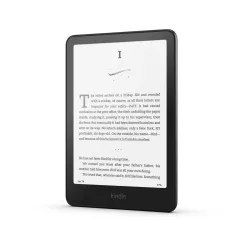
2. Kindle Paperwhite (2024) — Best Value
The standard Kindle Paperwhite (2024) shares the same 7-inch 300ppi display, IPX8 waterproofing, USB-C charging, and 211g weight as the Signature Edition. The only differences are: 16GB instead of 32GB, manual front light instead of auto-adjusting, and no wireless charging.
For most travelers, these trade-offs are completely acceptable. 16GB still holds thousands of books — you only need 32GB if you plan to store audiobooks locally. Manual light adjustment takes two seconds and you only change it a few times per day. And wireless charging is a convenience, not a necessity, when you are already carrying a USB-C cable.
The reading experience is identical to the Signature Edition. Same display sharpness, same page-turn speed, same waterproofing, same battery life. In a blind test, you could not tell them apart during actual reading.
At $160, the standard Paperwhite delivers 95% of the Signature Edition’s experience for 80% of the price. It is the e-reader we recommend to first-time buyers and anyone who does not want to overthink the decision.
Pros
- Same excellent 7-inch 300ppi display as Signature Edition
- IPX8 waterproof -- pool, beach, and bathtub safe
- USB-C charging -- use the same cable as your phone
- Battery life up to 12 weeks
- 17 LED front light with adjustable warm tone
- Best price-to-quality ratio in e-readers
Cons
- Manual front light adjustment only
- 16GB -- may feel tight if storing audiobooks
- No wireless charging
- Still locked to Amazon ecosystem
Best for: Most travelers. The standard Paperwhite is the right choice for 80% of people who want a great e-reader without paying for features they may not use.
Check Kindle Paperwhite on Amazon3. Kindle (2024) — Best Budget
The base Kindle (2024) is the lightest and cheapest way to carry an unlimited library while traveling. At 158 grams and $100, it removes every excuse not to bring an e-reader.
The 2024 model upgraded to a 300ppi display — the same pixel density as the Paperwhite. Previous-generation base Kindles had 167ppi screens that looked noticeably pixelated next to a Paperwhite. That gap is now closed. Text rendering is crisp and sharp.
The 6-inch screen is smaller than the Paperwhite’s 7 inches, which means less text per page and more frequent page turns. For novels and standard prose, the smaller screen is perfectly fine. For PDFs, textbooks, or anything with complex formatting, the Paperwhite’s larger display is worth the upgrade.
The front light uses only 4 LEDs compared to the Paperwhite’s 17, so illumination is less even across the screen. In practice, this is only noticeable in complete darkness — a slight gradient from the bottom edge. During normal reading in any ambient light, it looks fine.
The biggest trade-off is no waterproofing. The base Kindle is not rated for water exposure, so beach and pool reading carries risk. If you read primarily indoors, in transit, or in dry environments, this does not matter. If you want to read by the pool without worrying, spend the extra $60 for the Paperwhite.
At 158 grams, this is the lightest e-reader on the market and the easiest to hold one-handed during long reading sessions. It also charges via USB-C, which is a welcome change from the micro-USB on older base Kindles.
Pros
- Lightest e-reader at 158g -- effortless one-handed reading
- 300ppi display matches Paperwhite sharpness
- USB-C charging (finally)
- 16GB storage holds thousands of books
- $100 entry point makes it easy to justify
- Smallest footprint -- fits in any pocket
Cons
- Not waterproof -- avoid pool and beach use
- 6-inch screen is small for complex layouts
- Only 4 front-light LEDs -- uneven in total darkness
- No warm light adjustment
- No wireless charging option
Best for: Budget travelers, ultralight packers, and anyone who wants to test whether they will actually use an e-reader before committing to a Paperwhite. Also excellent as a secondary/backup e-reader.
Check Kindle (2024) on Amazon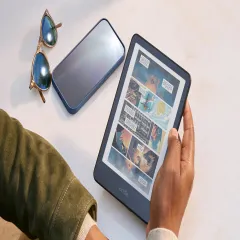
4. Kindle Colorsoft — Best for Comics and Magazines
The Kindle Colorsoft is Amazon’s first color e-ink Kindle, and it opens up a category of content that traditional e-readers handled poorly: comics, graphic novels, manga, travel magazines, and guidebooks with color maps and photos.
The color e-ink display renders colors that are muted compared to a tablet but significantly better than the grayscale-only alternatives. Comic book art looks recognizable and enjoyable. Guidebook maps are actually useful with color coding. Magazine layouts become readable rather than abstract. It is not iPad-quality color — think of it as “watercolor” rather than “HD” — but it transforms content that was previously unusable on a Kindle.
For standard text reading (novels, non-fiction), the Colorsoft performs identically to the Paperwhite Signature Edition. The 300ppi display is sharp, the auto-adjusting front light works well, and the 32GB storage accommodates the larger file sizes that color content requires.
At 227 grams, it is 16 grams heavier than the Paperwhite — negligible in practice. Battery life is shorter at approximately 8 weeks due to the color display technology, but still orders of magnitude better than any tablet.
The $280 price tag is the main barrier. If you primarily read text-based books, the Paperwhite delivers the same text-reading experience for $120 less. The Colorsoft only justifies its premium if you regularly read comics, manga, travel magazines, or other color-dependent content.
Pros
- First Kindle with color e-ink display
- Comics, manga, and magazines are finally readable
- Same 300ppi sharpness for text as Paperwhite
- IPX8 waterproof with auto-adjusting light
- 32GB handles larger color content files
- E-ink readability in sunlight (unlike tablets)
Cons
- $280 is expensive for an e-reader
- Colors are muted compared to tablets
- Shorter battery life (8 weeks vs 12 weeks)
- Slightly heavier at 227g
- Limited color content in Kindle Store currently
Best for: Travelers who read comics, manga, graphic novels, or travel magazines alongside regular books. If your reading is 100% text-based novels, skip this and get the Paperwhite.
Check Kindle Colorsoft on Amazon5. Kobo Libra Colour — Best Non-Kindle Alternative
The Kobo Libra Colour is the best e-reader for travelers who want to escape Amazon’s ecosystem. It supports EPUB files natively (Kindle does not), integrates with OverDrive/Libby for library book borrowing, and offers built-in Pocket integration for saving and reading long-form web articles offline.
The 7-inch color e-ink display matches the Kindle Colorsoft’s capabilities with muted but functional color rendering. At 199 grams, it is the lightest color e-reader available — 28 grams lighter than the Colorsoft. IPX8 waterproofing matches the Kindle range.
What sets the Kobo apart for travelers is library integration. If you have a library card from a participating system (most U.S., Canadian, UK, and Australian public libraries), you can borrow e-books for free directly from the Kobo. For nomads on a budget who read voraciously, this saves hundreds of dollars per year on book purchases.
The physical page-turn buttons on the right side are a legitimate advantage for one-handed reading while standing on a metro, lying in a hammock, or eating with the other hand. They provide tactile feedback that touchscreen swiping cannot replicate.
Kobo’s built-in Pocket app lets you save long-form articles and web pages from any browser, then read them on the e-reader in a formatted, distraction-free layout. For nomads who consume a lot of online longform writing, this replaces the need to stare at a phone or laptop screen.
The trade-off is Kobo’s store has a smaller selection than Amazon, and some bestsellers arrive later. However, EPUB support means you can sideload books from virtually any source.
Pros
- Native EPUB support -- not locked to one store
- Built-in OverDrive/Libby for free library borrowing
- Physical page-turn buttons for one-handed reading
- Lightest color e-reader at 199g
- IPX8 waterproof with auto-adjusting light
- Pocket integration for offline article reading
Cons
- Smaller book store than Amazon Kindle
- Some bestsellers arrive later than on Kindle
- Less accessory support (cases, etc.)
- $220 is not cheap for a non-Amazon device
- Syncing between devices is less seamless than Kindle
Best for: Travelers who want library book access, EPUB flexibility, and independence from Amazon. The page-turn buttons are a significant comfort upgrade for heavy readers.
Check Kobo Libra Colour on Amazon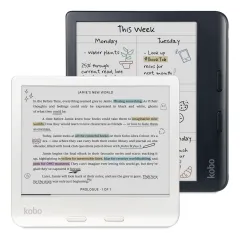
Choosing the Right E-Reader for Your Travel Style
Ultralight Backpackers
Go with the Kindle (2024). At 158 grams, it is the lightest option and costs the least. Every gram matters when you are counting ounces in a 30L pack.
Beach and Pool Readers
Get the Kindle Paperwhite or Paperwhite Signature Edition. IPX8 waterproofing means you can read by the pool without anxiety. The base Kindle is not waterproof.
Comic and Manga Readers
Choose between the Kindle Colorsoft or Kobo Libra Colour depending on your ecosystem preference. Both offer color e-ink that makes visual content actually enjoyable.
Budget-Conscious Nomads
The standard Kindle Paperwhite at $160 is the sweet spot. If you want to save more, the base Kindle at $100 delivers the same display sharpness in a smaller, lighter package.
Library Book Borrowers
The Kobo Libra Colour is your only option for built-in library integration. Kindle technically supports library borrowing through Amazon’s interface, but Kobo’s OverDrive integration is significantly smoother.
Travel Tips for E-Reader Owners
- Download before you go. Queue up your reading list while you have reliable WiFi. Most airports and hotels have slow, unreliable connections that time out during large downloads.
- Turn off WiFi. With WiFi disabled, battery life roughly doubles. Enable it only when you need to download new books.
- Get a case. E-ink displays are more fragile than phone screens. A slim case adds minimal weight and prevents cracks from backpack compression. We recommend the official Amazon cases for Kindles.
- Use Send-to-Kindle. Email documents, articles, and PDFs directly to your Kindle email address. They appear on your device next time you sync over WiFi.
- Consider a screen protector. If you read with sunscreen or greasy fingers (guilty), a matte screen protector prevents fingerprint buildup and adds a paper-like texture.
For more travel gear recommendations, see our digital nomad packing list and best power banks for travel.
Frequently Asked Questions
Is a Kindle worth it for travel?
Yes, overwhelmingly. A single Kindle replaces dozens of physical books, weighs under 200 grams, fits in any bag pocket, and the battery lasts weeks between charges. If you read more than 2-3 books during a trip, the weight and space savings alone justify the cost. The front-lit e-ink display is also readable in direct sunlight -- something phones and tablets cannot match -- making it perfect for beaches, poolside reading, and bright outdoor environments.
Kindle Paperwhite vs Kindle Oasis: which is better for travel?
The Kindle Paperwhite is better for most travelers. It is lighter (205g vs 188g for Oasis, but the Oasis has been discontinued in favor of Kindle Colorsoft), cheaper, waterproof, and fits in any pocket or bag. The Oasis offered physical page-turn buttons and an ergonomic grip that some heavy readers preferred. With the Oasis discontinued, the Paperwhite Signature Edition with auto-adjusting front light offers the best reading experience for travelers.
Can I read e-books without WiFi?
Yes. E-readers store books locally on the device. You download books when you have WiFi and read them completely offline. A standard Kindle Paperwhite with 16GB can store thousands of books. You only need WiFi to purchase and download new books, sync reading progress across devices, or update firmware. Many nomads download their reading list before a flight or remote area trip.
E-reader vs tablet for travel: which should I choose?
An e-reader is better if your primary goal is reading books. The e-ink display is easier on the eyes during long reading sessions, readable in direct sunlight, and the battery lasts weeks instead of hours. A tablet is better if you want a multi-purpose device for videos, apps, and web browsing. Many digital nomads carry both: an iPad for work and media, and a Kindle for dedicated reading. At under 200g, an e-reader adds negligible weight to your pack.
Are e-readers waterproof?
Most modern e-readers are waterproof. The Kindle Paperwhite (IPX8) can withstand immersion in 2 meters of fresh water for 60 minutes. The Kobo Libra Colour (IPX8) offers the same rating. This makes them safe for beach reading, pool reading, and accidental drops in the bathtub. However, saltwater exposure should be rinsed off with fresh water afterward, and the waterproofing does not cover damage from sand getting into ports.
How long does an e-reader battery last while traveling?
Modern e-readers last 4-10 weeks on a single charge with typical use (about 30 minutes of reading per day with WiFi off). Heavy readers who read 2-3 hours daily can expect 2-4 weeks between charges. With WiFi and Bluetooth turned off, battery life extends significantly. This is one of the biggest advantages over tablets, which last 8-12 hours. You can realistically leave your e-reader charger at home for trips under two weeks.