Best Travel Cable Organizers 2026: Pouches, Cables, and Chargers Tested
We tested 7 cable organizer pouches and the essential cables and chargers every traveler needs. Bellroy, Peak Design, Thule, BAGSMART, and more ranked.
We have lost cables in hotel rooms on four continents. We have untangled a USB-C cable from a pair of earbuds in the dark on an overnight bus in Vietnam. We have missed the beginning of a Zoom call because our laptop charger was buried under seven other cables at the bottom of a backpack. The cable chaos problem is real, and after three years of full-time nomad travel, we have solved it completely.
The solution is two things: a good cable organizer pouch and a ruthlessly curated cable collection. Most nomads carry too many cables and not enough organization. This guide covers both — the best pouches to hold your cables and the essential cables and chargers every digital nomad actually needs.
If you want a broader look at tech pouches beyond just cable organization, see our tested picks for the best tech organizer for travel. For expanding your laptop’s ports while traveling, check out the best USB-C hubs. And for keeping devices charged on the go, see our best power banks for travel guide.
Best Cable Organizer Pouches
| Feature | Bellroy Tech Kit | Peak Design Tech Pouch | Thule Subterra 2 | BAGSMART Electronics Organizer | tomtoc Organizer |
|---|---|---|---|---|---|
| Price | ~$59 | ~$60 | ~$40 | ~$17 | ~$20 |
| Size | 9.1 x 5.1 x 2.8 in | 9.5 x 6 x 4 in | 9.4 x 5.5 x 3.2 in | 9.8 x 6.7 x 1.4 in | 9.8 x 5.9 x 3.1 in |
| Weight | 7.1 oz | 10.2 oz | 6.8 oz | 3.8 oz | 8.5 oz |
| Material | Recycled woven fabric | 200D recycled nylon | 800D nylon | Water-repellent nylon | Waterproof fabric |
| Opening Style | Clamshell | Origami multi-section | Book-style | Flat open | Dual compartment |
| Cable Loops | 6 elastic + mesh pockets | Expandable fabric dividers | 4 elastic + zippered pocket | 5 elastic + mesh zip | Elastic + padded dividers |
| Water Resistant | Yes (exterior) | Yes (DWR coating) | Yes | Yes (repellent coating) | Yes (waterproof) |
| Our Verdict | Best Overall | Best Premium / Heavy Loads | Best Mid-Range | Best Budget | Best Waterproof |
| Visit Bellroy Tech Kit | Visit Peak Design Tech Pouch | Visit Thule Subterra 2 | Visit BAGSMART Electronics Organizer | Visit tomtoc Organizer |
1. Bellroy Tech Kit — Best Overall Cable Organizer
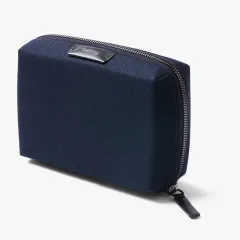
The Bellroy Tech Kit is the cable organizer we reach for every single day. At $59, it is not cheap for a cable pouch, but the design quality, material feel, and organizational layout justify the price over thousands of uses. The clamshell opening reveals the entire contents at a glance — six elastic loops of varying sizes hold cables and adapters, two mesh zippered pockets contain small items like SD cards and USB drives, and the main cavity accommodates a GaN charger or small power bank.
What we like most: The recycled woven fabric exterior feels premium without being delicate. It has survived rain in Lisbon, a spilled coffee in Medellin, and three years of daily bag tossing. The clamshell design means you lay it flat on a desk, see everything, grab what you need, close it. Ten seconds. No digging.
The catch: At 9.1 x 5.1 inches, it is sized for a minimalist cable collection. If you carry a laptop charger, power bank, travel router, four cables, and earbuds, you will be cramming. For heavier gear loads, step up to the Peak Design Tech Pouch.
Pros
- Premium recycled materials — looks and feels excellent
- Clamshell design shows everything at a glance
- Slim profile slides into any backpack pocket
- 6 elastic loops prevent cable tangling
- Durable enough for years of daily use
Cons
- $59 is expensive for a cable organizer
- Limited capacity for heavy gear loads
- No padded sections for fragile items
- Single-layer design means no separation between layers
2. Peak Design Tech Pouch — Best for Heavy Gear Loads
The Peak Design Tech Pouch is for digital nomads who carry a lot of tech. The 2-liter capacity and origami-style expandable dividers swallow a GaN charger, four cables, a power bank, a travel router, earbuds, adapters, and an SD card reader — all organized and accessible. This is the same Peak Design Tech Pouch we recommended in our tech organizer guide, and it remains our premium pick for heavy gear loads.
The origami dividers are genius. Instead of fixed elastic loops, Peak Design uses stretchy fabric panels that create expandable sections. A thick power bank and a thin cable occupy the same divider system — the sections flex to accommodate. This adaptability means the pouch grows and shrinks with your gear, unlike rigid organizers where half the loops sit empty.
The five external handles make the pouch easy to grab from any angle inside a bag. The cable pass-through port lets you charge devices without opening the pouch. The 200D recycled nylon shell is weatherproof and shows zero wear after over a year of daily use.
The catch: At 10.2 oz, it is the heaviest pouch on this list — adding nearly two-thirds of a pound before you put anything inside. And at $60, it ties with the Bellroy for the most expensive option. If your cable collection is small, this is overkill.
Buy Peak Design Tech Pouch on Amazon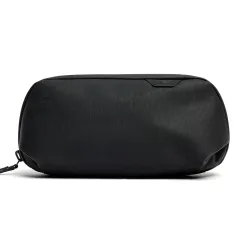
3. Thule Subterra 2 Tech Organizer — Best Mid-Range
The Thule Subterra 2 splits the difference between budget and premium. At $40, it uses quality 800D nylon, has a book-style opening with elastic loops and a zippered pocket, and is sized well for a standard nomad cable collection (3-4 cables, a charger, earbuds, and a small power bank).
The book-style opening is less convenient than a full clamshell — you cannot lay it completely flat — but the hinge keeps everything in place when you open it, preventing items from falling out. The build quality is noticeably above the BAGSMART tier without reaching Peak Design pricing.
Buy Thule Subterra 2 on Amazon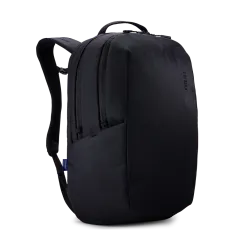
4. BAGSMART Electronics Organizer — Best Budget
The BAGSMART Electronics Organizer is the same pouch we ranked #1 overall in our tech organizer guide, and it deserves the top budget spot here too. At $17, it offers five elastic loops, a mesh zippered pocket, water-repellent nylon, and weighs just 3.8 ounces. It handles a standard cable collection with ease and costs less than a single meal in most Western cities.
We have been using a BAGSMART pouch for over two years across 20+ countries. The elastic loops have stretched slightly but still hold cables securely. The water-repellent coating has survived multiple spills. The flat-open design shows everything at a glance. For most travelers, this is all the cable organizer you need.
Buy BAGSMART Organizer on Amazon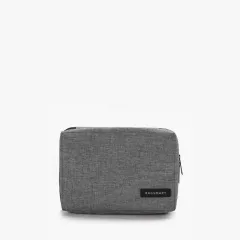
5. tomtoc Dual Compartment — Best Waterproof
The tomtoc uses a fully waterproof fabric (not just water-resistant) and a dual-compartment design that separates cables from chargers and bulkier items. At $20, it is a strong value pick for travelers who work in humid or rainy environments — Southeast Asian monsoon season, Scandinavian rain, or anywhere your bag might get wet.
Buy tomtoc Organizer on Amazon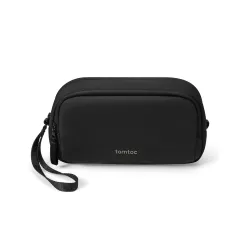
Essential Cables for Travel
Stop carrying cables “just in case.” Here is the exact cable kit we carry after three years of optimization:
The Minimum Cable Kit (4 cables)
| Cable | Length | Use Case | Why This One |
|---|---|---|---|
| USB-C to USB-C (100W) | 6 ft | Laptop + phone charging | Handles any USB-C device at max speed |
| USB-C to USB-C (short) | 6 in | Power bank charging | Tangle-free in-bag or in-flight charging |
| USB-A to USB-C | 3 ft | Hotel/airport USB-A ports | Backwards compatibility for older USB ports |
| USB-C to Lightning | 3 ft | AirPods, older iPhones | Skip if fully USB-C (iPhone 15+) |
The Extended Kit (add 2-3 cables)
| Cable | Length | Use Case | Who Needs It |
|---|---|---|---|
| USB-C to USB-C (right angle) | 6 ft | Charging while using phone in bed | Anyone who charges and uses simultaneously |
| HDMI 2.1 (slim) | 6 ft | Hotel TV, external monitor | Portable monitor users, presentation givers |
| 3.5mm audio | 3 ft | Wired headphones backup | Audiophiles, in-flight entertainment |
Cable recommendation: Anker cables are our go-to. The Anker 543 USB-C to USB-C (100W, 6ft) handles laptop and phone charging at full speed. Anker’s braided nylon construction is more durable than rubber-coated cables — we have been using the same one for 18 months without fraying.
Essential Multi-Port Chargers
A single GaN charger replaces your laptop charger, phone charger, and tablet charger. This is the single biggest space saver in your cable kit.
Anker Nano II 65W — Best for Most Nomads
Price: ~$40 | Ports: 1 USB-C (65W) + 1 USB-A (12W) | Weight: 4.0 oz
The Anker Nano II 65W is the charger we carry every day. It charges a MacBook Air at full speed (65W via USB-C) while simultaneously charging a phone via USB-A. At 4.0 oz and roughly the size of a golf ball, it is smaller and lighter than the MacBook Air’s included charger. This single device replaced three chargers in our bag.
The folding prongs make it pocket-friendly. The GaN technology keeps it remarkably cool even at full output. We have used this charger daily for over a year across dozens of countries with zero issues.
Buy Anker Nano II 65W on Amazon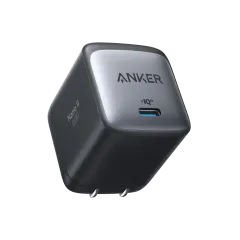
Ugreen Nexode 100W — Best for Heavy Setups
Price: ~$55 | Ports: 2 USB-C (100W/30W) + 1 USB-A (22.5W) | Weight: 7.0 oz
If you carry a larger laptop (MacBook Pro 14/16, Dell XPS 15) that needs more than 65W, the Ugreen Nexode 100W delivers. It charges a MacBook Pro 14 at full speed on the primary USB-C port while simultaneously fast-charging a phone and tablet. Three devices, one charger, one wall outlet.
The trade-off is size and weight — at 7.0 oz, it is nearly twice the Anker Nano II. But for nomads with heavy setups, it still saves space and weight versus carrying a laptop charger plus a phone charger plus a tablet charger.
Buy Ugreen Nexode 100W on Amazon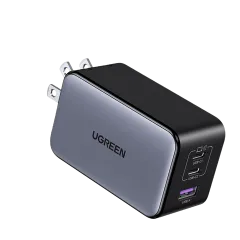
How to Build Your Travel Cable Kit
Step 1: Audit your devices. List every device you travel with and its charging port. Most modern setups are fully USB-C, which simplifies everything.
Step 2: Choose one multi-port GaN charger. The Anker Nano II 65W works for 90% of nomads. Step up to the Ugreen 100W only if your laptop needs it.
Step 3: Select your cables. Start with the minimum 4-cable kit. Add cables only if you have a specific, recurring need.
Step 4: Pick a pouch. Match the pouch size to your actual cable collection. The BAGSMART at $17 handles the minimum kit. The Bellroy or Peak Design handle extended kits.
Step 5: Eliminate redundancy. If your new GaN charger replaces your laptop charger, remove the laptop charger from your bag. If your phone is USB-C, you do not need a separate phone charger cable. Every cable and charger you remove saves weight and tangle potential.
The Complete Digital Nomad Cable Kit
Here is exactly what fits in our Bellroy Tech Kit, organized and ready to grab:
- Anker Nano II 65W GaN charger — one charger for laptop and phone
- Anker 543 USB-C to USB-C (6ft, 100W) — laptop charging cable
- Anker USB-C to USB-C (6in) — power bank short cable
- Anker USB-A to USB-C (3ft) — for hotel/airport USB-A ports
- USB-C to Lightning (3ft) — for AirPods Pro
- Apple EarPods (USB-C) — backup wired earbuds
- Anker SD card reader — for camera photo transfers
Total weight of the complete kit including the Bellroy pouch: approximately 14 oz (under 1 pound). That is a laptop charger replacement, five cables, earbuds, and an SD reader in a package that fits in your daypack’s front pocket.
Related Gear Guides
- Best Tech Organizers for Travel — for larger gear collections beyond just cables
- Best USB-C Hubs for Travel — expand your laptop’s ports on the go
- Best Power Banks for Travel — keep devices charged without an outlet
- Digital Nomad Packing List — the complete tech gear checklist
Frequently Asked Questions
What cables should I pack for international travel?
At minimum, pack two USB-C to USB-C cables (one short for charging from a power bank, one longer for wall charging), one USB-A to USB-C cable (for older USB-A ports in hotels and airports), and a Lightning cable if you have any Apple devices that still use it. If you carry a laptop with USB-C charging, a longer 100W USB-C cable is essential. A short 6-inch USB-C cable for in-flight charging from seat USB ports is also very useful.
What is the best travel charger to replace multiple chargers?
A GaN (Gallium Nitride) multi-port charger like the Anker Nano II 65W replaces your laptop charger, phone charger, and tablet charger with a single device. It has enough wattage to charge a MacBook Air at full speed while simultaneously charging a phone. For heavier setups, the Ugreen Nexode 100W handles a MacBook Pro plus two additional devices. Either one saves significant space and weight compared to carrying separate chargers.
How many cables do I really need for travel?
Most digital nomads can get away with 4-5 cables: two USB-C to USB-C (different lengths), one USB-A to USB-C, one Lightning or USB-C to Lightning (if needed for Apple devices), and one longer cable for laptop charging. Audiophiles might add a 3.5mm audio cable. Anyone using a portable monitor adds an HDMI or DisplayPort cable. The key principle is to carry the minimum that covers your devices — every extra cable adds tangle potential and weight.
Are short cables better than long cables for travel?
Both have their place. Short cables (6-12 inches) are ideal for charging from power banks in your bag, from airplane seat USB ports, or from a charger sitting right next to your device. Long cables (3-6 feet) are essential when the wall outlet is far from the bed or desk — common in hotel rooms and hostels. We recommend carrying one short and one long USB-C cable at minimum.
Is a GaN charger worth the premium over a regular charger?
Absolutely. GaN chargers deliver the same wattage as traditional silicon chargers in a package that is 30-50% smaller and significantly lighter. A GaN 65W charger is roughly the size of a standard phone charger but can charge a laptop. For travelers, the space and weight savings are meaningful. The Anker Nano II 65W weighs 4 oz — compare that to a standard MacBook Air charger at 5.7 oz. Over a full packing list, these savings compound.
What should I look for in a cable organizer pouch?
The five things that matter most: (1) Elastic loops or pockets that hold individual cables separately — no tangling. (2) A clamshell or full-open design so you can see everything at a glance. (3) A size that fits your specific cable and charger collection without wasted space. (4) Water-resistant exterior to protect against spills. (5) Lightweight construction — the pouch itself should not add significant weight. Avoid pouches with too many fixed-size pockets that force you to reorganize every time you swap a cable.