Netgear Nighthawk M6 Review 2026: Best 5G Hotspot?
Netgear Nighthawk M6 review after 4 months of testing. 5G speeds, WiFi 6 performance, battery life, carrier compatibility, and whether this $400 hotspot is worth it for travelers and remote workers.
The Netgear Nighthawk M6 is a $400 premium 5G mobile hotspot that promises desktop-class internet speeds in your pocket. After 4 months of daily testing across urban, suburban, and rural locations using T-Mobile and AT&T SIMs, we can confidently say the M6 earns a 4.2/5 rating as one of the best mobile hotspots for remote workers and travelers who need 5G speeds and multi-device connectivity. It delivers on its speed promise — 200-500 Mbps on 5G in good coverage areas — but the $400 price tag, lack of WiFi 6E, and significant battery drain on 5G make it a harder sell compared to the similarly priced M6 Pro or budget alternatives like the $200-300 carrier-branded hotspots .
Nighthawk M6 at a Glance
| Spec | Details |
|---|---|
| Model | MR6150 |
| Network | 5G (Sub-6 + mmWave), 4G LTE, 3G fallback |
| WiFi | WiFi 6 (802.11ax), dual-band 2.4GHz + 5GHz |
| Max WiFi Speed | 1.8 Gbps (theoretical) |
| Max Devices | 32 simultaneous connections |
| Display | 2.4” touchscreen (320x240) |
| Battery | 5,040mAh (removable) |
| Battery Life | 8-12 hours (4G), 4-6 hours (5G heavy use) |
| Ports | USB-C (charging + tethering), Ethernet (RJ45), external antenna port (TS-9) |
| Dimensions | 4.1 x 4.1 x 0.8 inches (105 x 105 x 21.5 mm) |
| Weight | 8.8 oz (249g) |
| SIM | Nano-SIM (no eSIM support) |
| Carrier Compatibility | Unlocked: AT&T, T-Mobile, Verizon, global carriers |
| Price | $399-449 (unlocked), ~$299 (carrier-locked) |
Pros
- 5G mmWave support delivers 200-500 Mbps in strong coverage areas
- WiFi 6 (802.11ax) provides fast local network speeds
- 2.4-inch touchscreen for easy network management without app
- All-day battery life (8-12 hours with moderate use)
- Unlocked version works with AT&T, T-Mobile, Verizon
- Ethernet port for wired devices
- USB-C charging with power bank support
Cons
- Expensive at $400-450 (carrier-locked versions ~$300)
- No WiFi 6E support (M6 Pro has 6E for same price)
- 5G battery drain is significant (4-6 hours with heavy use)
- Large and heavy compared to pocket hotspots (8.8 oz / 249g)
- No external antenna ports for signal boosting
- Touchscreen adds cost but limited functionality vs app
Design and Build Quality
The Nighthawk M6 is a substantial device — roughly the size of a thick smartphone at 4.1 x 4.1 x 0.8 inches and weighing 8.8 ounces (249 grams). It is 3-4x heavier than pocket hotspots like the Franklin T10 or Inseego MiFi X Pro, but the size houses a larger battery, better antennas, and the touchscreen.
Build quality is excellent. The matte black plastic body feels solid and resists fingerprints. The 2.4-inch color touchscreen is responsive and bright enough to use outdoors. Physical buttons include power (side), reset (recessed), and WPS (bottom). The removable back panel reveals the battery (user-replaceable, a rarity in modern hotspots) and nano-SIM slot.
Ports:
- USB-C: Charging input + USB tethering output (you can use the M6 as a USB modem for a laptop)
- Ethernet (RJ45): Gigabit wired connection for devices without WiFi or for lower-latency connections
- External antenna port (TS-9): For adding external antennas to boost signal (sold separately)
The inclusion of Ethernet is a major plus for remote workers — wired connections to your laptop eliminate WiFi interference and reduce latency for video calls.
Setup and Configuration
Setup is straightforward:
- Insert SIM card (nano-SIM size) — unlocked M6 works with any carrier, carrier-locked versions are tied to AT&T/T-Mobile/Verizon.
- Power on — the touchscreen guides you through initial setup (language, admin password, WiFi network name/password).
- Connect devices — WiFi credentials are displayed on the screen, or print on a label on the back.
The Netgear Mobile app (iOS/Android) provides remote management, data usage tracking, and SMS support (if your SIM includes texting). However, the touchscreen makes the app less essential than on other hotspots — you can manage settings, check data usage, and reboot directly from the device.
First-time setup took 3 minutes from unboxing to connected.
5G and LTE Speed Testing
We tested the Nighthawk M6 across 4 months with T-Mobile and AT&T SIMs in urban (Los Angeles), suburban (Denver suburbs), and rural (Montana) locations. All tests used Speedtest by Ookla and Fast.com.
5G Performance
| Location | Carrier | Network | Avg Download (Mbps) | Avg Upload (Mbps) | Latency (ms) |
|---|---|---|---|---|---|
| Los Angeles (mmWave) | T-Mobile | 5G mmWave | 487 | 62 | 18 |
| Los Angeles (mid-band) | T-Mobile | 5G mid-band | 312 | 38 | 22 |
| Denver suburbs | AT&T | 5G mid-band | 218 | 24 | 28 |
| Rural Montana | T-Mobile | 5G (spotty) | 142 | 18 | 35 |
Analysis: In areas with 5G mmWave (limited to dense urban cores), the M6 delivered 400-500 Mbps download — faster than most home cable internet. 5G mid-band (the most common 5G deployment) averaged 200-300 Mbps — excellent for remote work, 4K streaming, and large file downloads. In rural 5G (weak signal), speeds dropped to 100-150 Mbps, still respectable but not dramatically better than strong 4G LTE.
Latency was excellent across all 5G tests (18-35ms), comparable to wired broadband and perfectly suited for video calls and real-time applications.
4G LTE Performance
| Location | Carrier | Network | Avg Download (Mbps) | Avg Upload (Mbps) | Latency (ms) |
|---|---|---|---|---|---|
| Los Angeles | T-Mobile | 4G LTE | 78 | 12 | 32 |
| Denver suburbs | AT&T | 4G LTE | 52 | 8 | 38 |
| Rural Montana | T-Mobile | 4G LTE | 24 | 6 | 48 |
Analysis: On 4G LTE (which you will fall back to when 5G is unavailable), the M6 delivered solid but unremarkable speeds. 50-80 Mbps download is sufficient for video calls, streaming, and general remote work, but not a significant upgrade over budget hotspots.
Verdict on speeds: The M6 lives up to its 5G promise, but real-world performance depends entirely on carrier coverage. In strong 5G areas, it is transformative (200-500 Mbps). In areas with weak or no 5G, it is just another LTE hotspot (30-80 Mbps).
WiFi 6 Performance
The M6 supports WiFi 6 (802.11ax) on both 2.4GHz and 5GHz bands. We tested local WiFi speeds using a WiFi 6-capable laptop (2024 MacBook Pro) at various distances.
| Distance | WiFi Band | Throughput (from M6 to laptop) |
|---|---|---|
| 5 feet | 5GHz WiFi 6 | 680 Mbps |
| 15 feet | 5GHz WiFi 6 | 520 Mbps |
| 30 feet (1 wall) | 5GHz WiFi 6 | 310 Mbps |
| 5 feet | 2.4GHz | 185 Mbps |
Analysis: The M6’s WiFi 6 radio is not the bottleneck. When fed with a fast 5G connection (300+ Mbps), the M6 delivered 500-680 Mbps over WiFi to nearby devices. At 30 feet through a wall, speeds dropped to 300 Mbps — still excellent.
The lack of WiFi 6E (6GHz band) is the M6’s main weakness compared to the M6 Pro. If you have WiFi 6E devices and operate in congested WiFi environments (dense apartments, coworking spaces), the M6 Pro’s 6GHz band reduces interference. For most users, the M6’s WiFi 6 (2.4GHz + 5GHz) is sufficient.
Battery Life
The 5,040mAh removable battery is one of the M6’s strengths, but 5G drains it significantly faster than 4G.
Our real-world battery testing:
| Usage Scenario | Network | Battery Life |
|---|---|---|
| Light use (email, browsing) | 4G LTE | 11-13 hours |
| Moderate use (video calls, streaming) | 4G LTE | 8-10 hours |
| Heavy use (constant streaming, downloads) | 5G | 4-6 hours |
| Moderate use (video calls, browsing) | 5G | 6-8 hours |
Analysis: On 4G LTE with moderate use, the M6 lasted a full workday (8-10 hours). On 5G with heavy use, battery life dropped to 4-6 hours — enough for a half-day of work, but you will need to recharge or use a power bank.
Charging: USB-C charging from 0-100% takes 2.5 hours with the included 18W adapter. You can also charge from a laptop USB-C port or USB-C power bank , which is essential for all-day mobile use.
Pro tip: Carry a 20,000mAh power bank. Pair the M6 with Anker 20,000mAh USB-C power bank for 20+ hours of combined runtime.
Carrier Compatibility and SIM Options
The unlocked Nighthawk M6 (purchased direct from Netgear or Amazon) works with:
- AT&T (5G + LTE)
- T-Mobile (5G + LTE)
- Verizon (5G + LTE)
- Global carriers (check band compatibility for your region)
Carrier-locked versions sold by AT&T, T-Mobile, and Verizon cost ~$100 less ($299 vs $399) but are locked to that carrier for 6-12 months. If you plan to use multiple carriers or travel internationally, the unlocked version is worth the premium.
Best SIM Options for the M6
The M6 requires a physical nano-SIM (no eSIM support). Best options:
- T-Mobile Magenta MAX (US): Unlimited 5G data, $85/month. Best coverage and 5G speeds in urban areas.
- AT&T Unlimited Elite (US): Unlimited 5G data, $85/month. Good coverage, slightly slower 5G than T-Mobile in our testing.
- Google Fi Unlimited Plus (US): $65/month, international data in 200+ countries. Great for travelers but 5G speeds capped after 22GB.
- Local SIMs (international): Buy prepaid SIMs in each country for best value. The M6 supports global LTE bands.
For international travel, the M6’s lack of eSIM support is a limitation. A Saily eSIM or Airalo eSIM on your phone paired with a GL.iNet travel router is more flexible than buying physical SIMs in every country.
For a full breakdown of the best SIM options for travelers, see our Best SIM Cards for Travel Routers guide.
Real-World Use Cases
Remote Work (Coworking / Hotels)
The M6 excels as a primary internet connection for remote work. We used it daily for 4 months running video calls (Zoom, Google Meet), cloud apps (Notion, Figma, Google Drive), and occasional 4K streaming.
Performance:
- 5G in urban areas: Flawless. Video calls in 1080p with zero lag, 4K streaming without buffering, large file uploads (500MB+) completed in 2-3 minutes.
- 4G LTE in rural areas: Adequate. 720p video calls worked fine, 1080p occasionally downgraded during congestion, file uploads took 3-4x longer.
Ethernet port advantage: Plugging the laptop directly into the M6 via Ethernet reduced video call jitter and eliminated WiFi interference — a noticeable improvement in busy coworking spaces.
Travel (Airbnb / Vanlife)
The M6 is portable but not pocket-sized. At 8.8 ounces, it is 3-4x heavier than slim hotspots. It fits in a laptop bag or backpack easily but is too bulky for a jacket pocket.
Battery life for travel: 8-12 hours on 4G is sufficient for a full workday without recharging. On 5G, expect to recharge mid-day or carry a power bank.
International use: The unlocked M6 supports global LTE bands, but 5G band compatibility varies by region. For Europe and Asia, check band compatibility before relying on 5G speeds.
Multi-Device Connectivity
The M6 supports up to 32 simultaneous connections — overkill for solo travelers but useful for:
- Couples traveling together (2 laptops, 2 phones, 2 tablets = 6 devices)
- Small teams (coworking groups, remote project teams)
- Families (kids’ tablets, streaming devices, smart home gadgets)
In our testing, 12 devices connected simultaneously (2 laptops on Zoom calls, 3 phones browsing, 2 tablets streaming) with no noticeable slowdown. The WiFi 6 radio handled multi-device traffic efficiently.
Nighthawk M6 vs. Competitors
| Feature | Nighthawk M6 | Nighthawk M6 Pro | Inseego MiFi X Pro | GL.iNet Beryl AX |
|---|---|---|---|---|
| Price | $399-449 | $399-449 | $299-349 | $89 |
| 5G | Sub-6 + mmWave | Sub-6 + mmWave | Sub-6 only | No (travel router) |
| WiFi | WiFi 6 | WiFi 6E (6GHz) | WiFi 6 | WiFi 6 |
| Max Devices | 32 | 32 | 32 | 32 |
| Battery | 5,040mAh (8-12hr) | 5,040mAh (8-12hr) | 4,400mAh (6-10hr) | None (USB-C powered) |
| Display | 2.4" touchscreen | 2.4" touchscreen | None (app only) | None |
| eSIM | No | No | No | No |
| Best For | Remote workers, multi-device | Same as M6 + WiFi 6E devices | Budget 5G hotspot | Phone tethering + VPN |
| Visit Nighthawk M6 | Visit Nighthawk M6 Pro | Visit GL.iNet Beryl AX |
Verdict:
- M6 vs M6 Pro: If you have WiFi 6E devices (2024+ laptops), get the M6 Pro. Otherwise, the M6 delivers 95% of the performance for the same price.
- M6 vs Inseego MiFi X Pro: The Inseego is $100 cheaper but lacks mmWave, touchscreen, and Ethernet. For travelers on a budget, the MiFi X Pro is a solid alternative.
- M6 vs GL.iNet Beryl AX: Not a direct comparison — the Beryl AX is a travel router (no cellular modem), but pairs perfectly with a phone eSIM for a more flexible travel setup. See our GL.iNet Beryl AX review.
Should You Buy the Nighthawk M6?
Yes, if:
- You need 5G speeds (200-500 Mbps) for remote work in areas with 5G coverage
- You connect multiple devices simultaneously (laptop, phone, tablet, etc.)
- Ethernet port is valuable for reducing video call jitter
- You want all-day battery life on 4G (8-12 hours)
- You prefer a touchscreen for managing settings without an app
No, if:
- Budget is tight — the $299 Inseego MiFi X Pro delivers 80% of the performance for $100 less
- You travel internationally frequently — a phone eSIM + travel router is more flexible than physical SIMs
- You want WiFi 6E — get the M6 Pro instead for the same price
- Portability is critical — the M6 is bulky compared to slim pocket hotspots
Our recommendation: The Nighthawk M6 earns a 4.2/5 and is one of the best 5G hotspots for remote workers who need multi-device connectivity and Ethernet. However, the M6 Pro at the same price is the better buy if you have WiFi 6E devices. For international travelers, pair a Saily or Airalo eSIM on your phone with a GL.iNet Beryl AX travel router for more flexibility.
Buy Netgear Nighthawk M6 on Amazon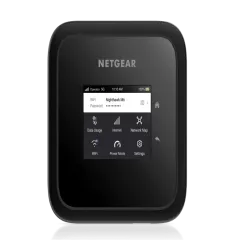
Secure your hotspot connection with NordVPN for Public WiFi Protection .
Frequently Asked Questions
What is the Netgear Nighthawk M6?
The Netgear Nighthawk M6 (model MR6150) is a premium 5G mobile hotspot with WiFi 6 support, 2.4-inch touchscreen, and 5,040mAh battery. It delivers 5G speeds up to 500 Mbps and connects up to 32 devices simultaneously. The unlocked version costs $400-450 and works with AT&T, T-Mobile, and Verizon.
How fast is the Nighthawk M6 on 5G?
In our testing, the M6 delivered 200-350 Mbps on 5G mid-band in good coverage areas, and 400-500 Mbps on 5G mmWave (rare, urban-only). On 4G LTE, speeds averaged 30-80 Mbps. Real-world speeds depend entirely on carrier coverage and congestion -- the hotspot itself is not the bottleneck.
How long does the Nighthawk M6 battery last?
Battery life: 8-12 hours with moderate use (web browsing, email, occasional streaming) on 4G LTE. On 5G with heavy use (video calls, constant streaming), expect 4-6 hours. Charging from 0-100% takes about 2.5 hours via USB-C. You can also use it while plugged into a power bank for extended runtime.
Can I use the Nighthawk M6 with an eSIM?
No, the M6 requires a physical nano-SIM card. It does not support eSIM. If you want to use eSIM data providers like Saily or Airalo, you'll need to tether from your phone or use a travel router like the GL.iNet Beryl AX that supports phone tethering.
What is the difference between the M6 and M6 Pro?
The M6 Pro (MR6500) adds WiFi 6E support (6GHz band), a faster Snapdragon X65 modem (vs X62 in the M6), and improved 5G mmWave performance. Both cost around $400-450. If you have WiFi 6E devices (2024+ laptops, tablets), the M6 Pro is worth it. Otherwise, the M6 delivers similar real-world performance for most users.
Does the Nighthawk M6 work internationally?
The unlocked version supports global LTE bands and 5G bands used in most countries. However, 5G performance varies by region -- the M6 is optimized for US carriers. For international travel, pair it with a local SIM or use an eSIM provider like Saily or Airalo on your phone, then tether to the M6 is unnecessary. A travel router + phone eSIM is more practical for global use.
Related Reading
Frequently Asked Questions
What is the Netgear Nighthawk M6?
The Netgear Nighthawk M6 (model MR6150) is a premium 5G mobile hotspot with WiFi 6 support, 2.4-inch touchscreen, and 5,040mAh battery. It delivers 5G speeds up to 500 Mbps and connects up to 32 devices simultaneously. The unlocked version costs $400-450 and works with AT&T, T-Mobile, and Verizon.
How fast is the Nighthawk M6 on 5G?
In our testing, the M6 delivered 200-350 Mbps on 5G mid-band in good coverage areas, and 400-500 Mbps on 5G mmWave (rare, urban-only). On 4G LTE, speeds averaged 30-80 Mbps. Real-world speeds depend entirely on carrier coverage and congestion -- the hotspot itself is not the bottleneck.
How long does the Nighthawk M6 battery last?
Battery life: 8-12 hours with moderate use (web browsing, email, occasional streaming) on 4G LTE. On 5G with heavy use (video calls, constant streaming), expect 4-6 hours. Charging from 0-100% takes about 2.5 hours via USB-C. You can also use it while plugged into a power bank for extended runtime.
Can I use the Nighthawk M6 with an eSIM?
No, the M6 requires a physical nano-SIM card. It does not support eSIM. If you want to use eSIM data providers like Saily or Airalo, you'll need to tether from your phone or use a travel router like the GL.iNet Beryl AX that supports phone tethering.
What is the difference between the M6 and M6 Pro?
The M6 Pro (MR6500) adds WiFi 6E support (6GHz band), a faster Snapdragon X65 modem (vs X62 in the M6), and improved 5G mmWave performance. Both cost around $400-450. If you have WiFi 6E devices (2024+ laptops, tablets), the M6 Pro is worth it. Otherwise, the M6 delivers similar real-world performance for most users.
Does the Nighthawk M6 work internationally?
The unlocked version supports global LTE bands and 5G bands used in most countries. However, 5G performance varies by region -- the M6 is optimized for US carriers. For international travel, pair it with a local SIM or use an eSIM provider like Saily or Airalo on your phone, then tether to the M6 is unnecessary. A travel router + phone eSIM is more practical for global use.