Best External SSDs for Travel 2026: Tested for Speed, Durability & Portability
We tested the top external SSDs for digital nomads and travelers. Samsung T7 Shield, SanDisk Extreme Pro, LaCie Rugged — here are the best portable SSDs.
You are sitting in a cafe in Medellin. The WiFi is 12 Mbps on a good day. You need to send a client a 4GB project file, back up 50GB of photos from last week, and access a presentation you edited on the plane. Without an external SSD, you are uploading files at 1.5 MB/s over Colombian WiFi (that is 44 minutes for 4GB), hoping Dropbox synced before you left the last city, and praying the cafe WiFi does not drop before the upload finishes.
With an SSD, you plug in, transfer at 800+ MB/s, and move on with your day.
An external SSD is the unglamorous backbone of any nomad tech setup. It is not exciting like a new laptop or a portable monitor. But when you need your files and you do not have reliable internet — which happens constantly when you travel — it is the one piece of gear that saves you from genuine professional disaster.
We have tested every major external SSD on the market through months of travel across South America, Southeast Asia, and Europe. We have subjected them to tropical humidity, desert dust, backpack abuse, and the kind of casual drops that happen when you are juggling a coffee, a laptop, and a passport at airport security. Here are the SSDs that survived and the ones we actually trust with our work.
Quick Comparison: Best External SSDs for Travel
| Feature | Samsung T7 Shield | SanDisk Extreme Pro V2 | LaCie Rugged Mini SSD | Crucial X9 Pro | Kingston XS2000 | WD My Passport SSD |
|---|---|---|---|---|---|---|
| Capacity | 1TB / 2TB / 4TB | 1TB / 2TB / 4TB | 500GB / 1TB / 2TB / 4TB | 1TB / 2TB / 4TB | 500GB / 1TB / 2TB / 4TB | 500GB / 1TB / 2TB / 4TB |
| Read Speed | 1,050 MB/s | 2,000 MB/s | 1,050 MB/s | 1,050 MB/s | 2,000 MB/s | 1,050 MB/s |
| Write Speed | 1,000 MB/s | 2,000 MB/s | 1,000 MB/s | 1,000 MB/s | 2,000 MB/s | 1,000 MB/s |
| Interface | USB 3.2 Gen 2 | USB 3.2 Gen 2x2 | USB 3.2 Gen 2 | USB 3.2 Gen 2 | USB 3.2 Gen 2x2 | USB 3.2 Gen 2 |
| Durability | IP65, 2m drop | IP55, 2m drop | IP67, 3m drop | Drop-proof (7.5 ft) | IP55, drop-proof | Drop-proof (6.5 ft), shock-resistant |
| Encryption | AES 256-bit hardware | AES 256-bit hardware | AES 256-bit hardware (via Toolkit) | AES 256-bit hardware | XTS-AES 256-bit hardware | AES 256-bit hardware |
| Weight | 98g | 77g | 100g | 39g | 29g | 46g |
| Dimensions | 88 x 59 x 13mm | 111 x 57 x 10mm | 95 x 55 x 11mm | 65 x 50 x 10mm | 69 x 33 x 14mm | 100 x 55 x 9mm |
| Price (1TB) | ~$90 | ~$110 | ~$120 | ~$80 | ~$85 | ~$85 |
| Our Pick | Best Overall | Fastest | Most Rugged | Best Value | Most Portable | Best Design |
| Visit Samsung T7 Shield | Visit SanDisk Extreme Pro V2 | Visit LaCie Rugged Mini SSD | Visit Crucial X9 Pro | Visit Kingston XS2000 | Visit WD My Passport SSD |
How We Tested
We evaluated each SSD on the criteria that matter for digital nomads and travelers — real-world transfer speeds under real conditions, not manufacturer benchmarks in a controlled lab:
- Real-world transfer speeds. Large file transfers (50GB folder of mixed files), sustained write performance, and speed consistency over time. Manufacturer speeds are theoretical maximums — we measured what you actually get.
- Durability. Drop tests from desk height (80cm), water splash exposure, and weeks of travel in backpacks without cases. Can this drive survive daily nomad life?
- Portability. Weight, dimensions, and how easily the drive fits in a tech organizer or pocket.
- Encryption. Hardware encryption setup process, password strength requirements, and whether encryption impacts performance.
- Heat management. Sustained transfers can cause thermal throttling. We measured how hot each drive gets during 50GB+ transfers and whether it slowed down.
- Cable quality. A drive is only as good as its cable. We tested included cables for durability and compatibility.
- Compatibility. Mac, Windows, and Linux. USB-C and USB-A. Formatting out of the box.
Every drive was tested as a daily-use travel drive for at least three weeks.
Best External SSDs for Digital Nomads
1. Samsung T7 Shield — Best Overall
The Samsung T7 Shield is the SSD we recommend to most travelers, and the one we carry daily. It hits the rare intersection of fast speeds, genuine durability, hardware encryption, and a price that does not feel like a luxury purchase. It is not the fastest, not the lightest, not the cheapest — but it is the best at everything that matters in aggregate.
IP65 rating means the T7 Shield is fully dust-proof and resistant to water jets from any direction. We tested this by pouring water over the drive mid-transfer — it continued writing without interruption. The rubberized exterior provides grip and shock absorption, and Samsung rates it for 2-meter drops onto concrete. We dropped it from desk height (80cm) onto a tile floor multiple times with zero issues. The rubber bumper absorbed impact without scuffs.
Transfer speeds hit 1,050 MB/s read and 1,000 MB/s write over USB 3.2 Gen 2 — the practical ceiling for this interface. In our real-world testing, a 50GB folder of mixed files (documents, photos, video) transferred in approximately 55 seconds. A single 20GB video file transferred in 21 seconds. These are speeds that make local storage feel instantaneous compared to cloud transfers.
Hardware AES 256-bit encryption is configured via Samsung’s Portable SSD Software. The setup is straightforward — create a password, and the drive is encrypted. Performance impact from encryption is negligible (we measured less than 2% speed reduction). If the drive is lost or stolen, your data is inaccessible without the password.
Thermal management is excellent. During sustained 50GB writes, the T7 Shield reached 42°C (warm to touch but not uncomfortable) and maintained consistent speeds throughout. No thermal throttling detected.
At 98g, it is slightly heavier than the lightest options on this list but still easily pocketable. The dimensions (88 x 59 x 13mm) are smaller than a credit card in two dimensions, though thicker.
Available in 1TB ($90), 2TB ($140), and 4TB ($250).
Pros
- IP65 water and dust resistance — genuinely rugged for travel
- 2-meter drop resistance with rubberized exterior
- Fast 1,050 MB/s speeds that hit USB 3.2 Gen 2 ceiling
- Hardware AES 256-bit encryption with minimal performance impact
- Excellent thermal management — no throttling during sustained transfers
- Competitive pricing at $90 for 1TB
- Includes USB-C to USB-C and USB-C to USB-A cables
Cons
- Heavier at 98g than some competitors (but lighter than LaCie)
- USB 3.2 Gen 2 limited — will not reach Gen 2x2 speeds even if your device supports it
- Samsung software required for encryption setup (available Mac/Windows only)
- Rubberized exterior attracts lint and dust
- Not the smallest form factor on this list
Best for: Most travelers and remote workers who want the best balance of speed, durability, encryption, and price. This is the default recommendation.
Check Samsung T7 Shield on Amazon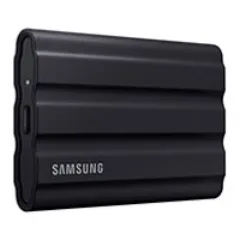
2. SanDisk Extreme Pro V2 — Fastest
The SanDisk Extreme Pro V2 is the speed champion. At 2,000 MB/s read and write over USB 3.2 Gen 2x2, it is nearly twice as fast as drives limited to Gen 2 speeds — if your laptop supports Gen 2x2.
The speed caveat is important. USB 3.2 Gen 2x2 (20 Gbps) is not universally supported. Most current laptops — including all MacBooks — max out at USB 3.2 Gen 2 (10 Gbps), which caps real-world speeds at approximately 1,050 MB/s regardless of the drive’s capability. If your laptop only supports Gen 2, the Extreme Pro V2 performs identically to the Samsung T7 Shield — but costs $20 more.
However, if your laptop or desktop has a Gen 2x2 port (increasingly common on newer Windows laptops and desktops with USB 3.2 Gen 2x2 or Thunderbolt 4), the Extreme Pro V2 delivers genuinely faster transfers. Our Gen 2x2 testing showed sustained reads of 1,850 MB/s and writes of 1,700 MB/s — a 50GB folder transferred in approximately 30 seconds versus 55 seconds on Gen 2 drives.
IP55 rated — dust-resistant and protected against water jets. Slightly less robust than the T7 Shield’s IP65 (the difference is dust protection — IP65 is fully dust-tight, IP55 is dust-protected). The 2-meter drop rating matches the Samsung. The forged aluminum core dissipates heat effectively.
Hardware AES 256-bit encryption via SanDisk SecureAccess software. Setup is simple. Performance impact is negligible.
The integrated carabiner loop is a practical design touch — clip the drive to a bag or keyring. At 77g, it is lighter than the Samsung T7 Shield. The slim profile (10mm thick) slips easily into any tech organizer.
Available in 1TB ($110), 2TB ($170), and 4TB ($300).
Pros
- Fastest SSD on this list — 2,000 MB/s on USB 3.2 Gen 2x2
- IP55 water and dust resistance with aluminum core
- 2-meter drop resistance
- Hardware AES 256-bit encryption
- Integrated carabiner loop — practical for travel
- Lightweight at 77g with slim 10mm profile
- Includes USB-C to USB-C and USB-C to USB-A cables
Cons
- Gen 2x2 speeds only achievable with compatible ports (most laptops cap at Gen 2)
- Premium price at $110 for 1TB — $20 more than Samsung T7 Shield
- IP55 is slightly less robust than IP65 for dust protection
- SanDisk SecureAccess software has a dated interface
- Aluminum body scratches more easily than rubberized Samsung
Best for: Users with USB 3.2 Gen 2x2 compatible devices who need maximum transfer speeds. Content creators and video editors benefit most from the speed premium.
Check SanDisk Extreme Pro V2 on Amazon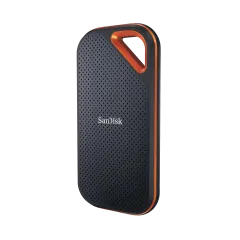
3. LaCie Rugged Mini SSD — Most Rugged
The LaCie Rugged Mini SSD is built for the worst-case scenario. If you are trekking in Nepal, shooting video in the Sahara, or simply clumsy with your gear, the LaCie is the drive that survives everything you throw at it — literally.
IP67 rating is the highest on this list. Fully dust-tight and submersible in up to 1 meter of water for 30 minutes. The 3-meter drop resistance exceeds every competitor (Samsung and SanDisk rate for 2 meters). LaCie wraps the drive in a distinctive orange rubber bumper that absorbs shock and provides excellent grip even with wet hands.
We dropped the LaCie from standing height (1.5m) onto concrete, submerged it in a bowl of water for 10 minutes, and left it in a dusty backpack pocket for two weeks in Morocco. It worked perfectly throughout and after every test. If you need absolute confidence that your drive will survive harsh travel conditions, the LaCie earns it.
Transfer speeds match the Samsung T7 Shield — 1,050 MB/s read, 1,000 MB/s write over USB 3.2 Gen 2. Real-world performance was consistent and reliable. No throttling during sustained 50GB transfers, though the drive did get noticeably warm (45°C — warmer than the Samsung).
Hardware encryption is available through LaCie Toolkit software (AES 256-bit). The software is straightforward and available for Mac and Windows.
At 100g and slightly larger dimensions (95 x 55 x 11mm), the LaCie is the heaviest SSD on this list. The orange rubber bumper adds bulk. It is still very portable — fits in a pocket — but noticeably chunkier than the Crucial X9 Pro or Kingston XS2000.
Available in 500GB ($90), 1TB ($120), 2TB ($180), and 4TB ($350).
Pros
- IP67 — highest water and dust resistance on this list
- 3-meter drop resistance — toughest drive available
- Reliable 1,050 MB/s speeds with no throttling
- Distinctive orange design is hard to lose in a bag
- Rubber bumper provides excellent grip and shock absorption
- Hardware encryption via LaCie Toolkit
Cons
- Heaviest at 100g and bulkiest form factor
- Most expensive at $120 for 1TB — $30 more than Samsung
- Runs warmer than Samsung T7 Shield during sustained transfers
- USB 3.2 Gen 2 only — no Gen 2x2 speeds
- Orange rubber attracts stains and discoloration over time
- LaCie Toolkit software is macOS/Windows only
Best for: Adventure travelers, outdoor photographers, videographers in harsh environments, and anyone who needs a drive that survives extreme conditions without question.
Check LaCie Rugged Mini SSD on Amazon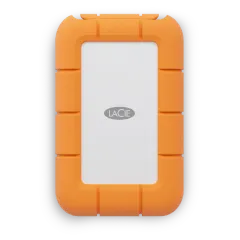
4. Crucial X9 Pro — Best Value
The Crucial X9 Pro is the best SSD on this list per dollar. At $80 for 1TB, it undercuts the Samsung T7 Shield by $10 while matching its speeds and adding hardware encryption — all in the smallest, lightest package of any full-featured SSD in this roundup.
At 39 grams, the X9 Pro is astonishingly light. It weighs less than a pack of gum and is smaller than a matchbox (65 x 50 x 10mm). You can genuinely forget it is in your pocket. For weight-conscious travelers who agonize over every gram in their packing list, the X9 Pro is the obvious choice.
Transfer speeds hit 1,050 MB/s read and 1,000 MB/s write — identical to the Samsung T7 Shield. Real-world performance was consistent and reliable. A 50GB mixed-file folder transferred in 56 seconds — effectively identical to the Samsung.
Hardware AES 256-bit encryption is included and configured via Crucial Storage Executive software. Setup is straightforward.
Durability is the trade-off. The X9 Pro is rated for drops from 7.5 feet (2.3m), which is excellent. However, it lacks a formal IP rating for water and dust resistance. The aluminum unibody is solid and well-built, but it does not have the rubberized protection of the Samsung T7 Shield or the IP67 submersibility of the LaCie. For normal travel — backpacks, suitcases, tech organizers — the X9 Pro is plenty durable. For adventure travel with water and dust exposure, the Samsung or LaCie are safer choices.
Thermal management is adequate. During sustained 50GB writes, the X9 Pro reached 48°C — the warmest of any drive we tested and noticeably hot to touch. We observed slight speed reductions (approximately 15% throttling) toward the end of very large sustained transfers (70GB+). For normal use — document storage, photo libraries, backups — this is unlikely to matter. For video editors transferring massive files regularly, the Samsung or SanDisk handle sustained writes more gracefully.
Available in 1TB ($80), 2TB ($120), and 4TB ($220).
Pros
- Best price at $80 for 1TB — cheapest quality SSD on this list
- Lightest at 39g — practically weightless in a bag
- Smallest form factor — fits in a coin pocket
- 1,050 MB/s speeds matching Samsung T7 Shield
- Hardware AES 256-bit encryption included
- Clean aluminum unibody design
Cons
- No formal IP water/dust rating — less protected in harsh conditions
- Runs warmest during sustained transfers (48°C)
- Slight thermal throttling on very large sustained writes (70GB+)
- Aluminum body is slippery without a case
- No rubber bumper for drop protection
- Crucial software interface is basic
Best for: Budget-conscious travelers, ultralight packers, and anyone who wants fast, encrypted storage at the lowest possible price and weight.
Check Crucial X9 Pro on Amazon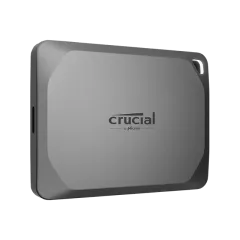
5. Kingston XS2000 — Most Portable
The Kingston XS2000 is the smallest external SSD you can buy with high-end performance. At 29 grams and 69 x 33 x 14mm, it is roughly the size of a car key fob — and it delivers up to 2,000 MB/s over USB 3.2 Gen 2x2.
The portability is remarkable. The XS2000 fits on a keyring (it includes a loop). It disappears into any pocket, any bag compartment, any tech organizer. For nomads who carry multiple drives — one for backup, one for client deliverables, one for media — the XS2000’s size means you can carry three drives in the space one Samsung T7 Shield occupies.
Speed matches the SanDisk Extreme Pro V2 — 2,000 MB/s on Gen 2x2 ports, approximately 1,050 MB/s on standard Gen 2 ports. Real-world performance was strong: 50GB transferred in 32 seconds on Gen 2x2 hardware.
IP55 rated for water and dust protection. The rubber sleeve cover (included) provides additional drop protection and grip.
XTS-AES 256-bit hardware encryption is built in, configured through Kingston Ironkey software.
The main trade-off for the extreme portability is thermal throttling under sustained load. The tiny form factor has limited surface area for heat dissipation. During our 50GB sustained write test, the XS2000 reached 52°C and throttled by approximately 20% after 40GB of continuous writing. For typical use — document access, photo transfers, moderate backups — this is not an issue. For large video files, the Samsung T7 Shield or SanDisk Extreme Pro manage heat more effectively.
Available in 500GB ($55), 1TB ($85), 2TB ($130), and 4TB ($250).
Pros
- Lightest and smallest SSD available — 29g, key-fob size
- 2,000 MB/s speeds on USB 3.2 Gen 2x2
- IP55 water and dust protection with included rubber sleeve
- XTS-AES 256-bit hardware encryption
- Keyring loop for attachment to bags
- Competitive pricing at $85 for 1TB
Cons
- Thermal throttling during sustained large transfers (40GB+)
- Tiny size makes it easier to lose
- Rubber sleeve can detach and get lost
- Gen 2x2 speeds require compatible ports
- Small form factor limits heat dissipation
- No bundled USB-A adapter (USB-C to USB-C cable only, USB-A cable sold separately)
Best for: Ultralight travelers, nomads who carry multiple drives, and anyone who values portability above all other factors.
Check Kingston XS2000 on Amazon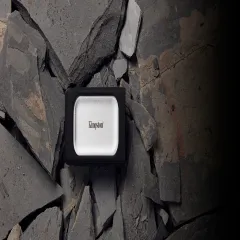
6. WD My Passport SSD — Best Design
The WD My Passport SSD is the drive for people who care about aesthetics alongside performance. It is a beautifully designed SSD — thin, elegant metal body with a soft-touch finish — that also delivers solid specs and reliable encryption.
At 9mm thin, the My Passport SSD is the slimmest drive on this list. It slides into a pocket, notebook sleeve, or tech organizer with zero bulk. The industrial design is clean and premium — this is a drive that looks good sitting on a coworking desk next to a MacBook.
Transfer speeds are standard USB 3.2 Gen 2 — 1,050 MB/s read, 1,000 MB/s write. Real-world performance was consistent and reliable. No surprises, no throttling under normal use.
Hardware AES 256-bit encryption via WD Security software. The software is mature, well-designed, and available for Mac and Windows. Western Digital’s encryption implementation is among the most polished in this roundup.
Drop resistance to 6.5 feet (2m) with shock-resistant internals. No formal IP water/dust rating, similar to the Crucial X9 Pro. The metal body is more scratch-prone than rubberized competitors but dissipates heat effectively.
Thermal management is good. The metal body acts as a passive heatsink. During sustained 50GB writes, the My Passport SSD reached 43°C — warm but controlled, with no measurable throttling.
Available in 500GB ($70), 1TB ($85), 2TB ($135), and 4TB ($240).
Pros
- Thinnest SSD at 9mm — slides into any pocket or sleeve
- Premium industrial design with soft-touch metal finish
- Reliable 1,050 MB/s speeds with no throttling
- Hardware AES 256-bit encryption with polished software
- Good thermal management via metal body heatsink
- Lightweight at 46g
- Available in multiple colors
Cons
- No formal IP water/dust rating
- Metal body shows scratches over time
- Drop rating (6.5 ft) is slightly lower than competitors (7.5 ft / 2m)
- USB 3.2 Gen 2 only — no Gen 2x2 speeds
- Soft-touch finish can wear with heavy use
- WD Discovery bundled bloatware (optional install)
Best for: Design-conscious professionals who want a slim, premium-looking drive that matches their MacBook aesthetic. Excellent for business travel where appearances matter.
Check WD My Passport SSD on Amazon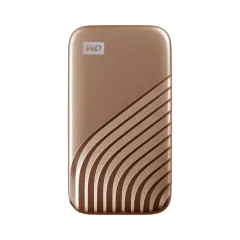
SSD Security for Travelers
Losing a drive is not a matter of if — it is a matter of when. We have left a drive at a cafe in Porto, had one fall out of a backpack pocket on a bus in Bolivia, and watched fellow nomads lose drives that contained months of client work. Hardware encryption makes these losses annoying instead of catastrophic.
Encryption Setup (All Drives)
Every SSD on this list except the LaCie (which requires separate Toolkit software) comes with hardware encryption enabled through the manufacturer’s software:
- Connect the drive and install the manufacturer’s encryption app
- Create a strong password (16+ characters, mixed case, numbers, symbols)
- Store your password in a password manager — if you forget it, the data is permanently inaccessible
- The drive auto-locks when disconnected, requiring the password on the next connection
Performance impact: Less than 2% speed reduction on all drives we tested. Hardware encryption is handled by the drive’s processor, not your computer’s CPU. There is no reason to skip encryption.
Backup Strategy for Nomads
An external SSD is not a backup. It is a local access point. For a proper nomad backup strategy, read our remote work security guide. The short version:
- Primary: Your laptop (work files, active projects)
- Local backup: External SSD (Time Machine, Windows Backup, or manual sync)
- Cloud backup: Backblaze, iDrive, or cloud storage (offsite protection against theft/loss of both laptop and SSD)
- Critical documents: Encrypted cloud vault (passport scans, insurance docs, emergency contacts)
Our Final Recommendation
For most digital nomads, the Samsung T7 Shield is the external SSD to buy. It delivers the best combination of speed, durability (IP65, 2m drop), encryption, and price ($90/1TB). It is rugged enough for daily travel without being bulky, fast enough for any task, and encrypted to protect your data if it goes missing.
If budget is your priority, the Crucial X9 Pro at $80 matches the Samsung’s speed at the lowest price and lightest weight — just accept the lack of formal water resistance.
If maximum speed matters (and you have a Gen 2x2 port), the SanDisk Extreme Pro V2 delivers 2,000 MB/s for the fastest transfers available.
If you need the toughest drive for harsh conditions, the LaCie Rugged Mini SSD with IP67 and 3m drop resistance is the tank of portable SSDs.
If you want the smallest possible drive, the Kingston XS2000 at 29g is genuinely keychain-sized with Gen 2x2 speeds.
And if aesthetics matter, the WD My Passport SSD is the most elegantly designed drive on the market.
Buy the Samsung T7 Shield on Amazon — Our Top PickFor packing everything efficiently, our best tech organizer for travel guide covers the cases that keep your drives, cables, and adapters organized. See our complete digital nomad tech stack for how the SSD fits into a full remote work setup, and our digital nomad packing list for everything that goes in the bag.
Frequently Asked Questions
How much storage do I need for travel?
For most digital nomads, 1TB is the sweet spot — enough for a full Time Machine or Windows backup, a photo library, work files, and offline media. Content creators working with video should consider 2TB or 4TB. The 500GB option is adequate if you only need document storage and light backups.
Are external SSDs durable enough for travel?
Modern rugged SSDs like the Samsung T7 Shield (IP65, 2m drop), SanDisk Extreme Pro (IP55, 2m drop), and LaCie Rugged Mini SSD (IP67, 3m drop) are built specifically for harsh conditions. They have no moving parts, resist water and dust, and survive drops from desk height. Standard non-rugged SSDs like the Crucial X9 Pro are still far more durable than hard drives but lack formal IP ratings.
What is the fastest external SSD for travel?
The Kingston XS2000 delivers the fastest sustained speeds at up to 2,000 MB/s read and 2,000 MB/s write over USB 3.2 Gen 2x2. However, most laptops only support USB 3.2 Gen 2 (10 Gbps), which caps real-world speeds at approximately 1,000 MB/s. The SanDisk Extreme Pro V2 and Samsung T7 Shield both deliver around 1,050 MB/s read, which hits the USB 3.2 Gen 2 ceiling.
Do I need hardware encryption on my external SSD?
For travelers carrying work files, client data, or personal documents, hardware encryption is strongly recommended. If you lose the drive or it is stolen, encrypted data is inaccessible without your password. The Samsung T7 Shield, SanDisk Extreme Pro, and Crucial X9 Pro all include hardware AES 256-bit encryption.
USB-C or USB-A for external SSDs?
USB-C is the standard for modern external SSDs. All six SSDs in this roundup use USB-C natively and include a USB-C to USB-C cable. Most also include a USB-C to USB-A cable or adapter for older computers. If your laptop only has USB-A, the drives work at USB 3.0 speeds (5 Gbps) through the adapter.
Is an external SSD better than cloud storage for travel?
They serve different purposes and are best used together. Cloud storage requires internet — which is unreliable on flights, in remote areas, and on slow connections. An external SSD gives you instant local access to all your files regardless of connectivity. Use cloud storage for sync and backup, an SSD for local access and speed.