Best Portable Laptop Stands for Travel 2026: Ergonomic Picks for Nomads
We tested 7 portable laptop stands in cafes, coworking spaces, and Airbnbs across 15 countries. The lightest, sturdiest options for digital nomads.
Hunching over a laptop at a cafe table in Chiang Mai gave me neck pain that lasted a week. Shoulders locked, upper back screaming, headaches creeping in every afternoon by 3pm. A $35 laptop stand fixed it permanently. That was two years and 15 countries ago, and a portable laptop stand is now the single piece of gear I refuse to travel without — right after my laptop itself.
The problem is simple: laptop screens sit too low. When your screen is on a table, your neck bends forward 20-40 degrees to see it. Do that for 6-8 hours a day, five days a week, and you are building chronic pain into your remote work lifestyle. A laptop stand raises the screen to eye level, and when paired with an external keyboard, gives you proper desktop ergonomics anywhere in the world.
We have tested seven portable laptop stands across cafes, coworking spaces, Airbnbs, and the occasional airport lounge in Southeast Asia, Europe, and Latin America. Here is what actually works for travel — and what is not worth the weight in your pack.
Quick Comparison: Best Portable Laptop Stands
| Feature | Roost V3 | Nexstand K2 | MOFT Adhesive | MOFT Z | Lamicall Foldable | iVoler |
|---|---|---|---|---|---|---|
| Weight | 6 oz (170g) | 8.2 oz (234g) | 3 oz (89g) | 1.5 lbs (680g) | 1.1 lbs (500g) | 9.6 oz (272g) |
| Height Range | 6-12.5" | 5.5-12.6" | 2 angles | Sit + Stand | 6 levels | 6 angles |
| Type | Foldable legs | Foldable legs | Adhesive pad | Z-fold platform | Foldable riser | Foldable riser |
| Laptop Size | 12-18" | 10-17" | 11-16" | Up to 16" | 10-17.3" | 10-15.6" |
| Price | ~$90 | ~$35 | ~$26 | ~$60 | ~$25 | ~$15 |
| Our Pick | Best Overall | Best Value | Best Ultralight | Best Sit-Stand | Best Budget | Best Compact |
| Visit Roost V3 | Visit Nexstand K2 | Visit MOFT Adhesive | Visit MOFT Z | Visit Lamicall Foldable | Visit iVoler |
Why Every Digital Nomad Needs a Laptop Stand
This is not optional ergonomic advice — it is a career longevity issue. If you work remotely on a laptop for 30+ hours per week, the cumulative strain from looking down at your screen causes real damage. Neck pain, tension headaches, rounded shoulders, and upper back stiffness are nearly universal among digital nomads who work without a stand.
The ergonomic math is straightforward: raising your screen 8-12 inches brings it to eye level, which keeps your cervical spine neutral. Add a $30-40 compact Bluetooth keyboard so your hands rest at elbow height, and you have replicated proper desk ergonomics for under $100 and less than a pound of pack weight.
For nomads specifically, a portable stand also:
- Turns any surface into a workstation. Cafe tables, kitchen counters, park benches — your ergonomics stay consistent regardless of where you set up.
- Improves laptop cooling. Elevated laptops run cooler because air circulates underneath. This matters in hot climates like Thailand, Indonesia, and Mexico.
- Stacks with coworking setups. Even coworking hot desks rarely come with monitor arms. Your stand makes any desk ergonomic instantly.
Read our full digital nomad tech packing list for the complete work-from-anywhere gear kit.
How We Tested
We evaluated each stand across five criteria specific to travel and remote work:
- Weight and packability. How much does it add to your bag, and does it fit alongside a laptop in a daypack?
- Stability. Does it wobble on uneven cafe tables? Can you type without the laptop sliding?
- Height adjustment. Can it raise a 13-14 inch laptop screen to eye level for average-height adults?
- Laptop compatibility. Does it support various laptop sizes, thicknesses, and weights?
- Durability. Will it survive daily packing and unpacking in a backpack for months?
Each stand was used for a minimum of two weeks as a primary work setup. We tested across MacBook Air 13-inch, MacBook Pro 16-inch, and ThinkPad X1 Carbon to cover different sizes and weights.
Best Portable Laptop Stands for Travel
1. Roost V3 — Best Overall
The Roost V3 is the gold standard of portable laptop stands, and for good reason. It is the lightest full-height stand we have tested at just 6 ounces, folds down to the size of a rolled-up magazine, and raises your screen a full 6.5 to 12.5 inches off the desk. The patented rigid folding structure is genuinely clever — it locks into place with a satisfying click and feels rock-solid once deployed.
We have used the Roost V3 across three continents over 18 months. The self-adjusting grips automatically adapt to any laptop from 12 to 18 inches. Setup takes about five seconds. The fiberglass-reinforced nylon construction has survived being crammed into backpacks, dropped on tile floors, and jostled through hundreds of cafe-to-coworking commutes.
What makes it the best: The combination of weight, height range, and stability is unmatched. At 6 oz, it weighs less than a banana. At 12.5 inches max height, it can bring even a 13-inch laptop screen to eye level for taller users. The build quality is noticeably superior to cheaper alternatives — there is zero flex or wobble.
The catch: It costs roughly $90, which is 2-3 times more than the competition. For daily professional use, the investment pays for itself in durability and ergonomics. But if you are on a tight budget, the Nexstand K2 below delivers 90% of the experience at a third of the price.
Pros
- Lightest full-height stand at 6 oz
- Excellent 6.5-12.5 inch height range with 7 levels
- Self-adjusting grips fit 12-18 inch laptops
- Premium build quality — fiberglass reinforced nylon
- Folds to 1.3 x 1.3 x 12 inches
Cons
- Premium price around $90
- Requires external keyboard for typing
- Minimal lateral stability on very uneven surfaces
2. Nexstand K2 — Best Value
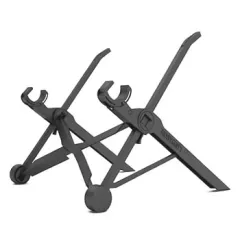
The Nexstand K2 is the stand we recommend to every digital nomad who asks. It delivers nearly identical functionality to the Roost V3 at roughly one-third the price. The design is clearly inspired by the Roost — same collapsible leg structure, same concept — but made from fiberglass-reinforced nylon that is slightly less refined.
At 8.2 oz (234g), it is marginally heavier than the Roost but still lighter than a phone. The K2 offers 8 height levels ranging from 5.5 to 12.6 inches, which actually gives it a slightly wider adjustment range than the Roost. It folds down to 1.5 x 1.5 x 14 inches and comes with a carrying pouch.
Real-world performance: We used the K2 for three months across Mexico and Portugal. Stability is excellent on flat surfaces. On uneven cafe tables, it occasionally needs a slight adjustment. The laptop grips are manual (you pull them apart to fit your laptop) rather than self-adjusting like the Roost, but this takes an extra two seconds at most. It supports laptops from 10 to 17 inches and holds up to 20 lbs.
Why it is not number one: The build quality difference is noticeable in the details. The hinge mechanism is slightly less smooth, the materials feel less premium, and the grips do not auto-adjust. None of these impact daily function, but after using both side by side, the Roost does feel meaningfully better in hand. If budget is not a concern, the Roost is worth the upgrade. For everyone else, the K2 is the smart choice.
Pros
- Excellent value at roughly $35
- 8 height levels with wider range than the Roost
- Supports laptops 10-17 inches up to 20 lbs
- Includes carrying pouch
- Fiberglass-reinforced nylon construction
Cons
- Manual grip adjustment, not auto-adjusting
- Slightly heavier than Roost at 8.2 oz
- Build quality is good but not premium
3. MOFT Adhesive Laptop Stand — Best Ultralight
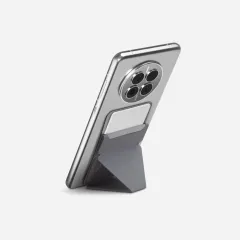
The MOFT Adhesive Laptop Stand is for minimalists who refuse to carry a single extra gram. At 3 oz (89g) and just 0.1 inches thin, it adheres directly to the bottom of your laptop and becomes virtually invisible. You never pack it, never set it up separately — it is just always there when you flip your laptop open.
The adhesive is reusable and repositionable. You peel it off, stick it on a different laptop, and it holds just as well. It provides two viewing angles — 15 degrees and 25 degrees — by folding out from the bottom of the laptop. The stand supports up to 18 lbs, which handles even the heaviest 16-inch laptops.
The critical trade-off: The MOFT does not raise your screen to eye level. At best, it tilts the screen up by 2-3 inches. This is a meaningful ergonomic improvement over a flat laptop but nowhere close to what the Roost or Nexstand deliver. Think of it as reducing neck strain by 30-40% rather than eliminating it.
Who this is perfect for: Travelers who prioritize weight savings above all else, people who hate carrying extra accessories, and anyone who wants a mild ergonomic boost without changing their workflow. It is also excellent as a secondary stand — keep the MOFT on your laptop for quick cafe sessions, and pull out a Roost or Nexstand for serious all-day work.
Pros
- Weighs only 3 oz and adds zero bulk
- Adhesive attaches directly to laptop — nothing extra to carry
- Reusable and repositionable adhesive
- Works on any surface instantly
- Supports up to 18 lbs
Cons
- Only 2-3 inches of screen elevation
- Does not bring screen to eye level
- Two angle options only — limited adjustability
- Adhesive may interfere with laptop bottom vents on some models
4. MOFT Z Invisible Sit-Stand Desk — Best Sit-Stand
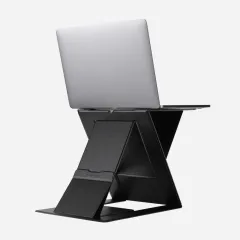
The MOFT Z is a different category entirely. Rather than just elevating your laptop, it functions as a portable sit-stand desk converter. The Z-fold design offers five configurations: four sitting angles (25, 35, 45, and 60 degrees) plus a full standing-desk mode that raises the laptop roughly 10 inches.
At 1.5 lbs (680g), it is the heaviest option on this list. But it replaces what would otherwise require a separate standing desk converter — a piece of furniture that does not exist in Airbnbs and most coworking hot desks. For nomads who value standing work sessions, this solves a real problem.
Real-world impressions: The MOFT Z is surprisingly stable in standing mode thanks to a triangular base support. It holds up to 22 lbs. The sitting angles are useful for different tasks — the 25-degree tilt works for typing with the built-in keyboard, while the steeper 45-degree angle is good for reading or video calls. Folded flat, it is about the size of a standard folder at 0.5 inches thick.
The limitation: At 1.5 lbs, it is significantly heavier than the Roost or Nexstand. You will feel it in a daypack. And the standing mode, while functional, does not raise the screen as high as a Roost mounted on a stack of books — a free hack that many nomads use for standing work. The MOFT Z makes the most sense for people who switch between sitting and standing frequently throughout the day and want a single, clean solution.
Pros
- 5 configurations including standing desk mode
- Tri-angle base support for stability at all heights
- Holds up to 22 lbs
- Folds flat to just 0.5 inches thick
- Multiple sitting angles for different tasks
Cons
- Heaviest option at 1.5 lbs
- Standing mode height is limited compared to dedicated standing setups
- Higher price than basic stands at around $60
- Overkill if you only need a simple screen riser
5. Lamicall Foldable Laptop Stand — Best Budget
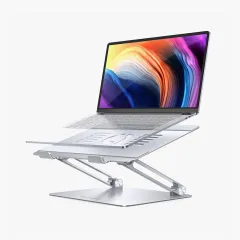
The Lamicall Adjustable Laptop Stand costs around $25 and punches well above its weight. Made from aluminum alloy, it folds flat for transport and offers six height adjustment levels. It supports laptops from 10 to 17.3 inches, which covers everything from iPads to gaming laptops.
The aluminum construction gives it a premium feel that belies the budget price. Rubber pads on the contact points prevent scratching and keep the laptop from sliding. Stability is solid on flat surfaces — the wider base footprint trades some packability for noticeably less wobble compared to the stick-style stands like the Roost and Nexstand.
The trade-off for budget shoppers: At 1.1 lbs (500g), the Lamicall is roughly twice the weight of the Nexstand K2. It also does not fold as compactly — think folded book versus rolled magazine. For a nomad with a 40L backpack who counts every ounce, the K2 is the better pick. But for anyone working from a home base, Airbnb, or van where weight is less critical, the Lamicall delivers excellent ergonomics at the lowest price on this list.
Pros
- Excellent value at around $25
- Aluminum alloy construction feels premium
- Wide base provides superior stability
- 6 height adjustment levels
- Supports 10-17.3 inch laptops
Cons
- Heavier at 1.1 lbs than stick-style stands
- Larger folded footprint than Roost or Nexstand
- Not ideal for ultralight travel setups
6. iVoler Laptop Stand — Best Compact
The iVoler Laptop Stand costs roughly $15 and weighs 9.6 oz (272g), making it the cheapest option worth recommending. The aluminum construction offers six angle adjustments and folds down to a compact 9.3 x 1.7 inches with a portable storage bag included.
It is not going to win awards for height range — the iVoler tilts and elevates the screen modestly rather than raising it to true eye level. Think of it as a step up from the MOFT adhesive in terms of height gain, but still below what the Roost and Nexstand achieve. The silicone padding prevents scratches and provides decent grip on most surfaces.
Best for: Budget-conscious nomads who want something better than nothing, or as a lightweight backup stand to keep in a daypack. At $15, the risk is essentially zero. If it works for your setup, you have saved $75 compared to the Roost. If you outgrow it, pass it along to another nomad and upgrade.
Pros
- Lowest price at around $15
- Lightweight aluminum at 9.6 oz
- Includes carrying bag
- 6 angle adjustments
- Slim folded profile fits easily in bags
Cons
- Limited maximum height — does not reach eye level
- Max laptop size 15.6 inches
- Less stable than wider-base designs
- Build quality reflects the budget price
Complete Ergonomic Travel Setup
A laptop stand is the foundation, but the complete ergonomic travel workstation includes three components:
- Laptop stand (this article) — raises the screen to eye level.
- Compact keyboard — lets your hands type at the correct height when the screen is elevated. The Logitech K380 ($35, 14 oz) connects to three devices via Bluetooth and runs for two years on AAA batteries.
- Travel mouse — eliminates the awkward trackpad-on-elevated-laptop situation. The Logitech Pebble 2 M750 ($30, 3 oz) is whisper-quiet for cafe use.
Total weight for the full ergonomic kit: under 2 lbs with a Roost V3, keyboard, and mouse. That is a trivial addition to any backpack for a massive improvement in daily comfort and long-term health.
For the complete gear rundown — connectivity, power, accessories, and everything else — see our digital nomad tech packing list.
If you are setting up a more permanent workspace at a coworking space, our best coworking memberships guide covers where to find the best desks, chairs, and WiFi worldwide.
How to Choose a Portable Laptop Stand
Stand Type Comparison
Stick-style stands (Roost V3, Nexstand K2): Fold down to a narrow cylinder. Lightest category. Best for backpack travelers and minimalists. Require an external keyboard.
Adhesive stands (MOFT Adhesive): Attach directly to your laptop. Zero extra bulk. Modest elevation only. Best as a supplementary ergonomic improvement.
Folding riser stands (Lamicall, iVoler): Fold flat like a book. Slightly heavier. Wider base offers more stability. Good for semi-permanent setups.
Sit-stand converters (MOFT Z): Multi-mode platforms. Heaviest category. Best for nomads who alternate between sitting and standing throughout the day.
Key Decision Factors
- If weight is your top priority: MOFT Adhesive (3 oz) or Roost V3 (6 oz)
- If budget is your top priority: iVoler ($15) or Lamicall ($25)
- If you want the best balance of weight, performance, and price: Nexstand K2 ($35, 8.2 oz)
- If you want the absolute best and do not mind spending more: Roost V3 ($90, 6 oz)
- If you want to alternate sitting and standing: MOFT Z ($60, 1.5 lbs)
Height Range Matters
For proper ergonomics, you want the top of your laptop screen at or slightly below eye level. For most adults sitting at a standard desk (28-30 inches high), this means raising the laptop 8-12 inches. The Roost V3 and Nexstand K2 both reach this range comfortably. The folding riser and adhesive styles provide less elevation — helpful but not fully ergonomic.
Final Verdict
For most digital nomads, the Nexstand K2 is the right choice. At $35 and 8.2 oz, it delivers genuine eye-level ergonomics without the premium price of the Roost V3. It has been our daily driver across four countries in the past six months and shows no signs of wear.
If money is not the deciding factor and you want the lightest, most refined option available, the Roost V3 justifies its $90 price tag through superior build quality and an ounce-shaving 6 oz weight. Nomads who have used both almost universally prefer the Roost — but most also acknowledge the K2 gets the job done perfectly well.
And if you want zero extra weight and zero setup time, stick a MOFT Adhesive to your laptop and call it a day. It does not solve the ergonomic problem completely, but it helps more than you would expect for 3 oz.
Whatever you choose, start using a laptop stand this week. Your neck will thank you in a month. Your back will thank you in a year.
Get the Nexstand K2 — Our Top Pick for ValueFrequently Asked Questions
Do I really need a laptop stand for travel?
Yes, especially if you work on a laptop more than a few hours a day. Without a stand, you hunch forward and angle your neck downward 20-40 degrees to see the screen. Over weeks and months this causes chronic neck pain, upper back tension, and headaches that most digital nomads know all too well. A portable stand raises your screen closer to eye level, and paired with a compact Bluetooth keyboard, gives you proper desk ergonomics at any cafe table, coworking hot desk, or Airbnb kitchen counter.
What is the lightest laptop stand for travel?
The MOFT Adhesive Laptop Stand weighs just 3 oz (89g) and attaches directly to the bottom of your laptop, adding virtually zero bulk to your pack. For a freestanding option, the Roost V3 is the lightest at 6 oz (170g). The Nexstand K2 is slightly heavier at 8.2 oz (234g) but roughly a third the price of the Roost.
Can I use a laptop stand in a cafe or on a plane?
Cafe tables are the ideal use case for a portable laptop stand. Every stand on this list works well on flat cafe and coworking surfaces. Airplane tray tables are trickier due to limited space and instability. The MOFT adhesive stand works best on planes because it is attached to the laptop itself. The Nexstand K2 and Roost V3 are too tall for most tray tables but can work on a flat-class or business-class surface.
Laptop stand vs laptop riser — what is the difference?
A laptop stand elevates your laptop at an angle, raising the screen height while tilting the keyboard. Stands like the Roost V3 and Nexstand K2 lift the screen 6 to 12 inches off the desk. A laptop riser is typically a flat platform that raises the entire laptop without tilting. For travel, stands are more common because they fold down smaller and weigh less than platform-style risers.
Do I need an external keyboard with a laptop stand?
Yes, ideally. When a laptop stand raises your screen to eye level, the built-in keyboard ends up too high for comfortable typing. Your wrists angle upward, which causes strain over time. A compact Bluetooth keyboard like the Logitech K380 or Apple Magic Keyboard completes the ergonomic setup. Many nomads also add a small travel mouse. The full combo — stand, keyboard, mouse — weighs under a pound total and fits easily in any laptop bag.
How high should my laptop screen be?
Ergonomic guidelines recommend positioning the top of your screen at or slightly below eye level, with the display 20 to 26 inches from your eyes. This keeps your neck in a neutral position and reduces strain on your cervical spine. Most portable laptop stands in the 8 to 12 inch height range achieve this for average-height adults when sitting at a standard desk or table.