Best Power Banks for Travel 2026: TSA-Approved & Laptop-Ready
We tested 8 portable chargers across flights, buses, and off-grid locations in 20 countries. The best TSA-approved power banks for phones, laptops, and travel.
Your phone is your eSIM, your hotspot, your GPS, your translator, and your boarding pass. When it dies mid-layover in Istanbul, so does your day. (Speaking of eSIMs — if you do not already have one loaded, grab one before you leave. Our best eSIM providers guide covers the top options for instant data in 200+ countries.) When your laptop hits 3% in a Lisbon cafe with no outlets, that deadline you were about to hit becomes the deadline that hit you. After three years of full-time travel across 20+ countries — airports, overnight buses, jungle cafes, and off-grid coworking spaces — we have tested every power bank worth testing. Some of them traveled with us for months. Others got left behind after a week.
A good travel power bank is not just about milliamp-hours on the spec sheet. It is about whether it charges your laptop fast enough to finish a presentation before your flight boards, whether it fits in your daypack without feeling like a brick, and critically, whether it will get confiscated at airport security.
Here are the 8 best power banks for travel in 2026, ranked after hands-on testing across real travel scenarios.
| Feature | Anker 737 (24K) | Anker Prime (20K) | Baseus 65W (20K) | Ugreen Nexode (20K) | Anker Nano (10K) | Nitecore NB20000 | Shargeek Storm 2 Slim | INIU B63 (25K) |
|---|---|---|---|---|---|---|---|---|
| Capacity | 24,000mAh (88.8Wh) | 20,000mAh (71.4Wh) | 20,000mAh (74Wh) | 20,000mAh (72Wh) | 10,000mAh (37Wh) | 20,000mAh (72Wh) | 20,000mAh (74Wh) | 25,000mAh (92.5Wh) |
| USB-C PD Output | 140W | 200W | 65W | 130W | 30W | 22.5W | 100W | 65W |
| Weight | 1.38 lbs (630g) | 1.04 lbs (472g) | 0.92 lbs (420g) | 1.12 lbs (510g) | 0.47 lbs (213g) | 0.64 lbs (291g) | 1.10 lbs (500g) | 1.10 lbs (500g) |
| Ports | 2x USB-C, 1x USB-A | 2x USB-C, 1x USB-A | 2x USB-C, 1x USB-A | 2x USB-C, 1x USB-A | 1x USB-C (built-in cable), 1x USB-A | 2x USB-C, 1x USB-A | 1x USB-C, 1x USB-A | 2x USB-C, 1x USB-A |
| Airline Safe | Yes | Yes | Yes | Yes | Yes | Yes | Yes | Yes |
| Display | Yes | Yes | Yes | Yes (TFT) | No | No | Yes (IPS) | Yes |
| Price | ~$110 | ~$130 | ~$36 | ~$80 | ~$28 | ~$70 | ~$179 | ~$40 |
| Our Pick | Best Overall | Best for Laptops | Best Value | Best Mid-Range | Best Compact | Best Ultralight | Best Display | Best Under $50 |
| Visit Anker 737 (24K) | Visit Anker Prime (20K) | Visit Baseus 65W (20K) | Visit Ugreen Nexode (20K) | Visit Anker Nano (10K) | Visit Nitecore NB20000 | Visit Shargeek Storm 2 Slim | Visit INIU B63 (25K) |
TSA and Airline Power Bank Rules
This is the section that matters before you buy anything. Get this wrong and your $130 power bank gets confiscated at security.
The FAA rule is straightforward:
- Under 100Wh: Carry-on only. No airline approval needed. No quantity limit (though airlines can impose their own — most allow 2-4).
- 100-160Wh: Carry-on only, with airline approval. Limited to 2 per passenger.
- Over 160Wh: Banned from all passenger flights. Period.
The formula you need to know:
Wh = mAh x V / 1000
Most power banks use 3.7V lithium-ion cells. So:
- 10,000mAh = 37Wh (well under the limit)
- 20,000mAh = 74Wh (safe zone)
- 26,800mAh = 99.16Wh (just under — the industry-standard “maximum” for travel)
- 27,000mAh = 99.9Wh (cutting it extremely close)
Critical rules travelers miss:
- Power banks must go in carry-on luggage. Never check them. If you gate-check a bag, remove the power bank first. Lithium batteries in the cargo hold are a fire risk — airlines take this seriously.
- The label matters. TSA agents look at the printed Wh or mAh rating on the power bank itself. If it is not labeled, they may confiscate it. Every pick in this guide has clear labeling.
- International airlines may differ. Some Asian and Middle Eastern carriers limit carry-on batteries to 100Wh total with no exceptions. Check your airline’s specific policy before flying. While you are doing pre-trip research, check our Japan internet guide or Thailand internet guide to understand connectivity options at your destination — knowing what to expect helps you decide how much battery backup you actually need.
Every power bank in this guide is under 100Wh and TSA-approved without special permission.
How We Tested
We evaluated power banks across five criteria that matter to travelers:
- Actual capacity vs. stated capacity. We drained each bank completely and measured real-world output with a USB power meter. Energy is always lost to heat and voltage conversion — typically 15-25%. A “20,000mAh” power bank usually delivers 14,000-16,000mAh of usable charge.
- Charging speed. We measured how quickly each bank charges an iPhone 15 Pro (0-50% and 0-100%), a MacBook Air M2, and a Samsung Galaxy S24. We recorded both single-device and multi-device speeds.
- Recharge time. How long it takes to charge the power bank itself with its maximum-rated input charger.
- Size and weight. Measured with a kitchen scale and packed in actual travel bags to test real-world portability.
- Durability and pass-through charging. Each bank traveled in a daypack across multiple countries. We tested pass-through charging (charging the bank while it charges your device) and noted any overheating issues.
Best Power Banks for Travel
1. Anker 737 PowerCore 24K — Best Overall
The Anker 737 is the power bank we have carried the longest and recommend most often. It hits the sweet spot between capacity, charging power, and airline compliance that no other model matches. At 24,000mAh (88.8Wh), it sits safely under the 100Wh limit while packing more capacity than most 20,000mAh competitors.
The standout feature is 140W bidirectional USB-C PD 3.1. That means it charges a MacBook Pro 14-inch at full speed and recharges itself from empty to full in under an hour with a compatible charger. In practice, we plugged it into a cafe outlet in Medellin with a 140W GaN charger and it was full before we finished our coffee. That speed matters when you have 45 minutes between meetings and your power bank is dead.
Three ports (two USB-C, one USB-A) let you charge a laptop, phone, and earbuds simultaneously. The digital display shows exact percentage, watts in, watts out, and estimated time remaining — genuinely useful when you are rationing power on a long bus ride.
Real-world performance: It charged our iPhone 15 Pro from 0-50% in 18 minutes and fully recharged a MacBook Air M2 with 40% capacity left over. On a 14-hour bus from Mexico City to Oaxaca, it kept two phones and a pair of AirPods alive the entire trip.
Pros
- 140W output charges any USB-C laptop at full speed
- Recharges itself in under 60 minutes with 140W input
- 24,000mAh is just under the 100Wh airline limit
- Digital display with real-time wattage and time estimates
- Three ports for simultaneous device charging
- Rock-solid build quality -- survived 18 months of travel
Cons
- At 1.38 lbs, noticeably heavier than 20K alternatives
- ~$110 is a premium price for a power bank
- Thick form factor does not slide into pants pockets
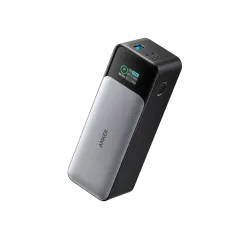
2. Anker Prime 20,000mAh — Best for Laptops
If your primary use case is keeping a laptop alive, the Anker Prime is the one to get. Its 200W total output is the highest in this guide — enough to charge even power-hungry 16-inch MacBook Pros at near-full speed. The single USB-C port delivers up to 100W, and combined output across all three ports hits 200W.
At 20,000mAh (71.4Wh), it is comfortably airline-safe and lighter than the Anker 737 at just over a pound. The smart display shows detailed charging data, and the compact cylindrical design fits well in bag side pockets.
Real-world performance: It pushed a MacBook Air M2 from 15% to 100% in about 75 minutes while simultaneously charging a phone. The 100W input means it recharges itself in about 75 minutes too. On a day of cafe-hopping in Lisbon with no reliable outlets, it gave us roughly one full MacBook charge plus three phone top-ups.
The tradeoff versus the 737 is 4,000mAh less capacity. For pure laptop users who want the fastest charging speeds in the smallest package, the Prime wins. For maximum overall capacity, the 737 is better.
Pros
- 200W combined output -- highest in this roundup
- 100W single-port USB-C handles demanding laptops
- Compact and lighter than higher-capacity alternatives
- 100W input recharges the bank in ~75 minutes
- Smart display with detailed power data
Cons
- Only 20,000mAh -- about one laptop charge
- ~$130 is the most expensive pick here
- Cylindrical shape wastes space in flat bag pockets
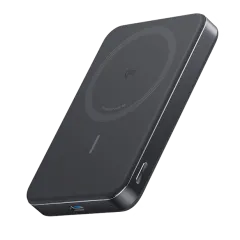
3. Baseus 65W 20,000mAh — Best Value
The Baseus 65W is the power bank we recommend to anyone who asks “what is a good power bank that does not cost too much?” At around $36, it delivers 80% of the performance of the $110+ premium options at a third of the price.
It packs 20,000mAh (74Wh) with 65W USB-C PD output — enough to charge a MacBook Air, most Windows ultrabooks, and an iPad at full speed. Three ports (two USB-C, one USB-A) handle multi-device charging. The digital display shows remaining capacity and wattage, and at just 420 grams, it is one of the lighter 20,000mAh options we tested.
Real-world performance: It charged a MacBook Air M2 from 20% to 85% before running out, and handled overnight phone charging for two phones in a hostel with no bedside outlets. The 65W input means it recharges in about 2 hours. Build quality is solid — the metal shell inspires more confidence than the price suggests.
The only meaningful compromise is charging speed. At 65W, it charges laptops at a perfectly usable but not maximum rate. If you need to charge a MacBook Pro 16-inch fast, spend up for the Anker 737 or Prime. For everything else, this is a ridiculous amount of value.
Pros
- ~$36 price is unbeatable for 65W USB-C PD output
- 20,000mAh capacity handles phones and laptops
- 420g is lighter than most competitors at this capacity
- Digital display with battery and wattage readout
- Metal shell feels premium despite the budget price
Cons
- 65W output is slower than premium 100W+ models for large laptops
- Build quality, while good, is not quite Anker-tier
- No pass-through charging at full speed

4. Ugreen Nexode 20,000mAh 130W — Best Mid-Range
The Ugreen Nexode slots neatly between the budget Baseus and the premium Ankers. At around $80, you get 130W total output with a single USB-C port delivering up to 100W — enough for any laptop on the market. It is a serious piece of kit wrapped in a compact matte-black shell.
The standout feature is the TFT color display that shows real-time input and output wattage, remaining capacity, and charging time estimates. Among sub-$100 power banks, this is the best display we tested. Three ports (two USB-C, one USB-A) handle simultaneous charging, and 80W input means it recharges itself in about 1.5 hours.
Real-world performance: We used it as our daily driver for three weeks across Thailand. It charged a MacBook Air M2 at near-maximum speed and handled a phone plus earbuds simultaneously without throttling. The 72Wh capacity is well under airline limits and delivered about 80% of the Anker 737’s real-world performance at 70% of the price.
If the Baseus 65W feels too budget and the Anker 737 feels too expensive, the Ugreen Nexode is the Goldilocks pick.
Pros
- 130W output with 100W single-port -- charges any laptop
- Excellent TFT color display with real-time data
- ~$80 is strong value for these specs
- 80W input recharges in about 1.5 hours
- Compact, professional design
Cons
- Slightly heavier than the Baseus at 510g
- Only 20,000mAh -- no capacity advantage over cheaper options
- USB-A port maxes out at 22.5W
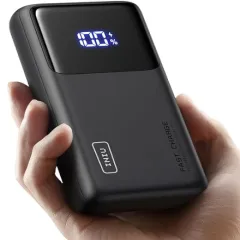
5. Anker Nano 10,000mAh — Best Compact
The Anker Nano 10,000mAh is the power bank you grab when you just need your phone to survive the day. At 213 grams (under half a pound), it practically disappears into a jacket pocket or daypack. The built-in USB-C cable means one less cable to carry and one less cable to lose.
With 30W USB-C PD output, it charges modern phones at fast-charging speeds and can even slow-charge an iPad. The built-in cable is retractable and surprisingly durable — ours survived 6 months of daily use without fraying. A separate USB-A port handles legacy devices.
Real-world performance: It charged an iPhone 15 Pro from 0-50% in 25 minutes and delivered just over two full charges before dying. That is exactly enough for a long day of sightseeing with heavy map and camera use. We kept this in our daypack on exploring days and saved the big Anker 737 for work days.
This is not a laptop power bank. The 30W output can technically trickle-charge a MacBook Air, but you will drain it faster than it charges under any real workload. Get this for phone-and-earbuds duty only.
Pros
- Just 213g -- lightest in this roundup by far
- Built-in retractable USB-C cable eliminates cable hunting
- 30W fast charges any modern phone
- ~$28 is very affordable for Anker build quality
- Perfect daypack and pocket size
Cons
- 10,000mAh is only 2-3 phone charges
- Cannot meaningfully charge a laptop
- No display -- LEDs only for battery indication
- Built-in cable is USB-C only (no Lightning for older iPhones)
6. Nitecore NB20000 Gen 3 — Best for Outdoor and Adventure Travel
The Nitecore NB20000 is built for travelers who push into rough conditions. At just 291 grams for 20,000mAh, it has the best capacity-to-weight ratio in this guide. The carbon fiber shell is genuinely tough, and the IPX5 water resistance means rain, splashes, and sweaty backpack pockets will not kill it.
Originally designed for outdoor enthusiasts and flashlight users (Nitecore is a flashlight company), the NB20000 Gen 3 has found a loyal following among backpackers, hikers, and adventure-travel digital nomads. Two USB-C ports and one USB-A handle multiple devices.
Real-world performance: We brought it on a five-day trek in northern Thailand and a motorbike trip through Bali. It survived a rainstorm in an open pannier bag, charged two phones for three days straight, and weighed noticeably less than every other 20,000mAh bank we compared it against.
The tradeoff is charging speed. At 22.5W maximum USB-C output, it will not fast-charge phones or charge laptops. This is a phone-and-tablet power bank, not a laptop charger. If you need ruggedness and low weight above all else, it is the best option available.
Pros
- 291g for 20,000mAh -- best power-to-weight ratio
- IPX5 water resistance for outdoor conditions
- Carbon fiber shell is genuinely rugged
- Dual USB-C ports plus USB-A
- Trusted brand in the outdoor and EDC community
Cons
- 22.5W max output -- no laptop charging, slower phone charging
- ~$70 is pricey for 22.5W output
- No display
- Not ideal for digital nomads who need laptop charging
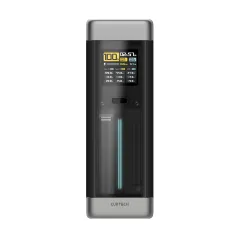
7. Shargeek Storm 2 Slim — Best Display
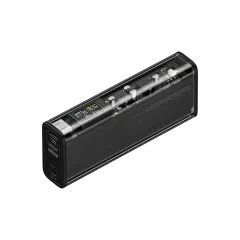
The Shargeek Storm 2 Slim is the power bank for people who care about gear aesthetics as much as function. The transparent housing lets you see the internal circuit board and battery cells through a clear polycarbonate shell, and the IPS display screen shows real-time data including battery percentage, input/output wattage, temperature, operation hours, and active port status.
Beyond looks, it performs. 100W USB-C PD output charges MacBooks and Windows laptops at full speed. The 20,000mAh capacity (74Wh) is airline-safe, and it recharges fully in about 90 minutes. The see-through design is a genuine conversation starter in coworking spaces — we have been asked “what is that?” more times than we can count.
Real-world performance: It handled daily MacBook Air charging for a week in Chiang Mai and never throttled during Thailand’s heat. The display proved surprisingly useful for monitoring charging efficiency across different cafe outlets (spoiler: many older buildings deliver inconsistent power).
The price is the sticking point. At $179, it is the second most expensive pick in this guide, and you can get comparable charging specs from the Ugreen Nexode at half the price. You are paying a premium for the design, the display, and the conversation piece factor.
Pros
- Stunning transparent design with visible internals
- Best-in-class IPS display with detailed real-time data
- 100W USB-C PD charges laptops at full speed
- Recharges in ~90 minutes
- Premium build quality and materials
Cons
- ~$179 is expensive for 20,000mAh
- Only 2 ports (1 USB-C, 1 USB-A) -- fewer than competitors
- Transparent shell shows fingerprints and scratches
- Heavier than you would expect at 500g

8. INIU B63 25,000mAh — Best Under $50
The INIU B63 offers the most raw capacity per dollar in this guide. At 25,000mAh (92.5Wh), it is the largest airline-safe power bank here — still under 100Wh. It delivers 65W USB-C PD output, enough to charge a MacBook Air or Windows ultrabook, and includes a built-in phone stand for video calls while charging.
At around $40, the value proposition is hard to argue with. You get three ports (two USB-C, one USB-A), a digital display, and 65W laptop charging for less than most brands charge for a basic 10,000mAh bank. The build quality is plastic rather than metal, but it feels solid enough, and INIU backs it with a 3-year warranty.
Real-world performance: It charged a MacBook Air M2 from 20% to 90% and still had juice left for two phone charges. On a budget airline marathon (Bangkok to Denpasar with a 6-hour layover in KL), it kept two phones and a Kindle alive across 16 hours of travel. The built-in stand is a nice bonus for propping up your phone during hostel video calls.
The tradeoff versus the Baseus is slightly larger size and weight. But you get 5,000mAh more capacity and a phone stand for a few dollars more. For budget-conscious travelers who want maximum power per dollar, this is the pick.
Pros
- 25,000mAh is the largest airline-safe capacity here
- ~$40 for 65W USB-C PD -- exceptional value
- Built-in phone stand is a useful travel bonus
- Three ports with simultaneous charging
- 3-year INIU warranty
Cons
- Plastic build is not as premium-feeling as metal alternatives
- Slightly bulkier than 20,000mAh competitors
- 65W output is slower for large laptop charging
- Brand is less established than Anker or Baseus

How to Choose a Travel Power Bank
Not sure which one to grab? Here is how to decide based on how you actually travel.
Capacity: How Much Do You Need?
- 10,000mAh (37Wh): Day trips, sightseeing, light phone use. 2-3 phone charges.
- 20,000mAh (74Wh): The sweet spot for most travelers. 4-6 phone charges or 1 laptop charge.
- 25,000-26,800mAh (92-99Wh): Maximum airline-safe capacity. Best for long travel days, multi-device users, and digital nomads.
USB-C PD Wattage: What Are You Charging?
- 18-30W: Phones and tablets only. Fine for casual travelers.
- 45-65W: Phones, tablets, and most laptops (MacBook Air, XPS 13, ThinkPad X1).
- 100W+: Any laptop including demanding 15/16-inch models. Worth it for heavy laptop users.
Size and Weight
If it goes in your pocket, get the Anker Nano (213g). If it goes in a daypack, anything under 500g is comfortable. Over 500g and you will notice it. The Anker 737 at 630g is the heaviest pick and best suited for a dedicated spot in your main bag.
Ports
More ports mean less cable-swapping. Three ports is the sweet spot for travelers (laptop + phone + earbuds/watch). Two ports works if you charge sequentially. Check whether USB-A ports deliver enough power for your devices — many are limited to 18-22.5W.
Airline Compliance
Stay under 100Wh (roughly 26,800mAh) and you never need to think about it. Every bank in this guide qualifies. If a power bank lists capacity in Wh on its label, even better — TSA agents understand watt-hours faster than mAh calculations.
Power Bank Care Tips for Travelers
A few habits that will extend your power bank’s lifespan by years:
Never leave it in a hot car. Lithium-ion batteries degrade rapidly above 45 degrees Celsius. A car parked in Bali’s sun can easily hit 60+ degrees inside. Keep your power bank in your bag, not the glove compartment. (Planning time in Bali or Indonesia? Our Indonesia internet guide covers local SIM cards, eSIMs, and coworking connectivity so you know which backup power scenario you are planning for.)
Use quality cables. A cheap USB-C cable can bottleneck charging speed from 65W down to 15W and generate excess heat. Use the cable that came with your power bank, or buy a certified USB-IF cable.
Store at 50-80% charge. If you are not using your power bank for a few weeks, charge it to about 60% before storing. Fully charged or fully depleted storage stresses the cells and shortens overall lifespan.
Charge it before it hits zero. Lithium-ion batteries handle partial charge cycles better than full ones. Topping up from 30% to 80% regularly is better for battery health than running it to 0% and charging to 100%.
Keep it in carry-on during flights. This is not optional — it is required. But it also protects the battery from extreme temperatures and pressure changes in unpressurized cargo holds.
The Bottom Line
For most travelers and digital nomads, the Anker 737 PowerCore 24K is our top recommendation. It charges anything, recharges fast, and the 24,000mAh capacity handles a full day of heavy device use. If your budget is tight, the Baseus 65W delivers 90% of what you need at a third of the price. And if you only need phone power in a pocket-friendly size, the Anker Nano 10K is hard to beat.
Whatever you choose, make sure it is under 100Wh, has USB-C PD output, and goes in your carry-on. Your future self, sitting in an airport with a dead phone and a boarding pass that only exists digitally, will thank you.
Get the Anker 737 PowerCore 24K on AmazonKeep Connected Everywhere
A great power bank is just one piece of the puzzle. Complete your travel tech setup:
- Best eSIM Providers 2026 — instant data in 200+ countries, no SIM card swapping at the airport
- Best Travel VPN — secure your connection on public WiFi and hotel networks
- Best Tech Organizer for Travel — keep all your charging cables and adapters tidy
- Best Travel Insurance for Digital Nomads — protect your gear (including expensive power banks) against theft and damage
- Digital Nomad Tech Packing List 2026 — the complete gear kit for remote workers
- Best Portable Power Stations for Van Life — when you need 500Wh+ for Starlink and off-grid work
Frequently Asked Questions
What size power bank can you take on a plane?
The FAA allows lithium-ion batteries under 100 watt-hours (Wh) in carry-on luggage without airline approval. Batteries rated 100-160Wh require airline approval and are limited to two per passenger. Anything over 160Wh is banned from passenger aircraft entirely. To calculate watt-hours, use the formula: Wh = mAh x V / 1000. Most power banks use 3.7V cells, so a 26,800mAh bank equals 99.16Wh -- just under the limit. A 20,000mAh bank is 74Wh, well within the safe zone. Power banks must always go in carry-on luggage, never checked bags.
How many mAh do I need for travel?
It depends on your devices. A 10,000mAh power bank provides 2-3 full phone charges and is ideal for day trips and light travel. A 20,000mAh bank delivers 4-6 phone charges or roughly one full laptop charge, making it the sweet spot for most travelers and digital nomads. If you need maximum capacity for flights, 26,800mAh is the practical ceiling -- it comes in just under the 100Wh airline limit at 3.7V. For van life or off-grid stays, consider a portable power station instead.
Can a power bank charge a laptop?
Yes, but only if the power bank supports USB-C Power Delivery (PD) at sufficient wattage. A MacBook Air needs at least 30W, a MacBook Pro 14-inch needs 70W, and most Windows ultrabooks need 45-65W. Look for a power bank with 65W or higher USB-C PD output for reliable laptop charging. Models like the Anker 737 (140W), Anker Prime (200W), and Ugreen Nexode (130W) all handle laptop charging with ease. A standard USB-A-only power bank cannot charge a laptop.
How long does a 20000mAh power bank take to charge?
Charging speed depends entirely on the input wattage. With a basic USB-A charger (10-12W), expect 8-10 hours. With a 30W USB-C charger, it drops to 3-4 hours. With 65W USB-C input, most 20,000mAh banks recharge in 1.5-2 hours. Premium models are even faster -- the Anker 737 supports 140W input and recharges in under an hour, while the Anker Prime handles 100W input for a full charge in about 75 minutes. Always use the highest-wattage charger your power bank supports.
Is it worth getting a power bank with a display?
A display showing exact battery percentage, input and output wattage, and estimated time remaining is genuinely useful for travelers who need to plan their charging. Models like the Shargeek Storm 2 Slim and Baseus 65W have detailed displays showing real-time power flow. The Ugreen Nexode includes a TFT screen with similar data. That said, displays add cost -- typically $20-40 more than comparable models without one. Worth it for power users and digital nomads who manage multiple devices. Skip it if you just need to charge your phone.
Power bank vs portable power station -- which do I need?
Power banks are for daily travel: they are pocketable, plane-safe (under 100Wh), and charge phones and laptops. Portable power stations are for van life and extended off-grid stays: they range from 500Wh to 3000Wh+, can run Starlink dishes and small appliances, but are far too heavy and too large for flights. If you fly regularly or travel light, get a power bank. If you live in a van or work off-grid for days at a time, you need a power station. See our best portable power stations for van life guide for those recommendations.
Do power banks lose charge when not in use?
Yes, but quality power banks lose very little -- typically 1-2% per month through self-discharge. Cheap power banks with lower-grade cells can lose significantly more. LiFePO4 (lithium iron phosphate) chemistry has the lowest self-discharge rate, though it is more common in power stations than portable banks. For maximum lifespan, store your power bank at 50-80% charge in a cool, dry place. Avoid leaving it fully charged or fully depleted for extended periods, and keep it out of hot cars -- heat is the biggest enemy of lithium battery longevity.