Best Travel WiFi Extenders 2026: Boost Weak Hotel & Cafe WiFi
We tested 6 portable WiFi extenders and repeaters across hotels, cafes, and Airbnbs. Boost weak WiFi signals while traveling with these compact range extenders.
The WiFi reaches the lobby. It reaches the restaurant. It even reaches the hallway outside your room. But inside your room — the one you are paying for, the one where you need to take a Zoom call in twenty minutes — it barely loads a search page. You have been staring at a spinning wheel for four minutes and your patience has evaporated.
This is the single most common complaint we hear from digital nomads, remote workers, and travelers. The WiFi exists, it is technically functional, but it does not reach where you need it. A portable WiFi extender fixes this problem for under $30 and weighs less than a deck of cards.
We have tested six portable WiFi extenders across hotels in Lisbon, Airbnbs in Chiang Mai, cafes in Mexico City, and a particularly stubborn guesthouse in Bali where the router lived three floors below our room. We measured signal strength before and after, ran speed tests in multiple positions, and evaluated each device on portability, ease of setup, and real-world performance improvement.
The bottom line: a $20-80 WiFi extender can turn an unusable hotel connection into a reliable work setup. Here are the ones that earned their space in our bags.
Quick Comparison: Best Travel WiFi Extenders
| Feature | GL.iNet Beryl AX (MT3000) | TP-Link N300 (TL-WR802N) | NETGEAR EX3110 (AC750) | TP-Link RE305 (AC1200) | WAVLINK AC1200 | GL.iNet Mango (GL-MT300N-V2) |
|---|---|---|---|---|---|---|
| Type | Travel Router + Repeater | Travel Router + Repeater | WiFi Extender | WiFi Extender | WiFi Extender | Travel Router + Repeater |
| Bands | Dual-band WiFi 6 | Single-band 2.4GHz | Dual-band AC750 | Dual-band AC1200 | Dual-band AC1200 | Single-band 2.4GHz |
| Speed | AX3000 (up to 3 Gbps) | N300 (up to 300 Mbps) | AC750 (up to 750 Mbps) | AC1200 (up to 1200 Mbps) | AC1200 (up to 1200 Mbps) | N300 (up to 300 Mbps) |
| VPN Support | WireGuard, OpenVPN | No | No | No | No | OpenVPN, WireGuard |
| Weight | 11 oz (312g) | 2.3 oz (65g) | 5.4 oz (153g) | 6.5 oz (184g) | 6 oz (170g) | 1.4 oz (39g) |
| Power | USB-C (no battery) | Micro USB | Wall plug | Wall plug | Wall plug | Micro USB |
| Price | ~$80 | ~$20 | ~$25 | ~$30 | ~$25 | ~$25 |
| Our Pick | Best Overall | Best Budget | Best Dual-Band Value | Best for Speed | Best with Ethernet | Most Portable |
| Visit GL.iNet Beryl AX (MT3000) | Visit TP-Link N300 (TL-WR802N) | Visit NETGEAR EX3110 (AC750) | Visit TP-Link RE305 (AC1200) | Visit WAVLINK AC1200 | Visit GL.iNet Mango (GL-MT300N-V2) |
How We Tested
We evaluated each WiFi extender in real travel scenarios — not a lab with controlled variables, but the messy reality of hotel networks, cafe captive portals, and concrete-walled Airbnbs:
- Signal improvement. We measured WiFi signal strength (dBm) at our workspace before and after placing the extender. Tests were run in 10+ venues across different countries.
- Speed retention. What percentage of the source speed did the extender deliver? We ran Speedtest.net measurements at the router, at the extender, and at our device.
- Setup ease. How long from unboxing to working internet? Did captive portals cause issues? Did it require a phone app, web interface, or just WPS?
- Portability. Weight, size, power requirements, and whether it fits in a tech pouch without bulk.
- Bonus features. VPN support, ethernet port, travel router mode, and multi-device management.
Best Travel WiFi Extenders for 2026
1. GL.iNet Beryl AX (GL-MT3000) — Best Overall
The GL.iNet Beryl AX is more than a WiFi extender — it is a full travel router that happens to have an excellent repeater mode. If you are serious about reliable internet while traveling, this is the device that replaces every other gadget on this list and then some.
In repeater mode, the Beryl AX connects to a hotel or cafe WiFi network and rebroadcasts it as your own private WiFi 6 network. Every device in your room connects to the Beryl AX instead of the hotel network directly. The result: stronger signal, faster speeds (WiFi 6), VPN encryption on every device, and a single login to the captive portal — no more entering credentials on your laptop, phone, tablet, and e-reader separately.
We tested the Beryl AX in a three-story guesthouse in Ubud, Bali, where the router was in the lobby and our room was on the third floor. The hotel WiFi signal at our desk registered -78 dBm (barely usable). With the Beryl AX placed near the stairwell outlet, our private network registered -52 dBm at our desk — a 26 dBm improvement that transformed the connection from dropping-every-ten-seconds to running video calls without a hiccup.
The killer feature is built-in VPN support. Install NordVPN or WireGuard directly on the Beryl AX, and every device connected to your network is encrypted automatically. No configuring VPN on each device. No forgetting to turn it on before joining a public network. This alone makes it worth the price for security-conscious travelers.
Pros
- WiFi 6 repeater mode delivers the fastest speeds on this list
- Built-in VPN (WireGuard, OpenVPN) encrypts all connected devices
- Also works as travel router via USB tethering and ethernet
- Private network means one captive portal login for all devices
- USB-C powered — runs from any USB-C charger or power bank
- Web admin panel is clean and easy to configure
Cons
- At $80, it is 3-4x the price of basic extenders
- Heaviest on this list at 11 oz — still packs well but noticeable
- No built-in battery — needs a constant USB-C power source
- Overkill if you literally just need signal boost and nothing else
Best for: Digital nomads and remote workers who want the best WiFi repeater, VPN protection, and travel router in one device. This is what we carry daily.
Check GL.iNet Beryl AX on Amazon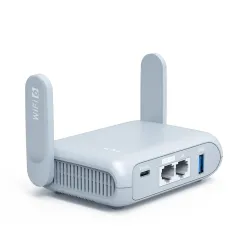
2. TP-Link N300 (TL-WR802N) — Best Budget
The TP-Link N300 is the travel WiFi extender for people who want something tiny, cheap, and effective without overthinking it. At $20 and 2.3 ounces, it is smaller than a credit card stack and disappears into any tech pouch.
In repeater mode, the N300 connects to an existing WiFi network and rebroadcasts it under a new network name. Setup takes about three minutes through a web browser — connect to the N300’s default network, navigate to the admin page, select the hotel WiFi, enter the password, and you are done.
It is a single-band 2.4GHz device, which means it will cut your speed roughly in half compared to the source. In a hotel with 50 Mbps WiFi, expect 20-30 Mbps from the N300. For email, web browsing, messaging, and even standard-definition video calls, that is perfectly fine. For heavy video conferencing and file uploads, the dual-band options on this list are a better fit.
We used the N300 as a backup in our kit for eight months. It bailed us out in a Medellin Airbnb where the bedroom had zero signal but the kitchen had strong WiFi. Plugged the N300 into a hallway outlet, and the bedroom went from zero bars to a stable 25 Mbps connection.
Pros
- Only $20 — cheapest functional extender available
- Weighs just 2.3 oz — truly pocket-sized
- Multiple modes: repeater, access point, travel router
- Powered by micro USB — runs from any charger or power bank
- Dead-simple setup through web browser
Cons
- Single-band 2.4GHz cuts speed roughly in half
- No VPN support
- N300 speed ceiling is low for modern use
- Micro USB instead of USB-C
- No dual-band means more congestion in crowded WiFi areas
Best for: Budget travelers and minimalists who want a small, cheap WiFi boost without extra complexity.
Check TP-Link N300 on Amazon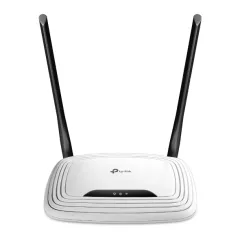
3. NETGEAR EX3110 (AC750) — Best Dual-Band Value
The NETGEAR EX3110 is a dual-band WiFi extender at a single-band price. At around $25, it delivers simultaneous 2.4GHz and 5GHz repeating, which means it retains significantly more speed than single-band alternatives.
In our testing, the EX3110 retained 70-80% of source speed on the 5GHz band — compared to 40-55% on single-band devices. In a hotel with 80 Mbps WiFi, we consistently got 55-65 Mbps through the EX3110. That is fast enough for HD video calls, cloud-based work, and file syncing without complaint.
The wall-plug form factor means it plugs directly into an outlet without a cable. This is convenient in hotels but can be awkward if the outlet is behind furniture or at floor level. We found the best placement is an outlet in a hallway or doorway between the router and our workspace — the midpoint where the source signal is still strong enough for the extender to work effectively.
Setup uses the NETGEAR Nighthawk app or WPS button. The WPS method takes about 30 seconds — press the WPS button on the hotel router (if accessible), press WPS on the EX3110, and they pair automatically. In hotels where you cannot access the router, use the app-based setup instead.
Pros
- Dual-band AC750 retains 70-80% of source speed
- Only $25 — best dual-band value available
- Wall-plug design needs no cable
- WPS one-button setup when router is accessible
- Signal strength LEDs help find optimal placement
- Compact and solid build quality
Cons
- Wall-plug form factor limits placement flexibility
- Heavier than USB-powered options at 5.4 oz
- Requires local power outlet — no USB or battery option
- No VPN support or travel router features
- US plug only — needs adapter for international outlets
Best for: Travelers who want dual-band speed retention at the lowest price and do not need VPN or travel router features.
Check NETGEAR EX3110 on Amazon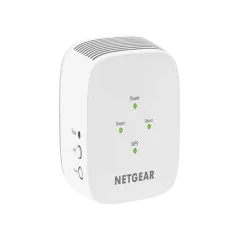
4. TP-Link RE305 (AC1200) — Best for Speed
The TP-Link RE305 is the fastest dedicated WiFi extender on this list. Dual-band AC1200 delivers up to 867 Mbps on 5GHz and 300 Mbps on 2.4GHz — more headroom than most hotel networks can even provide. If the source WiFi is fast (80+ Mbps), the RE305 makes sure the extended signal stays fast.
We tested the RE305 in a Lisbon apartment with a 200 Mbps fiber connection but a router positioned in the far corner. Our workspace registered 35 Mbps from the router directly. Through the RE305 positioned in the hallway, our workspace jumped to 140 Mbps — an improvement that turned choppy Zoom calls into crisp, reliable sessions.
The RE305 also has a gigabit ethernet port, which means you can hardwire your laptop directly to the extender for the most stable possible connection. We used this for an important client presentation in a Barcelona Airbnb — ethernet directly from the RE305, zero WiFi instability, zero dropped packets.
Setup uses the TP-Link Tether app, which walks you through connecting to the source network and configuring the extended network name and password. The process takes about four minutes and is straightforward even for non-technical users.
Pros
- AC1200 dual-band delivers fastest extended speeds
- Gigabit ethernet port for wired laptop connection
- Signal strength indicator helps find best placement
- TP-Link Tether app makes setup easy
- Reliable performance in our 6-month testing
- Around $30 — great value for AC1200 speeds
Cons
- Wall-plug design limits placement options
- 6.5 oz is heavier than pocket-sized alternatives
- No VPN or travel router capabilities
- US plug requires adapter abroad
- Slightly larger body than the NETGEAR EX3110
Best for: Remote workers who need maximum speed from their extended WiFi signal, especially for video calls and file transfers.
Check TP-Link RE305 on Amazon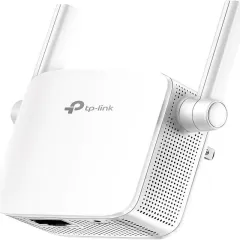
5. WAVLINK AC1200 — Best with Ethernet Port
The WAVLINK AC1200 matches the TP-Link RE305 on speed but stands out with a more versatile ethernet setup. It features a gigabit ethernet port that works in both directions — you can connect your laptop via ethernet to the extender for stability, or plug the extender into a wired ethernet jack to create a WiFi network from a wired connection.
This bidirectional ethernet capability is surprisingly useful in travel scenarios. Many European hotels and some Airbnbs have ethernet jacks in the room but no WiFi, or weak WiFi alongside a strong wired connection. The WAVLINK lets you plug into the ethernet jack and broadcast a full AC1200 WiFi network to all your devices.
The build quality is solid, with external antennas that fold flat for packing. At 6 oz, it is compact enough for a tech pouch but not quite pocket-sized. The web-based setup interface is functional if slightly less polished than TP-Link’s app — plan for about five minutes of configuration.
Pros
- AC1200 dual-band with external antennas for stronger range
- Ethernet port works as both input and output
- Creates WiFi from wired ethernet connections
- Around $25 — competitive pricing for AC1200
- Antennas fold flat for travel packing
Cons
- Wall-plug form factor with US plug
- Web-based setup is functional but not as polished as competitors
- 6 oz — moderate travel weight
- No VPN support
- External antennas add slight bulk compared to flush designs
Best for: Travelers who encounter wired ethernet connections and want to convert them to WiFi, or who want a stable wired option for their laptop.
Check WAVLINK AC1200 on Amazon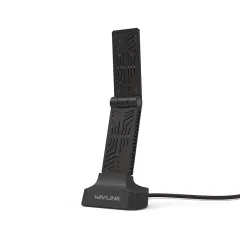
6. GL.iNet Mango (GL-MT300N-V2) — Most Portable
The GL.iNet Mango weighs 1.4 ounces. It is smaller than a matchbox. It costs $25. And it runs OpenVPN and WireGuard firmware, which makes it the tiniest VPN-capable WiFi repeater you can buy.
The Mango is not a performance powerhouse — it is a single-band 2.4GHz device with N300 speeds, so expect roughly half the source speed in repeater mode. But for its size, the feature set is remarkable. It repeats WiFi, creates a VPN-encrypted private network, supports USB tethering from your phone, and even has an ethernet port for wired connections.
We carried the Mango as an emergency backup for an entire year. It lived in the bottom of our tech pouch and was forgotten about until we needed it — which happened more often than expected. A hostel in Medellin with no WiFi in the dorm room. A train station lounge with a weak signal. A conference venue where the WiFi password only worked for one device. Every time, the Mango came through.
Pros
- Only 1.4 oz — lightest device on this list by a wide margin
- Built-in VPN support (OpenVPN, WireGuard)
- Functions as repeater, travel router, and VPN gateway
- Ethernet port for wired connections
- Powered by micro USB — runs from any charger or power bank
- Just $25 — remarkable value for the features
Cons
- Single-band 2.4GHz with N300 speeds — halves your speed
- Weak processing power limits VPN throughput to ~15-20 Mbps
- Micro USB instead of USB-C
- No 5GHz band means crowded environments hurt performance
- Tiny size makes it easy to lose — keep it in a dedicated pocket
Best for: Ultra-light packers who want a pocket-sized VPN-capable repeater as a backup or primary device for light use.
Check GL.iNet Mango on Amazon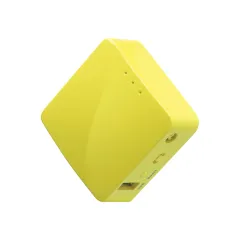
WiFi Extender vs Travel Router: Which Do You Need?
This is the question we get asked most, so let us make it simple:
Get a WiFi extender if:
- You just need a stronger WiFi signal in your room
- Budget is a concern (under $30)
- You do not care about VPN encryption
- You want plug-and-play simplicity
- Weight is your top priority
Get a travel router (with repeater mode) if:
- You want VPN protection on public networks
- You need to share one internet source across many devices
- You use phone tethering regularly
- You want a private network that isolates you from other hotel guests
- You are willing to spend $25-80 for a more capable device
Our recommendation for most digital nomads: The GL.iNet Beryl AX does everything — repeater, travel router, VPN gateway — in one device. If you are going to carry one connectivity device, make it the one that handles every scenario.
For a deep dive on travel routers specifically, see our best travel routers guide and our travel router setup tutorial.
How to Set Up a WiFi Extender in a Hotel
Hotel WiFi networks have quirks that home networks do not. Here is how to handle them:
Dealing with Captive Portals
Most hotels use a captive portal — the login page that appears when you first connect. This can trip up WiFi extenders because the extender needs to authenticate before it can rebroadcast the signal.
For travel routers (GL.iNet Beryl AX, Mango): Connect to the hotel WiFi through the router’s admin panel. The captive portal login page will appear in your browser. Enter the hotel credentials. Once authenticated, all devices connected to your travel router inherit the authentication — no need to log in separately on each device.
For basic extenders (NETGEAR, TP-Link, WAVLINK): Connect the extender to the hotel WiFi via WPS or the setup interface. Then connect your laptop to the extender’s network. The captive portal should appear in your browser. Log in, and the extender’s connection is authenticated.
Tip: Some captive portals time out every 12-24 hours. If your extender drops connection overnight, you may need to re-authenticate in the morning. Travel routers with MAC address cloning can sometimes work around this.
Optimal Placement
The number one mistake with WiFi extenders is placing them too far from the source. An extender cannot boost a signal it can barely receive.
The rule: Place the extender at the midpoint between the source router and your workspace — where the source signal is still moderate (at least two bars). If you place the extender right next to your desk in a dead zone, it has nothing to amplify.
In a hotel, this usually means an outlet in the hallway, near the room door, or in the bathroom closest to the corridor. In an Airbnb, the midpoint between the living room router and your bedroom workspace.
Most extenders have signal strength LEDs that help you find the sweet spot. Green means the extender has a strong connection to the source. Amber or red means you need to move it closer.
Security Considerations
Any WiFi extender that simply repeats a hotel network inherits that network’s security weaknesses. Hotel WiFi is shared with every guest on the floor, which means your traffic is visible to anyone with basic packet-sniffing tools.
The solution: Use a VPN. Either run NordVPN on each device individually, or use a VPN-capable travel router (GL.iNet Beryl AX or Mango) that encrypts everything at the network level.
For a complete guide to securing your connection on public networks, see our best VPN for public WiFi guide.
The Bottom Line
For most digital nomads and remote workers, the GL.iNet Beryl AX is the best investment. It functions as a WiFi extender, travel router, and VPN gateway in one $80 device. It is what we carry every day, and it has paid for itself dozens of times over in rescued work sessions.
If budget is the priority, the TP-Link N300 at $20 is the cheapest functional extender that actually works. For the best balance of speed and price in a dedicated extender, the NETGEAR EX3110 at $25 delivers dual-band performance at a budget price.
Whichever you choose, a WiFi extender is one of those small, cheap additions to your travel kit that eliminates a massive daily frustration. Pack it once, use it in every hotel room for the rest of your travels.
For the complete guide to staying connected anywhere in the world, see our best internet for digital nomads guide. For dedicated travel router recommendations, see best travel routers. And to keep your connection secure on any network, check our best VPN for public WiFi guide.
Frequently Asked Questions
What is a travel WiFi extender?
A travel WiFi extender (also called a portable WiFi repeater or range extender) is a compact device that picks up a weak WiFi signal and rebroadcasts it at full strength. It sits between you and the WiFi router, boosting the signal so you can work from rooms, balconies, or corners of a building where the original signal barely reaches. Unlike a mobile hotspot, it does not create internet — it amplifies an existing WiFi source.
Do WiFi extenders actually work in hotels?
Yes, but results depend on the source signal strength. If you can see the hotel network on your laptop but it is too weak to load pages, a WiFi extender can typically boost that signal to usable speeds. In our testing, extenders improved weak hotel signals by 200-400% in signal strength and doubled or tripled effective throughput. However, if the hotel's internet is simply slow at the source (overloaded router, poor ISP), an extender cannot fix that — it amplifies a weak signal, not a slow connection.
What is the difference between a WiFi extender and a travel router?
A WiFi extender repeats and amplifies an existing WiFi signal. A travel router creates a private WiFi network from a source (hotel WiFi, phone tethering, ethernet). Some devices do both — the GL.iNet Beryl AX and TP-Link N300 can repeat WiFi while also adding VPN encryption and device sharing. If you only need better signal, a basic extender works. If you also want security and multi-device management, a travel router with repeater mode is the better investment.
Can I use a WiFi extender in an Airbnb?
Absolutely. Airbnbs often have the router in a living room or kitchen, leaving bedrooms and workspaces with weak coverage. Plug a WiFi extender into an outlet halfway between the router and your workspace, and it rebroadcasts the signal. This is the most common use case we encounter — and the scenario where extenders make the biggest difference.
Will a WiFi extender slow down my internet speed?
Single-band extenders cut your speed roughly in half because they use the same radio to receive and rebroadcast the signal. Dual-band extenders minimize this by using one band (5GHz) to receive and another (2.4GHz) to rebroadcast, or vice versa. In our testing, dual-band extenders retained 70-85% of the source speed, while single-band models retained 40-55%. For basic browsing and email, single-band is fine. For video calls and remote work, dual-band is worth the extra cost.
Are WiFi extenders allowed in hotels and cafes?
Yes. WiFi extenders are personal devices that simply connect to the existing network like any other device. No hotel or cafe has ever asked us about one, and most do not even notice. The device draws minimal power from a wall outlet and does not interfere with the venue's network infrastructure. That said, some hotel captive portals (the login page) can cause issues — see our setup tips section for how to handle this.