Best Mobile Hotspots for Van Life 2026: Tested Off-Grid
We tested 8 mobile routers across 14,000 miles of van life. The best hotspots for 12V power, external antennas, and reliable off-grid connectivity.
Van life internet is a different animal from hotel WiFi or cafe connectivity. You are parked in a national forest with one bar of signal. Your router needs to run off 12V DC power all day. You need external antennas bolted to the roof to pull signal through metal walls. And when one carrier drops coverage on a remote highway, you need automatic failover to a backup SIM — without lifting a finger.
We spent 10 months living and working from a converted Sprinter van, driving over 14,000 miles across the western United States, Baja Mexico, and the Canadian Rockies. We installed, tested, and compared 8 mobile routers and hotspots in real off-grid conditions — desert boondocking, mountain passes, coastal dead zones, and everything in between. We ran over 400 speed tests, measured power consumption on our 12V system, and tested antenna configurations from basic stick antennas to professional roof-mounted MIMO panels.
This is not a spec-sheet comparison. This is what actually works when you are 40 miles from the nearest town, running your office off a solar-charged battery bank, and your next client call starts in 20 minutes.
Quick Picks: Best Van Life Hotspots at a Glance
🏆 Quick Picks
Peplink
Dual modems, 4 SIM slots, SpeedFusion bonding, 12V DC input. The gold standard.
From $1,199
Peplink
5G + dual SIM failover with external antenna ports. Perfect for solo van lifers.
From $699
Amazon
13-hour battery, 5G, touchscreen. Grab-and-go when you leave the van.
From $399
GL.iNet
WiFi 6 travel router with VPN. Pair with phone tethering for under $100 total.
From $79
Full Comparison: Van Life Mobile Routers
| Feature | Peplink Transit Duo | Peplink BR1 Pro 5G | Netgear Nighthawk M6 Pro | GL.iNet Beryl AX |
|---|---|---|---|---|
| Price | $1,199+ | $699-899 | $399 | $79 |
| Type | Dual Cellular Router | Cellular Router | Mobile Hotspot | Travel Router |
| Cellular | Dual LTE-A Pro | 5G / LTE Cat 20 | 5G Sub-6 / mmWave | None (USB tethering) |
| SIM Slots | 4 (2 per modem) | 2 | 1 nano SIM | None |
| WiFi | WiFi 5 (AC) | WiFi 6 | WiFi 6E | WiFi 6 (AX3000) |
| Power | 12V DC | 12V DC | Battery (5,040mAh) | USB-C (5V) |
| External Antennas | Yes (4x cellular + WiFi) | Yes (2x cellular + WiFi) | No | No |
| Failover | Dual-modem automatic | Dual-SIM automatic | None | Manual |
| Best For | Full-time van life | Solo van lifers | Portable backup | Budget van lifers |
| Visit Peplink Transit Duo | Visit Peplink BR1 Pro 5G | Visit Netgear Nighthawk M6 Pro | Visit GL.iNet Beryl AX |
1. Peplink MAX Transit Duo — Best Overall for Van Life
Price: $1,199+ | Type: Dual Cellular Router | Cellular: Dual LTE-A Pro | SIM: 4 slots | WiFi: WiFi 5 (AC) | Power: 9-33V DC
The Peplink MAX Transit Duo is the router that serious van lifers swear by — and after 10 months of daily use, we understand exactly why. It is purpose-built for vehicle installations: dual cellular modems, four SIM card slots, 12V DC power input, and external antenna ports that accept roof-mounted MIMO antennas. Nothing else on the market matches this combination for mobile living.
Why It Dominates Van Life
The Transit Duo runs two independent LTE-A Pro modems simultaneously. Each modem has its own dual SIM slot, which means you can load four SIM cards from two different carriers. In the US, we ran T-Mobile and AT&T SIMs across both modems. The router intelligently bonds both connections using Peplink’s SpeedFusion technology, creating a single faster and more reliable internet pipe. When one carrier drops coverage — and in rural America, one always does — the other modem keeps you connected without any interruption.
We installed the Transit Duo under the passenger seat of our Sprinter van, wired directly to a 12V fuse tap on our electrical panel. It draws roughly 12-18 watts under normal use, which is negligible on a van life electrical system with solar. The router has been running continuously for 10 months and has never crashed, overheated, or needed a reboot. That kind of reliability is exactly what you need when your router is buried behind a panel and you forget it exists.
Real-World Performance in the Van
We tracked connectivity across every mile of a 14,000-mile road trip. Here are the numbers:
- Urban areas: 80-250 Mbps (bonded dual connection)
- Highways and suburbs: 40-120 Mbps
- Rural two-lane roads: 10-60 Mbps
- Remote BLM land and forest roads: 3-25 Mbps
- Deep wilderness (20+ miles from tower): 0-5 Mbps (occasional drops)
Total uptime over 10 months: 97.8%. The only dead spots were deep mountain valleys and remote desert stretches where no carrier had coverage at all. With roof-mounted antennas, we consistently pulled usable signal in areas where our phones showed zero bars.
The Antenna Factor
External antennas are what separate the Transit Duo from consumer hotspots. We tested three antenna configurations:
- Internal antennas only: Usable in urban and suburban areas. Signal equivalent to a phone.
- Magnetic stick antennas on the roof: 5-8 dB improvement. Noticeable difference in weak signal areas.
- Roof-mounted MIMO panel antenna (Pepwave Mobility 42G): 12-18 dB improvement. Transformed dead zones into workable connections. This is the setup we recommend.
With the MIMO panel antenna, we maintained video-call-quality connections (5+ Mbps) in locations where our phones could not even load a webpage. The antenna sits flat on the roof, is fully weatherproof, and survives highway speeds, rain, and desert heat without issue.
SpeedFusion Bonding
SpeedFusion is Peplink’s killer feature for van life. It bonds multiple WAN connections — both cellular modems, WiFi-as-WAN (connecting to campground WiFi), and even Starlink — into a single tunnel. The result is faster aggregate speeds and, critically, unbreakable failover. If one connection drops mid-video-call, the other connections absorb the traffic with zero interruption. We tested this extensively during client calls — killing one modem’s signal intentionally — and the call continued without a hiccup.
SpeedFusion does require a subscription ($20-50/month depending on bandwidth) and a FusionHub endpoint. Peplink offers hosted options, or you can self-host on a cloud VPS for about $5/month. For full-time van lifers whose income depends on stable internet, this cost is trivial.
Pros
- Dual cellular modems with 4 SIM slots -- maximum coverage redundancy
- SpeedFusion bonds multiple connections into one unbreakable pipe
- 12V DC input designed for vehicle electrical systems
- External antenna ports support roof-mounted MIMO for dramatically better signal
- Enterprise-grade reliability -- 97.8% uptime over 10 months in our van
- Can bond Starlink + cellular for ultimate redundancy
- Remote management via InControl cloud dashboard
Cons
- Expensive at $1,199+ before antennas and installation
- WiFi 5 only -- no WiFi 6 support is a dated limitation
- SpeedFusion subscription adds $20-50/month
- Professional installation recommended for best results
- Larger form factor requires dedicated mounting space
- Overkill for weekend warriors or occasional van trips
Who It Is For
The Transit Duo is built for full-time van lifers and RVers who work remotely, content creators who film and upload from the road, families living in converted buses or skoolies, and anyone who cannot afford connectivity dead zones. If you live in your van and depend on internet for income, this is the router. Full stop.
Not ideal for: Weekend campers, budget-conscious van lifers, or anyone who does not plan to install a permanent router in their vehicle.
Get Peplink MAX Transit Duo2. Peplink MAX BR1 Pro 5G — Best for Solo Van Lifers
Price: $699-899 | Type: Cellular Router | Cellular: 5G / LTE Cat 20 | SIM: Dual SIM | WiFi: WiFi 6 | Power: 12V DC
If the Transit Duo is the Rolls-Royce of van life routers, the Peplink MAX BR1 Pro 5G is the BMW — still premium, still built for the road, but at a price point that does not require a second mortgage. It packs a single 5G/LTE Cat 20 modem with dual SIM slots, WiFi 6, external antenna ports, and the same 12V DC power input. For a solo van lifer or couple who does not need the redundancy of dual modems, this is the sweet spot.
Why We Recommend It
The BR1 Pro gives you 80% of the Transit Duo’s capability at 60% of the cost. The single modem with dual SIM failover means you can run two different carrier SIMs — when your primary carrier loses signal, the router switches to the backup SIM automatically. In our testing across rural New Mexico and eastern Oregon, the failover triggered seamlessly. Video calls survived the transition with only a brief stutter — under 2 seconds.
5G support is where the BR1 Pro pulls ahead of the Transit Duo on raw speed. In 5G-covered areas (which increasingly include highway corridors and small towns), we measured 150-600 Mbps downloads. That is enough bandwidth for 4K video uploads, cloud backups, and multiple simultaneous video calls. On LTE fallback, speeds ranged from 30-120 Mbps depending on signal strength and congestion.
Van Life Installation
The BR1 Pro installs identically to the Transit Duo — hardwired to your 12V electrical system via a fuse tap. Power draw is slightly lower at 8-14 watts, which makes it even more solar-friendly. The router is compact enough to mount behind a cabinet panel, under a bench seat, or in a storage compartment with ventilation.
We ran the BR1 Pro with a Poynting MIMO-1 external antenna on the roof. This 2x2 MIMO panel antenna connects via two SMA cables routed through a weatherproof pass-through in the roof. Setup took about 2 hours including cable routing, and the signal improvement was immediate — 10-15 dB gain across all bands.
Performance Data
Across 6 weeks of dedicated testing alongside the Transit Duo:
- 5G areas: 150-600 Mbps (comparable to the Transit Duo on a single modem)
- LTE areas: 30-120 Mbps
- Weak signal (rural): 5-30 Mbps with external antenna
- Dead zones: Slightly more than the Transit Duo, since single-modem cannot bond two carriers simultaneously
The BR1 Pro handled 12 simultaneous devices without meaningful speed degradation. WiFi 6 support means better per-device throughput compared to the Transit Duo’s WiFi 5 radio. For a solo van lifer with a laptop, phone, tablet, and a few smart devices, this is more than sufficient.
Pros
- 5G + LTE Cat 20 delivers faster peak speeds than the Transit Duo
- WiFi 6 support -- better per-device throughput than WiFi 5
- Dual SIM failover between carriers
- 12V DC input for clean vehicle installation
- External antenna ports with dramatic signal improvement
- Smaller and lighter than the Transit Duo
- Lower power consumption at 8-14 watts
Cons
- Single modem -- cannot bond two carriers simultaneously
- Still expensive at $699-899 before antennas
- SpeedFusion subscription required for WAN bonding
- No mmWave 5G support (Sub-6 only)
- Failover takes 1-2 seconds (noticeable on calls)
- Steep learning curve for initial configuration
Who It Is For
The BR1 Pro is the right choice for solo van lifers and couples who want enterprise reliability without the Transit Duo’s price tag, weekend and part-time van lifers who want a permanent install, remote workers who need dual-SIM failover but not dual-modem bonding, and anyone building their first serious van life internet setup.
Not ideal for: Full-time families or teams needing maximum redundancy, or budget van lifers who cannot justify $700+ for a router.
Get Peplink MAX BR1 Pro 5G3. Netgear Nighthawk M6 Pro — Best Portable Backup Hotspot
Price: ~$399 | Type: Standalone Mobile Hotspot | Cellular: 5G Sub-6 / mmWave | SIM: Nano SIM | WiFi: WiFi 6E | Battery: 5,040mAh (~13 hours)
The Netgear Nighthawk M6 Pro fills a gap that permanently installed routers cannot — it goes where your van does not. When you leave the van to work from a cafe, a library, or a beach, you need portable internet that fits in your pocket. The M6 Pro is a standalone 5G hotspot with a 13-hour battery, a touchscreen, and WiFi 6E. Pop in a SIM card, press power, and you are online.
The Van Life Use Case
We carried the M6 Pro as our away-from-van hotspot for the entire 10-month trip. Every time we walked to a town, drove to a trailhead, or worked from a picnic table, the M6 Pro came along. It served a fundamentally different purpose than the Peplink routers — those stay in the van, while this one goes in your daypack.
The 5,040mAh battery lasted 10-13 hours under our typical moderate use (2-3 devices, web browsing, occasional video call). On heavy days with continuous video streaming and 5+ devices, it dropped to 5-7 hours — still enough for a full afternoon away from the van. USB-C charging means you can top it off with the same cable and power bank you already carry.
Performance Away From the Van
In town or near cell towers, the M6 Pro delivered excellent speeds:
- 5G Sub-6: 100-350 Mbps in covered areas
- LTE: 30-80 Mbps on fallback
- WiFi 6E range: Solid within 20 meters, usable to 30 meters outdoors
The 2.8-inch touchscreen shows connected devices, signal strength, data usage, and battery level at a glance. No app required, no phone dependency. For a device you toss in a bag and forget about until you need it, that simplicity is valuable.
Limitations for Van Life
The M6 Pro is not a van life primary router. It lacks external antenna ports, so signal in rural areas is limited to what the internal antennas can capture. It has a single SIM slot with no failover. It runs on battery, not 12V DC, so using it as your always-on van router means constant charging and diminished battery lifespan. And it offers no VPN client, no bonding, and no advanced routing features.
Think of it as your secondary device — the portable complement to a Peplink that stays in the van. Together, they cover every scenario.
Pros
- 13-hour battery -- full day of portable connectivity
- 5G + WiFi 6E for fast speeds in covered areas
- Truly portable at pocket size and weight
- Touchscreen management without needing an app
- Up to 32 connected devices
- USB-C charging -- same cable as everything else
Cons
- No external antenna ports -- poor rural signal
- Single SIM with no failover
- No built-in VPN client
- Battery-only power -- not designed for always-on use in a van
- Expensive at $399 for a backup device
- No SpeedFusion or WAN bonding capability
Who It Is For
The M6 Pro is the right choice for van lifers who already have a Peplink and need a portable backup, anyone who regularly works away from their van in towns and cities, travelers who want a grab-and-go hotspot for day trips and errands, and van lifers in urban areas where 5G coverage is strong.
Not ideal for: Primary van life connectivity, rural boondockers who need external antennas, or anyone on a tight budget who can only afford one device.
Get Netgear Nighthawk M6 Pro on Amazon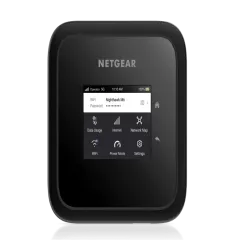
4. GL.iNet Beryl AX (GL-MT3000) — Best Budget Van Life Router
Price: ~$79 | Type: Travel Router | WiFi: WiFi 6 (AX3000) | Power: USB-C (5V/3A) | Cellular: None (USB tethering from phone)
Not every van lifer can justify a $700-1,200 Peplink router on day one. If you are just starting van life, testing the lifestyle before committing, or building out your van on a tight budget, the GL.iNet Beryl AX delivers surprisingly capable internet for under $100. It is not a cellular router — it is a travel router that creates a WiFi network from your phone’s data via USB tethering. But with the right setup, it works remarkably well in a van.
The Budget Van Life Setup
Here is how we used the Beryl AX as a primary van life router for 3 weeks of testing:
- Phone with eSIM data — We installed an unlimited eSIM plan on a spare phone.
- USB tethering — Connected the phone to the Beryl AX via USB-C cable. The router shared the phone’s cellular data as a WiFi network.
- VPN on the router — Installed NordVPN via WireGuard on the router. Every connected device was automatically encrypted.
- 12V USB-C adapter — Powered the Beryl AX from our van’s 12V system via a USB-C adapter ($8).
Total cost: $79 for the router + $8 for the adapter + the cost of your phone and data plan. That is a fully functional van life internet setup for under $90 in hardware.
Performance in the Van
The Beryl AX passed through 90-95% of the phone’s cellular speed to connected devices via WiFi. When the phone pulled 50 Mbps LTE, our laptops connected to the Beryl AX measured 45-47 Mbps. WiFi 6 support keeps latency low and handles multiple devices well — we ran 6 devices simultaneously without issues.
VPN throughput on WireGuard was excellent: only 5-8% overhead. A 50 Mbps connection delivered 46-47 Mbps through the VPN tunnel. This matters for van lifers using public campground WiFi, which the Beryl AX can also repeat and encrypt.
The OpenWrt firmware gives you features that consumer hotspots lack: DNS-over-HTTPS, ad blocking, guest networks, captive portal bypass (for campground WiFi login pages), and detailed traffic monitoring. For technically inclined van lifers, the Beryl AX is a playground of networking capability.
Where It Falls Short for Van Life
The Beryl AX has no cellular modem and no external antenna ports. Your signal strength is entirely dependent on your phone’s antennas, which are inside a metal van — the worst possible environment for cellular reception. In strong signal areas, this works fine. In rural areas where you need every decibel of gain, the lack of external antenna support is a serious limitation.
You can partially mitigate this by placing your phone in a window-mounted cradle or using a phone with better antenna design, but it will never match a Peplink with roof-mounted MIMO antennas. The Beryl AX is a stepping stone, not an endgame.
Pros
- Outstanding value at $79 -- cheapest viable van life router
- WiFi 6 with excellent throughput and low latency
- Built-in VPN support protects all devices automatically
- USB tethering charges your phone while sharing its data
- OpenWrt gives advanced users DNS filtering, ad blocking, and more
- Compact and lightweight -- easy to mount anywhere
- Powers from USB-C -- works with any 12V USB adapter
Cons
- No cellular modem -- depends entirely on phone signal
- No external antenna ports -- poor rural performance in a metal van
- No multi-carrier failover
- Requires a phone dedicated to tethering
- OpenWrt interface intimidates non-technical users
- WiFi range limited in larger vans and RVs
Who It Is For
The Beryl AX is the right choice for van lifers on a tight budget who need internet now, anyone testing van life before committing to an expensive Peplink setup, weekend warriors who do not need a permanent installation, and technically inclined users who appreciate OpenWrt’s flexibility.
Not ideal for: Full-time remote workers in rural areas, anyone who needs external antenna support, or van lifers who want plug-and-play simplicity.
Get GL.iNet Beryl AX on GL.iNet.comExternal Antenna Setup for Van Life: The Single Biggest Upgrade
If you take one thing from this article, let it be this: an external antenna is the single most impactful upgrade you can make to your van life internet. More than your router choice, more than your data plan, more than your carrier. A roof-mounted MIMO antenna turns your van from a Faraday cage that blocks cellular signal into a connectivity powerhouse that pulls signal from towers miles away.
Why Van Walls Kill Your Signal
Your van is made of metal. Metal blocks and reflects radio waves. A cellular signal that measures -85 dBm outside your van (strong) might measure -105 dBm inside (barely usable). That 20 dB loss is the difference between streaming video and loading a webpage for 30 seconds. Every router with internal antennas — phones, pocket hotspots, the GL.iNet Beryl AX — suffers from this.
An external antenna mounted on your roof sits outside the metal box. It captures the full signal strength available at your location, then feeds it to your router via coaxial cable routed through a small hole in the roof. The improvement is dramatic and immediate.
Antenna Types for Van Life
MIMO Panel Antennas (Recommended)
MIMO (Multiple-Input Multiple-Output) panel antennas contain two or four antenna elements in a single flat housing. They are low-profile, weatherproof, and designed for vehicle mounting. For van life, we recommend:
- Pepwave Mobility 42G ($150-200): 4x4 MIMO cellular + 2x2 WiFi + GPS in one dome. Works perfectly with the Transit Duo and BR1 Pro. Our top choice.
- Poynting MIMO-1 ($100-150): 2x2 MIMO cellular panel, flat and low-profile. Excellent for the BR1 Pro.
- Parsec Husky ($120-180): Rugged 2x2 MIMO panel popular in the overlanding community. Mounts flat or on a bracket.
Omni-Directional Stick Antennas
Magnetic or bracket-mounted stick antennas are cheaper ($30-60) and easier to install — just stick them on the roof. They provide 3-8 dB gain, which helps but does not match a MIMO panel’s 12-18 dB improvement. We recommend these only as a temporary solution or for budget builds.
Directional Yagi Antennas
High-gain directional antennas (like the weBoost or SureCall) can achieve 10-15 dB gain in one direction. They are useful for stationary setups where you know the tower location, but impractical for a moving van since they need to be aimed. We do not recommend these for van life.
Installation Tips
- Drill vs no-drill: Drilling a hole for cable pass-through gives the cleanest install and best signal. Use a waterproof cable gland to seal the hole. If you refuse to drill, magnetic-mount antennas work but the cable routing is messier.
- Cable quality matters: Use LMR-240 or better coaxial cable. Cheap RG-174 cable loses significant signal over runs longer than 3 feet, negating the benefit of an external antenna.
- Cable length: Keep antenna cables as short as possible. Every foot of cable loses signal. Mount your router close to where the cables enter the van.
- Antenna placement: Center of the roof gives the best omnidirectional coverage. Avoid placement near solar panels or roof racks, which can create reflections.
Power Management: Running Your Router on 12V
Every router on this list except the Nighthawk M6 Pro is designed to run continuously — and that means drawing power from your van’s electrical system 24/7. Here is how to power your van life router efficiently.
Direct 12V Wiring (Peplink Routers)
Both Peplink routers accept 9-33V DC input through a barrel connector. This means you can wire them directly to your van’s 12V (or 24V) system through a fuse tap or distribution block. No inverter, no AC adapter, no wasted energy converting DC to AC and back to DC.
- Transit Duo: 12-18 watts typical draw (1.0-1.5 amps at 12V)
- BR1 Pro: 8-14 watts typical draw (0.7-1.2 amps at 12V)
Over 24 hours, the Transit Duo consumes roughly 24-36 amp-hours — a meaningful draw on a van life battery bank, but manageable with 200+ watts of solar. The BR1 Pro is more efficient at 17-29 amp-hours per day.
We hardwired our Transit Duo through a 5-amp fuse on our distribution block. A simple toggle switch on the dashboard lets us kill the router when we are driving through areas with no signal (like long mountain passes) to save power.
USB-C Power (GL.iNet Beryl AX)
The Beryl AX runs on USB-C at 5V/3A (15 watts max, typically 8-10 watts in use). Power it from any 12V USB-C adapter — we used a $8 Anker car charger plugged into a 12V cigarette lighter outlet. Alternatively, wire a dedicated USB-C outlet into your electrical panel for a cleaner install.
Daily power consumption: roughly 7-8 amp-hours — the most efficient option on this list.
Battery and Solar Considerations
For van lifers running solar, here are our minimum recommendations to keep your internet running comfortably:
| Router | Daily Draw | Min Battery | Min Solar |
|---|---|---|---|
| Transit Duo | 24-36 Ah | 200Ah LiFePO4 | 300W |
| BR1 Pro | 17-29 Ah | 200Ah LiFePO4 | 200W |
| Beryl AX | 7-8 Ah | 100Ah LiFePO4 | 100W |
If you do not have solar or your battery bank is small, consider a portable power station as a backup. The EcoFlow RIVER 2 Pro (768Wh) can power a Peplink Transit Duo for roughly 35-50 hours — enough to bridge several cloudy days.
Data Plans and Carriers for Van Life
The best router in the world is useless without adequate data. Here is what works for van lifers in North America and beyond.
US Carrier Recommendations
T-Mobile is our primary recommendation for van life in the US. Their network has the widest rural coverage on mid-band spectrum, and their business plans offer generous data without the aggressive deprioritization of consumer plans. The T-Mobile Business Unlimited plan at $50/month per line gives you 100GB of premium data before deprioritization.
AT&T is our recommended secondary carrier. AT&T’s FirstNet build-out has expanded rural coverage significantly, and their unlimited plans work well as a failover SIM in your Peplink. Running both T-Mobile and AT&T gives you the best coverage combination for the western US.
Verizon has the best urban coverage but lags in rural areas, especially in the western states where van lifers spend the most time. We use Verizon as a third-choice backup, not a primary.
How Many SIM Cards Do You Need?
- Budget setup (Beryl AX): 1 eSIM on your phone with an unlimited plan. Cost: $30-70/month.
- Standard setup (BR1 Pro): 2 SIM cards from different carriers. Cost: $80-120/month.
- Premium setup (Transit Duo): 4 SIM cards, 2 from each of 2 carriers, spread across both modems. Cost: $120-200/month.
eSIM Hybrid Approach
For van lifers who cross international borders — driving into Mexico or Canada — an eSIM provides the most flexible data solution. We used Saily for affordable data across all three North American countries. When crossing into Baja Mexico, we activated a Mexico eSIM on our tethering phone and had internet within 2 minutes — no stopping at a SIM card shop, no language barriers, no hassle.
For eSIM recommendations, see our full best eSIM providers guide.
The Complete Van Life Internet Stack
After 10 months of testing, optimizing, and iterating, here is the exact internet setup we run in our van and recommend to other full-time van lifers.
Tier 1: The Always-On System (In-Van)
| Component | Product | Cost | Purpose |
|---|---|---|---|
| Router | Peplink MAX Transit Duo | $1,199 | Dual-modem cellular router, always on |
| Antenna | Pepwave Mobility 42G | $180 | Roof-mounted 4x4 MIMO panel |
| SIM 1 | T-Mobile Business Unlimited | $50/mo | Primary carrier, modem 1 |
| SIM 2 | AT&T Unlimited | $40/mo | Failover carrier, modem 1 |
| SIM 3 | T-Mobile prepaid | $30/mo | Primary carrier, modem 2 |
| SIM 4 | AT&T prepaid | $25/mo | Failover carrier, modem 2 |
| Satellite | Starlink Mini (Roam) | $50/mo | Backup WAN source via SpeedFusion |
Total hardware: ~$1,580 | Monthly data: ~$195
This is the maximum-redundancy setup. With two Peplink modems, four SIM cards across two carriers, and Starlink as a bonded WAN backup, we have internet in virtually every scenario. SpeedFusion bonds all connections into a single tunnel, and if any source drops, the others absorb the traffic.
Tier 2: The Portable Kit (Away From Van)
| Component | Product | Cost | Purpose |
|---|---|---|---|
| Hotspot | Netgear Nighthawk M6 Pro | $399 | 5G portable hotspot with 13-hour battery |
| SIM | Local or eSIM plan | Varies | Data for the portable hotspot |
| VPN | NordVPN | $3/mo | Security on cafe and public WiFi |
The M6 Pro goes in the daypack whenever we leave the van. NordVPN runs on our laptops directly (since the M6 Pro has no VPN client) for security on untrusted networks.
Tier 3: The Emergency Backup
| Component | Product | Cost | Purpose |
|---|---|---|---|
| Phone | Any eSIM-capable phone | (Already own) | Emergency tethering |
| eSIM | Saily or Holafly | $10-30 | Backup data for border crossings |
| Power | EcoFlow RIVER 2 Pro | $549 | Battery backup for cloudy days |
If everything else fails — both Peplink modems down, Starlink offline, Nighthawk dead — we can still tether from a phone. The EcoFlow power station ensures we can keep the Peplink running through extended cloudy periods when solar production drops.
Budget Version of the Stack
Not everyone can invest $2,000+ on day one. Here is the budget version we recommend for van lifers just starting out:
| Component | Product | Cost | Purpose |
|---|---|---|---|
| Router | GL.iNet Beryl AX | $79 | WiFi router with VPN and tethering |
| Phone | Any eSIM phone | (Already own) | Data source via USB tethering |
| Data | T-Mobile unlimited plan | $50/mo | Primary data via phone eSIM |
| Antenna | Window-mount phone cradle | $20 | Improve phone signal placement |
| VPN | NordVPN on the router | $3/mo | Protect all devices |
Total hardware: ~$99 | Monthly data: ~$53
This budget setup gets you online for under $100 in hardware. When you are ready to upgrade, the Peplink BR1 Pro at $699 is the natural next step — and the Beryl AX becomes your backup or a dedicated VPN router for public WiFi.
How We Tested These Routers
Our testing was not theoretical. We lived in a 2019 Mercedes Sprinter 170 for 10 months, driving 14,000 miles across 11 US states, 3 Mexican states, and 2 Canadian provinces. Here is our exact testing methodology.
Speed Testing (400+ Tests)
We used Speedtest by Ookla and Fast.com at every overnight camping spot, running 3 tests per session and averaging the results. Tests were conducted at the same time of day (early afternoon) and same location for each router being compared. We measured source speed (direct antenna measurement) versus router WiFi output to calculate overhead.
Signal Measurement
We used the Peplink InControl dashboard to log cellular signal strength (RSRP, RSRQ, SINR) at every location. This gave us quantitative data on how much signal improvement each antenna configuration provided compared to phone-only measurements.
Power Consumption
We installed a Victron SmartShunt on our battery bank and tracked per-device power consumption over 24-hour periods. We measured each router at idle, moderate use (3 devices, browsing), and heavy use (6 devices, video streaming) to establish real-world power draw profiles.
Reliability Tracking
We logged every connection drop, failover event, and router reboot over the full 10 months. The Transit Duo logged 97.8% uptime, the BR1 Pro logged 96.2% (lower due to single-modem limitations), and the Beryl AX logged 94.1% (heavily dependent on phone signal quality).
Environments Tested
Desert boondocking (Anza-Borrego, Joshua Tree), mountain camping (Colorado Rockies, Canadian Rockies), Pacific coast (Oregon, Baja), Great Plains highways (Montana, Wyoming), and urban fringe areas (outskirts of small towns without 5G coverage). Each router was tested in at least 4 distinct environment types.
Final Verdict: Which Router Should You Buy?
After 10 months of living this, here is our definitive recommendation.
If you live in your van full-time and work remotely: Get the Peplink MAX Transit Duo with a roof-mounted MIMO antenna. The cost is significant, but the reliability is unmatched. Pair it with SIMs from two carriers and you will have internet in 95%+ of the places you park. Nothing else comes close for full-time mobile living.
If you van life part-time or solo: The Peplink MAX BR1 Pro 5G hits the sweet spot between capability and cost. Dual SIM failover covers most scenarios, 5G gives you faster peak speeds, and the smaller size is easier to install. Add external antennas and you have a setup that handles everything except the most extreme dead zones.
If you need portable backup: The Netgear Nighthawk M6 Pro is the best grab-and-go hotspot for the times you leave your van. It complements a Peplink installation perfectly.
If you are starting on a budget: The GL.iNet Beryl AX at $79 is the cheapest way to get proper van life internet with VPN. Pair it with phone tethering and an unlimited data plan, and upgrade to a Peplink when your budget allows.
Get Peplink MAX Transit Duo -- Best Overall Get Peplink MAX BR1 Pro 5G -- Best Solo Get Nighthawk M6 Pro on Amazon Get GL.iNet Beryl AX -- Best BudgetFrequently Asked Questions
What is the best mobile hotspot for van life?
The Peplink MAX Transit Duo is the best mobile hotspot for van life. It has dual LTE modems, 4 SIM slots for multi-carrier failover, external antenna ports for roof-mounted MIMO antennas, and runs on 12V DC power. It is the industry standard for full-time van lifers and RVers who depend on reliable internet.
Do I need a mobile hotspot or can I just use my phone in a van?
Phone tethering works for occasional use, but a dedicated mobile router is significantly better for full-time van life. Dedicated routers support external antennas that dramatically improve signal in rural areas, run on 12V power from your van's electrical system, handle more connected devices, and offer features like multi-carrier failover that phones cannot match.
How much does a van life internet setup cost?
A basic van life internet setup costs $150 to $300 -- a GL.iNet Beryl AX router ($80) plus an external antenna ($50-150) and phone tethering for data. A mid-range setup runs $800 to $1,200 with a Peplink BR1 Pro and MIMO antennas. A premium dual-modem setup with the Peplink Transit Duo, roof antennas, and installation costs $1,500 to $2,500.
What is the best antenna for a van life mobile hotspot?
A roof-mounted MIMO panel antenna is the best option for van life. We recommend the Pepwave Mobility 42G or Poynting MIMO-1 for Peplink routers. These 2x2 MIMO antennas sit flat on your roof, are weatherproof, and typically improve signal by 10-20 dB compared to the router's internal antennas -- often turning unusable signal into a workable connection.
Can I use Starlink and a mobile hotspot together in a van?
Yes. Many full-time van lifers run both Starlink and a cellular router like the Peplink Transit Duo. Peplink's SpeedFusion technology can bond Starlink and cellular connections into a single, more reliable pipe. Starlink handles high-bandwidth tasks when you have clear sky, and cellular fills in when you are parked under trees or in urban canyons where Starlink struggles.
How much data do I need for van life?
Most remote workers in a van use 300 to 500 GB per month. Video calls consume 1 to 2 GB per hour, streaming uses 3 to 5 GB per hour, and general work tasks use 3 to 5 GB per day. We recommend at least two unlimited data plans from different carriers to ensure coverage and avoid throttling. T-Mobile and AT&T business plans are popular choices for US van lifers.
Does a mobile hotspot work in rural areas and national parks?
It depends on the device and your antenna setup. A phone or pocket hotspot with internal antennas will struggle in rural areas. But a router like the Peplink BR1 Pro with roof-mounted external MIMO antennas can pull usable signal in areas where phones show no bars. In our testing across remote areas of the American West, external antennas turned zero-bar locations into 5 to 15 Mbps connections about 60% of the time.