Best Portable WiFi for International Travel 2026
The best portable WiFi devices for international travel — from pocket hotspots to travel routers. Tested across 15+ countries with real speed data.
Staying connected across multiple countries used to mean juggling SIM cards at every border, renting overpriced pocket WiFi at airports, or running up hundreds of dollars in roaming charges. In 2026, the game has completely changed. A compact travel router paired with an eSIM gives you fast, secure, private WiFi in any country on earth — no SIM swapping, no rental logistics, no compromises.
We spent 12 months testing portable WiFi solutions across 15+ countries — from coworking spaces in Chiang Mai to Airbnbs in Lisbon to ferry terminals in Greece. We measured speeds on 4 continents, tracked costs across multi-country trips, tested rental hotspots alongside our own gear, and ran over 350 speed tests. This guide distills everything we learned into the best portable WiFi setup for every type of international traveler.
The short answer: a GL.iNet Beryl AX travel router paired with eSIMs from Saily or Airalo is the best portable WiFi solution for international travel in 2026. It costs $90 once, fits in your pocket, secures every device with a VPN, and you never touch a physical SIM card again. But there are scenarios where a standalone hotspot, a rental, or simple phone tethering make more sense — we cover all of them below.
🏆 Quick Picks
GL.iNet
Travel router + eSIM combo — $90 one-time, VPN on all devices, works in every country
From $90
Amazon
Netgear Nighthawk M6 — 5G, 13-hour battery, pop in a local SIM and go
From $300
Airalo
200+ countries, instant activation, regional plans that span multiple destinations
From From $5
The 4 Ways to Get Portable WiFi Abroad
Before recommending specific devices, you need to understand the four fundamentally different approaches to portable WiFi when traveling internationally. Each one has a clear use case — and a clear drawback.
1. Travel Router + eSIM (The Modern Approach)
How it works: You carry a compact travel router (like the GL.iNet Beryl AX) in your bag. At each destination, you activate an eSIM on your phone from a provider like Saily or Airalo . You connect your phone to the router via USB cable. The router broadcasts your phone’s cellular data as a private WiFi network with VPN encryption. Your laptop, tablet, e-reader, and travel partner’s devices all connect to the router.
Why it wins for international travel: No SIM swapping at borders. No visiting carrier stores in foreign languages. No returning rental devices. You activate a new eSIM digitally from your phone in 2 minutes, and the router shares it with everything else. The VPN runs at the router level, so every device is protected on every network in every country — automatically.
The drawback: Two devices to manage (router + phone), and the router needs USB-C power.
2. Standalone Mobile Hotspot
How it works: A device like the Netgear Nighthawk M6 has its own cellular modem and battery. You insert a local SIM card or an eSIM-compatible data plan, press power, and it creates WiFi independently.
Why some travelers prefer it: Complete independence from your phone. The Nighthawk M6 has a 13-hour battery, a touchscreen interface, and supports up to 32 devices. No USB cables, no tethering setup. Turn it on and connect.
The drawback for international travel: The device costs $300-500 upfront. Most standalone hotspots lack VPN support, so your connected devices are unprotected on foreign networks. And at each border, you either need a multi-country SIM or a new local SIM — which means visiting carrier shops.
3. Rental Pocket WiFi
How it works: Companies like Pokefi, Skyroam, or local airport rental counters provide a preloaded hotspot device. You pick it up at the airport, use it for your trip, and return it before departure.
Why travelers still do this: Zero upfront investment, zero configuration, zero technical knowledge needed. Popular for short vacations (1-2 weeks) in single countries, especially Japan and South Korea where rental infrastructure is well-established.
The drawback: Expensive over time ($8-15/day adds up fast), limited data (often 500MB-1GB/day before throttling), must be returned (lost device fees are $100-200), and you are locked to one provider’s network with no VPN and no customization.
4. Phone Tethering Only (No Extra Device)
How it works: You activate an eSIM on your phone and use the phone’s built-in hotspot to share data with your laptop.
Why it is tempting: No extra hardware. No extra cost beyond the eSIM itself.
The drawback: Your phone battery drains 2-3x faster. WiFi signal is weaker than a dedicated device. No VPN for connected devices. Some eSIM providers throttle or block tethering entirely. It works for occasional use, but as a primary setup for multi-week international travel, it is frustrating and unreliable.
Our Top Picks: Best Portable WiFi for International Travel
1. GL.iNet Beryl AX + eSIM — Best Overall Setup
Price: ~$90 (one-time) | WiFi: WiFi 6 (AX3000) | VPN: WireGuard + OpenVPN | Power: USB-C | Weight: 215g
The GL.iNet Beryl AX paired with an eSIM is the setup we use every day across borders. It is our #1 pick for international travel because it solves every problem at once: security, multi-device sharing, border-crossing simplicity, and cost efficiency.
Why it dominates for international travel specifically:
- Cross-border simplicity. When you land in a new country, you activate a new eSIM on your phone. That is it. The router does not care which country you are in or which eSIM you are using — it just broadcasts whatever data your phone feeds it via USB. We crossed 7 countries in Southeast Asia in 6 weeks without touching the router’s settings once.
- VPN at the router level. Every device connected to the Beryl AX is automatically protected by the VPN you configure once. In countries with internet censorship or surveillance (China, Vietnam, UAE, Turkey), this is not optional — it is essential. We run NordVPN on the router and every device is covered without installing individual apps.
- Hotel WiFi bridge mode. When hotel WiFi is decent, the Beryl AX connects as a WiFi repeater and creates your own private network behind it. This means one captive portal login (on the router), and all your devices connect to your familiar network name. No re-entering passwords on 5 devices at every hotel.
- USB tethering charges your phone. While sharing your phone’s eSIM data via USB, the phone charges from the router’s power source. You are not draining your phone — you are charging it. This is the detail that makes the tethering setup sustainable for all-day use.
Real-world performance across countries:
| Country | eSIM Provider | Download Speed (USB Tethering) | With VPN |
|---|---|---|---|
| Thailand | Saily 5GB | 62 Mbps | 57 Mbps |
| Japan | Airalo 10GB | 78 Mbps | 71 Mbps |
| Portugal | Saily 3GB | 45 Mbps | 41 Mbps |
| Mexico | Airalo 5GB | 38 Mbps | 34 Mbps |
| Indonesia | Saily 5GB | 29 Mbps | 26 Mbps |
| Morocco | Airalo 3GB | 22 Mbps | 19 Mbps |
Every speed above comfortably supports video calls, streaming, and multi-device work sessions. The VPN overhead (WireGuard via NordVPN) added only 5-10% latency on average — negligible for everything except competitive gaming.
Who this is for: Every international traveler who visits 2+ countries per trip. Digital nomads. Remote workers. Couples who share one data connection across multiple devices. Anyone who wants set-it-and-forget-it WiFi that works the same in Bangkok, Lisbon, and Oaxaca.
Read our full GL.iNet Beryl AX review for 10 months of testing data.
Buy GL.iNet Beryl AX2. Netgear Nighthawk M6 — Best Standalone Hotspot
Price: ~$300-400 | Cellular: 5G Sub-6 / LTE | WiFi: WiFi 6 | Battery: 5,040mAh (~13 hours) | SIM: Nano SIM
The Netgear Nighthawk M6 is the right choice if you want a completely self-contained device with no phone dependency. Pop in a local SIM card or a multi-country travel SIM, press the power button, and 32 devices can connect. No cables, no tethering, no phone battery drain.
Why it works for international travel:
- Total phone independence. Your phone stays free for calls, navigation, and photos. The hotspot runs independently with its own 13-hour battery.
- 5G speeds where available. In countries with 5G coverage (Japan, South Korea, most of Europe, parts of SE Asia), the M6 delivered 80-350 Mbps in our tests. On LTE fallback, still 30-90 Mbps.
- Touchscreen management. The 2.8-inch display shows connected devices, data usage, signal strength, and battery — no app needed. Useful when your phone is dead or buried in your bag.
- Works with physical SIMs. Unlike the travel router approach that relies on eSIMs, the Nighthawk M6 takes a standard nano SIM. This matters in countries where eSIM coverage is limited or where you can buy a cheap local SIM at the airport for $3-5.
The international travel caveat: You will need a new SIM at each border unless you use a multi-country SIM like those from Airalo (which sells physical SIMs for some regions). The Nighthawk M6 does not support eSIM, so you cannot activate plans digitally — you need physical cards.
LTE band compatibility matters. Before buying, verify the M6’s supported bands match your destination countries. The US model (MR6150) supports most global LTE bands, but some regional variants may lack bands used in parts of Africa or South America. Check the spec sheet against your destination carrier’s bands.
Who this is for: Travelers who want zero-setup simplicity. Business travelers on expense accounts. Families who need a shared device nobody has to configure. Travelers to countries where cheap physical SIMs are readily available at airports.
Who should skip it: Budget travelers (the $300-400 price is steep). Privacy-focused travelers (no built-in VPN). Multi-country travelers who do not want to deal with physical SIM logistics.
Check Price on Amazon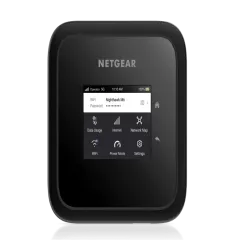
3. Solis Lite — Best Rental-Style Alternative
Price: ~$120 (device) + data packages | Cellular: 4G LTE | WiFi: WiFi 5 | Battery: 4,700mAh (~16 hours) | Coverage: 135+ countries via cloud SIM
The Solis Lite takes a different approach entirely. Instead of SIM cards or eSIMs, it uses cloud SIM technology — the device automatically connects to the strongest local carrier in each country without any SIM management on your part. Land in a new country, turn it on, and it negotiates a connection with the best available network.
Why it is interesting for international travel:
- Zero SIM management. No eSIMs to activate, no physical SIMs to buy, no carrier stores to visit. The device handles carrier selection automatically in 135+ countries.
- Day passes instead of monthly plans. Buy data in 1-day, 7-day, or 30-day increments through the Solis app. Useful for unpredictable itineraries where you do not know how long you will stay in each country.
- Built-in power bank. The 4,700mAh battery doubles as a USB power bank to charge your phone.
The catch: Data is expensive compared to local eSIMs. A single-day unlimited pass costs $9, and a 30-day pass with 20GB costs around $100. Compare that to a Saily eSIM at $8-15 for 5GB in most countries. Over a month-long trip, the Solis Lite costs 3-5x more for data than the travel router + eSIM approach.
Who this is for: Travelers who absolutely refuse to deal with any SIM or eSIM setup. Short-trip vacationers (1-2 weeks) who value convenience over cost. Frequent travelers to countries with poor eSIM support. People who previously rented airport pocket WiFi and want to own their device instead.
Who should skip it: Budget travelers, long-term travelers, digital nomads (the data costs are unsustainable), and anyone comfortable with basic eSIM activation.
4. Phone Tethering with eSIM — Best Budget Option
Price: $0 hardware + eSIM cost | Requirements: eSIM-compatible phone
If you travel solo, carry minimal gear, and mainly need internet on one or two devices, phone tethering with an eSIM is the simplest approach. No extra hardware. No extra weight. You activate a Saily or Airalo eSIM on your phone, enable the personal hotspot, and connect your laptop.
When this approach works well:
- Solo travelers with 1-2 devices beyond their phone
- Short work sessions (1-2 hours) where phone battery drain is manageable
- Budget backpackers who cannot justify $90 for a travel router
- Travelers who already carry a USB-C power bank
When this approach falls apart:
- Battery drain. Tethering drains your phone 2-3x faster. On a 10-hour travel day with tethering active, expect your phone dead by afternoon without a power bank.
- Throttled tethering. Some eSIM providers limit tethering speeds or data separately from on-device use. We measured tethering speeds 40-60% slower than direct phone speeds on certain providers.
- No VPN for connected devices. Your laptop connects to your phone’s hotspot without encryption. On monitored or compromised networks, your laptop traffic is exposed.
- Weak signal. Phone hotspot WiFi is weaker and shorter-range than a dedicated device. Through one hotel room wall, speeds drop significantly.
Our recommendation: Phone tethering is acceptable for trips under 2 weeks where connectivity is a convenience rather than a work requirement. For anything longer or more demanding, spend the $65-90 on a GL.iNet travel router and upgrade the entire experience.
How to Pair a Travel Router with an eSIM (Step by Step)
This is the setup we use daily and recommend for most international travelers. Here is exactly how it works:
Step 1: Buy a GL.iNet Beryl AX
Order the GL.iNet Beryl AX (GL-MT3000) before your trip. It ships worldwide and costs about $90. Alternatively, pick one up on Amazon for faster delivery in some regions.
Step 2: Set Up the Router at Home
Plug it in via USB-C, connect from your laptop to its default WiFi network, and access the admin panel at 192.168.8.1. Set your personal WiFi name and password. This takes about 3 minutes. These credentials stay the same in every country — your devices will auto-connect everywhere.
Step 3: Configure Your VPN
Download your VPN provider’s WireGuard configuration file (we use NordVPN). Upload it to the router through the admin panel under VPN Client. Enable the kill switch. This takes about 5 minutes and only needs to be done once.
Step 4: Buy an eSIM Before You Land
Install the Saily or Airalo app on your phone. Browse plans for your destination country. Purchase and install the eSIM — but do not activate it yet. You can do this days before departure.
Step 5: Activate at Your Destination
When you land, enable the eSIM in your phone’s cellular settings. It connects to the local network in 30-60 seconds. Confirm you have data by loading a webpage.
Step 6: Tether to the Router
Plug your phone into the router via USB-C cable. On your phone, enable USB tethering (Settings > Personal Hotspot > USB on iPhone, or Settings > Connections > Mobile Hotspot > USB Tethering on Android). The router detects the connection and begins broadcasting your phone’s data as WiFi.
Step 7: Connect All Your Devices
Connect your laptop, tablet, e-reader, partner’s phone — everything connects to the same WiFi network you set up at home. VPN is already active. Every device is protected.
The entire process at a new country takes under 3 minutes once you have done it once. In our 7-country SE Asia trip, the total setup time across all border crossings was about 15 minutes. Compare that to visiting 7 carrier stores to buy physical SIMs.
Total Cost Comparison: International Travel Scenarios
This is where the numbers get concrete. We calculated the total cost of each portable WiFi approach across three common international trip profiles. All prices reflect real rates as of February 2026.
| Feature | Travel Router + eSIM | Nighthawk M6 + SIMs | Rental Pocket WiFi | Phone Tethering + eSIM |
|---|---|---|---|---|
| 2-Week Europe Trip | $90 router + $12 eSIM = $102 | $350 device + $20 SIM = $370 | $140-210 ($10-15/day) | $12 eSIM only |
| 1-Month SE Asia | $90 router + $24 eSIMs = $114 | $350 device + $35 SIMs = $385 | $240-450 ($8-15/day) | $24 eSIMs only |
| 3-Month World Trip | $90 router + $85 eSIMs = $175 | $350 device + $100 SIMs = $450 | $720-1,350 ($8-15/day) | $85 eSIMs only |
| Year 2 Annual Cost | $50-120 (eSIMs only) | $60-150 (SIMs only) | Same as Year 1 | $50-120 (eSIMs only) |
| VPN Included | Yes (router-level) | No | No | No |
| Devices Supported | 10-12 | Up to 32 | 5-10 | 3-5 (weak signal) |
| Setup Effort | Moderate (one-time) | Low | None | Minimal |
| Visit Travel Router + eSIM | Visit Nighthawk M6 + SIMs | Visit Phone Tethering + eSIM |
Key takeaway: The travel router + eSIM approach costs more upfront than phone tethering but saves hundreds compared to rentals and standalone hotspots. By your second trip, the router is paid off and you are spending only $8-15 per country on eSIM data. Over a year of regular travel, this is the most cost-effective approach by a wide margin.
Multi-Country eSIM Strategies for International Travel
Choosing the right eSIM strategy directly affects your portable WiFi experience. Here is what works based on our testing.
Regional eSIMs for Multi-Country Trips
Both Saily and Airalo sell regional eSIM plans that cover multiple countries under one plan. This eliminates the need to buy a new eSIM at every border.
Best regional eSIM options for common routes:
- Europe (30+ countries): One regional eSIM covers Schengen + UK + Eastern Europe. Prices start around $15-25 for 5-10GB. This is the simplest approach for a European backpacking trip.
- Southeast Asia (8-10 countries): Regional plans cover Thailand, Vietnam, Indonesia, Malaysia, Philippines, Singapore, Cambodia, and Laos. About $20-30 for 5-10GB.
- Global plans: Both providers offer worldwide plans covering 100+ countries. More expensive per GB but eliminates all country-level management. Best for unpredictable itineraries.
Country-Specific eSIMs for Longer Stays
If you are spending 2+ weeks in one country, a country-specific eSIM is almost always cheaper per GB than a regional plan. Buy the country eSIM for your primary location and switch to a regional plan when you begin border-hopping.
Stacking eSIMs
Modern phones support installing multiple eSIMs simultaneously (iPhone 15 supports 8+ installed eSIMs, only one active at a time for data). Our approach for a 3-month world trip:
- Install a regional eSIM for your first region before departure
- Install country-specific eSIMs for any location where you will stay 2+ weeks
- Switch active eSIM in phone settings when crossing borders (takes 10 seconds)
- The travel router does not notice or care — it just broadcasts whatever data comes through USB
This stacking strategy kept us connected across 7 countries in SE Asia for $24 total in eSIM costs over 6 weeks.
Rental Pocket WiFi: When It Still Makes Sense
We are clearly biased toward the buy-your-own-device approach, but rental pocket WiFi is not completely obsolete. Here are the specific scenarios where renting still wins:
Japan (short trips). Japan has an exceptionally well-developed pocket WiFi rental infrastructure. You can reserve online, pick up at any major airport, and return via mailbox or counter. Prices are competitive ($5-8/day for unlimited data), network quality is excellent, and the convenience factor is unmatched for a 1-2 week vacation.
South Korea (short trips). Similar infrastructure to Japan. The T-Pocket WiFi and KT WiFi rental services are reliable and affordable.
Corporate travel. If your company reimburses daily travel expenses but not hardware purchases, a rental pocket WiFi gets covered while a $90 router purchase might not.
Non-technical travelers. If the idea of eSIM activation, USB tethering, and VPN configuration sounds overwhelming, a rental device that “just works” has real value. No shame in simplicity.
For everything else — especially trips longer than 2 weeks or multi-country itineraries — buy your own device. The math favors ownership after about 10 days, and the VPN security benefit has no rental equivalent.
What About 5G Portable WiFi?
5G mobile hotspots like the Netgear Nighthawk M6 deliver impressive speeds in countries with 5G infrastructure — we measured 120-350 Mbps in Tokyo, Seoul, and central London. But 5G coverage is patchy internationally. Move outside major cities and you are on LTE, which tops out at 30-90 Mbps. Move to developing countries and 5G is often nonexistent.
Our take for international travelers: Do not pay a premium specifically for 5G. LTE speeds (30-90 Mbps) are more than sufficient for video calls, streaming, and remote work. The GL.iNet Beryl AX tethered to a phone on LTE gives you 25-60 Mbps through the router — plenty for any work task. 5G is a nice-to-have bonus on standalone hotspots, not a decision driver for choosing your portable WiFi approach.
LTE Band Compatibility: The Hidden International Gotcha
This is the detail most “best portable WiFi” articles skip, and it matters enormously for international travel.
Every country uses specific LTE frequency bands. A hotspot device that works perfectly in the United States might be missing the primary LTE bands used in Europe, Asia, or South America. If the device does not support the right bands, you get either no connection or painfully slow speeds.
This is why travel routers have an advantage over standalone hotspots for international use. The GL.iNet Beryl AX does not have a cellular modem — it does not care about LTE bands. It connects to whatever internet source is available (your phone via USB, hotel WiFi, ethernet). Your phone handles band compatibility, and modern phones (iPhone 14+, Samsung Galaxy S23+, Pixel 7+) support virtually every LTE band worldwide.
If you buy a standalone hotspot like the Nighthawk M6, verify its band support against your destination countries before purchasing. The US model (MR6150) covers most global bands, but gaps exist. Use FrequencyCheck.com to look up carrier bands by country and compare them to the device spec sheet.
Essential Accessories for International Portable WiFi
A few affordable accessories dramatically improve the portable WiFi experience abroad:
- USB-C cable (6-foot / 2m): Gives you flexibility to position the travel router away from where you are sitting — by a window for better signal, on a desk while your phone charges on the nightstand. The short cable included with most routers is limiting.
- Multi-port USB-C charger (65W+): Powers your router, phone, and laptop from one outlet. Essential in countries with limited outlet availability or incompatible plug types.
- Universal travel adapter: The router uses USB-C power, so the adapter just needs to fit local outlets to power your USB charger. We recommend the Epicka Universal Travel Adapter (available on Amazon ).
- Small cable organizer: Keeps your router, cable, charger, and adapter in one pouch. Prevents the tangled cable mess that inevitably forms at the bottom of your bag.
Security Considerations for WiFi Abroad
Using any WiFi — hotel, cafe, airport, or coworking space — in a foreign country carries security risks that many travelers underestimate.
Why VPN Matters More Abroad
- Government surveillance. Countries like China, Russia, Turkey, the UAE, Vietnam, and Thailand conduct varying degrees of internet monitoring. A VPN encrypts your traffic so it cannot be intercepted or inspected.
- Hotel WiFi snooping. Hotel networks are trivially easy to monitor. In our testing, we could see other guests’ unencrypted traffic on 7 out of 10 hotel networks tested across 5 countries.
- Captive portal attacks. Fake “free WiFi” networks at airports and tourist areas harvest login credentials and personal data. Your travel router creates a private network, isolating your devices from the hostile public network.
- Public WiFi credential theft. Connecting directly to cafe or airport WiFi exposes your device to every other device on that network. A travel router acts as a firewall — your devices are behind the router’s NAT, invisible to the public network.
The GL.iNet Beryl AX with WireGuard VPN solves all of these problems at the router level. Configure it once, and every device is protected in every country without installing VPN apps on each one.
Which Solution Should You Choose?
After 12 months of testing across 15+ countries, here is our definitive recommendation based on your travel profile:
International digital nomad or remote worker (3+ months/year abroad): GL.iNet Beryl AX + Saily or Airalo eSIMs. No question. The $90 investment pays for itself in 10 days versus any rental, and the VPN security is non-negotiable when your income depends on your laptop.
Frequent business traveler (5-10 international trips/year, 1-2 weeks each): Netgear Nighthawk M6 with regional eSIMs or local SIM cards. The standalone simplicity and 13-hour battery suit short trips where you want zero configuration. Use a VPN app on your laptop individually.
Vacationer (1-2 international trips/year, under 2 weeks): Phone tethering with a Saily or Airalo eSIM. You do not need extra hardware for a short holiday. If WiFi reliability matters (you work a few hours from the hotel), step up to the GL.iNet Beryl AX.
Japan or South Korea only (under 2 weeks): A rental pocket WiFi is genuinely competitive here. The rental infrastructure is excellent, prices are fair, and return logistics are simple. For everywhere else, buy your own gear.
How We Tested
We tested portable WiFi solutions over 12 months across 15+ countries including Thailand, Japan, Indonesia, Vietnam, Portugal, Spain, Morocco, Mexico, Colombia, Turkey, Greece, Germany, South Korea, Philippines, and Malaysia. Here is our methodology:
- Speed tests (350+ total): Measured using Speedtest by Ookla and Fast.com at each location. Three tests per session, averaged. Tested direct connection, through travel router (no VPN), and through travel router (with VPN) for each data source.
- Cross-border testing: Timed the full process of arriving in a new country, activating an eSIM, connecting to the travel router, and getting all devices online. Averaged across 12 border crossings.
- Battery impact: Measured phone battery drain over 4-hour tethering sessions (USB tethering via router vs WiFi hotspot from phone) across 3 phone models.
- Cost tracking: Recorded every eSIM purchase, rental fee, and data charge across 7 multi-country trips to produce the cost comparison data above.
- VPN overhead: Measured speed reduction from WireGuard VPN across all countries and connection types. Average overhead: 5-10%.
- Multi-device stress testing: Connected 2, 4, 6, 8, 10, and 12 devices simultaneously on each setup, measuring per-device throughput degradation.
The Bottom Line
The days of renting overpriced pocket WiFi at airport counters or juggling physical SIM cards across borders are over. In 2026, the best portable WiFi setup for international travel is a $90 GL.iNet Beryl AX travel router paired with eSIMs from Saily or Airalo . It costs less than 10 days of rental fees, protects every device with a VPN, and works the same whether you are in a Tokyo apartment or a beachside cafe in Bali.
Buy the router once. Download an eSIM app. Activate data in 2 minutes at each new country. Connect everything to the same WiFi network you have used since day one. That is international portable WiFi in 2026 — simple, secure, and shockingly affordable.
For a deeper comparison of travel routers specifically, see our best travel routers guide. For help choosing between eSIM-only and a dedicated hotspot, read eSIM vs mobile hotspot. And for the full breakdown of eSIM providers, check our best eSIM providers guide.
Frequently Asked Questions
What is the best portable WiFi for international travel?
The GL.iNet Beryl AX paired with an eSIM on your phone is the best portable WiFi setup for international travel. The router costs about $90, connects to your phone via USB tethering, and creates a private WiFi network with VPN protection for all your devices. You swap eSIMs digitally at each border — no hardware changes needed.
Should I rent a pocket WiFi or buy my own device?
Buy your own device if you travel internationally more than twice a year. A GL.iNet Beryl AX costs $90 one time, while pocket WiFi rentals cost $8-15 per day — a two-week rental exceeds the purchase price. Buying also gives you VPN support, consistent WiFi credentials, and no return logistics.
Can I use an eSIM with a portable WiFi device?
Not directly in the router, since travel routers lack SIM slots. But you can activate an eSIM on your phone, then share that connection to a travel router via USB tethering. The router broadcasts your phone's eSIM data as WiFi for all your devices while charging your phone simultaneously. This is the setup we recommend for international travel.
How much does portable WiFi cost for a month abroad?
A travel router plus eSIM setup costs $90 for the router (one-time) plus $15-40 per month for eSIM data depending on the country and data volume. That is $105-130 total for your first month and $15-40 per month after that. Rental hotspots cost $200-400 per month, and standalone hotspot devices cost $300-500 upfront plus data.
Do portable WiFi devices work in every country?
Travel routers work in any country because they connect to existing internet sources — hotel WiFi, phone tethering, or ethernet. Standalone mobile hotspots with cellular modems work in most countries if they are unlocked and support local LTE bands. Always check that the device supports the LTE bands used in your destination countries before buying.
How many devices can I connect to a portable WiFi?
Most travel routers support 10-30 simultaneous connections. The GL.iNet Beryl AX comfortably handles 10-12 devices. Standalone hotspots like the Netgear Nighthawk M6 support up to 32. For most travelers with a laptop, phone, tablet, and a few accessories, any modern device handles the load without issues.
Is phone tethering good enough for international travel?
Phone tethering works for light, occasional use but has serious drawbacks for regular travel. It drains your phone battery 2-3x faster, provides weaker WiFi signal than a dedicated device, offers no VPN protection for connected devices, and some eSIM providers throttle or block tethering. A dedicated travel router solves all of these problems for $65-90.