Best Travel Routers 2026: Tested & Ranked for Digital Nomads
We tested 8 travel routers across 15+ countries. Here are the 5 best travel routers for digital nomads, remote workers, and frequent travelers in 2026.
A travel router turns sketchy hotel WiFi into a secure private network, runs a VPN for all your devices, and creates a consistent WiFi setup wherever you go. After 10 months of testing 8 travel routers across 15+ countries — from coworking spaces in Bali to Airbnbs in Mexico City to campsites in Portugal — we have ranked the 5 best options for every budget and use case in 2026.
Whether you need a $65 budget router for backpacking, a $90 all-rounder for remote work, or a $500+ cellular router for van life, this guide covers the right tool for every traveler.
🏆 Quick Picks
GL.iNet
WiFi 6, VPN support, USB tethering, pocket-sized — the complete package for $90
From $90
Peplink
Dual SIM failover, SpeedFusion bonding, external antennas — enterprise-grade for the road
From $500+
Amazon
GL.iNet Slate AX — same VPN and tethering features as the Beryl AX at $65
From $65
Why Travel Routers Matter for Digital Nomads
If you have ever connected to hotel WiFi and wondered who else is watching your traffic, you already understand the core problem. Public WiFi networks are inherently insecure. Every device on the same network can potentially see every other device’s traffic. In countries with weak data privacy laws or active government surveillance, this risk multiplies.
A travel router solves this by creating a private network within the public network. Your devices connect to the router, the router connects to the hotel WiFi, and a VPN encrypts everything in between. Here are the four specific problems a travel router eliminates:
1. Security on Public WiFi
When you connect your laptop directly to hotel or cafe WiFi, your traffic is visible to every other device on that network. A travel router with VPN enabled means your traffic is encrypted before it touches the public network. No one can intercept your emails, passwords, banking sessions, or work communications — even on the most compromised networks.
2. Device Consistency
Hotels change WiFi passwords. Airbnbs have different network names. Cafes require captive portal logins. Without a travel router, you reconfigure WiFi on every device at every location. With a travel router, your devices always connect to the same network name and password — the router handles the upstream connection. Your laptop, phone, tablet, and e-reader never need to be reconfigured.
3. Multi-Device Sharing
Most hotels limit you to 2-3 device connections per room. Your laptop, phone, tablet, and partner’s devices quickly exceed that limit. The travel router connects as one “device” to the hotel network and creates its own network for unlimited devices behind it.
4. VPN at the Router Level
Installing VPN apps on every device is tedious and easy to forget. A VPN running on the travel router protects every connected device automatically. No per-device configuration, no forgetting to enable it, no devices left unprotected. Configure it once, and it works everywhere.
How We Tested
We tested 8 travel routers over 10 months across 15+ countries including Thailand, Japan, Indonesia, Mexico, Portugal, Spain, Morocco, Turkey, Colombia, and the Philippines. Here is our methodology:
- Speed tests (400+ total): We measured source connection speed, router throughput, and VPN overhead using Speedtest by Ookla and Fast.com at each location. Three tests per session, averaged.
- VPN performance: WireGuard and OpenVPN throughput tested on each device using NordVPN servers. We measured both speed and connection stability over 4-hour sessions.
- USB tethering: Tested with iPhone 15 Pro, Samsung S24, and Pixel 8 using various eSIM providers including Saily and Holafly.
- Multi-device stress: Connected 2, 4, 6, 8, 10, and 12 devices simultaneously, measuring per-device throughput degradation.
- Range testing: Measured usable WiFi range in hotel rooms, through one wall, and through two walls.
- Heat testing: Recorded surface temperature after 4 hours of continuous heavy use in 35C+ ambient conditions.
- Setup time: Timed initial setup from unboxing to functional VPN connection for each device.
1. GL.iNet Beryl AX (GL-MT3000) — Best Overall
Price: ~$90 | WiFi: WiFi 6 (AX3000) | VPN: WireGuard + OpenVPN | Power: USB-C | Weight: 215g
The GL.iNet Beryl AX is our top pick for the second year running. It is the travel router that lives permanently in our bag, and after 10 months of daily use across 15+ countries, it has never let us down.
What Makes It the Best
The Beryl AX runs OpenWrt firmware with GL.iNet’s user-friendly admin interface layered on top. This gives you the best of both worlds: advanced features for power users (VPN, DNS filtering, ad blocking, custom firewall rules) and a simple web UI for basic setup. First-time setup takes under 5 minutes. Adding VPN takes another 5.
WiFi 6 (AX3000) is a meaningful upgrade over older WiFi 5 routers. In our tests, the Beryl AX delivered 300-500 Mbps on its 5GHz band in close range and 150-250 Mbps at typical hotel room distances. With WireGuard VPN enabled through NordVPN, speeds dropped only 5-8% — WireGuard’s efficiency on this chipset is excellent.
USB tethering is the feature that completes the setup. Connect your phone via USB, enable tethering, and the Beryl AX broadcasts your phone’s eSIM data as WiFi for all your devices. Your phone charges simultaneously. We used this daily for 3 months, tethering to a phone with a Saily eSIM, and it was our most reliable internet setup.
Performance Highlights
| Scenario | Speed Without VPN | Speed With VPN (WireGuard) |
|---|---|---|
| Hotel WiFi repeater (85 Mbps source) | 72 Mbps | 66 Mbps |
| USB tethering (iPhone, 65 Mbps LTE) | 58 Mbps | 53 Mbps |
| Ethernet bridge (200 Mbps source) | 185 Mbps | 172 Mbps |
| Multi-device (6 devices, 100 Mbps source) | 82 Mbps aggregate | 74 Mbps aggregate |
Who Should Buy This
Every digital nomad and remote worker who travels between hotels, Airbnbs, and cafes. It is the single best travel connectivity investment under $100. Pair it with an eSIM on your phone and NordVPN on the router, and you have a complete security and connectivity stack that fits in your jacket pocket.
Read our full GL.iNet Beryl AX review for the complete breakdown with 10 months of data.
Buy GL.iNet Beryl AX2. Peplink MAX BR1 Pro — Best for Van Life and Overlanding
Price: $500-700 | Cellular: Cat-7 LTE | WiFi: 802.11ac | SIM Slots: 2 | Power: 12V DC
The Peplink MAX BR1 Pro is a different class of device from the GL.iNet routers. It has its own Cat-7 LTE cellular modem with dual SIM slots — it does not need hotel WiFi or phone tethering. Insert two SIM cards from different carriers, power it on, and the router connects directly to cell towers. If one carrier drops signal, the other takes over automatically within seconds.
Why It’s Worth 5x the Price of a Beryl AX
The BR1 Pro solves a problem that travel routers cannot: standalone cellular connectivity in areas without WiFi. For van lifers driving through rural Portugal, overlanders crossing Morocco, or remote workers at campsites — the Beryl AX is useless without a data source. The BR1 Pro is its own data source.
SpeedFusion bonding is the enterprise feature that justifies the premium. It combines multiple connections (dual SIMs, Starlink, WiFi) into a single pipe that is faster and more resilient than any individual link. In our testing, bonding two LTE SIMs delivered 52 Mbps from connections that individually measured 35 and 28 Mbps. Bonding cellular with Starlink hit 118 Mbps.
External antenna ports are the other transformative feature. With a roof-mounted MIMO antenna ($100-250), the BR1 Pro pulled 28 Mbps at a rural campsite where our phones showed one bar and could barely load a webpage. That is the difference between “no internet” and “productive workday.”
Who Should Buy This
Full-time van lifers, RVers, overlanders, and anyone who needs reliable internet in locations without existing WiFi infrastructure. If your income depends on connectivity and you operate from a vehicle, the BR1 Pro is the gold standard.
Not for hotel hoppers — you are paying $500+ for cellular capability you do not need if WiFi is always available. Read our full Peplink MAX BR1 Pro review for 6 weeks of van life testing data.
Buy Peplink MAX BR1 Pro3. GL.iNet Slate AX (GL-AXT1800) — Best Budget
Price: ~$65-70 | WiFi: WiFi 6 (AX1800) | VPN: WireGuard + OpenVPN | Power: USB-C | Weight: 205g
The GL.iNet Slate AX is the Beryl AX’s more affordable sibling. It runs the identical OpenWrt firmware with the same VPN support, USB tethering, ad blocking, and repeater features. The difference is in the hardware: a slightly older WiFi 6 chipset (AX1800 vs AX3000) that delivers lower maximum throughput.
Where It Matches the Beryl AX
In daily use for most travelers, the experience is nearly identical to the Beryl AX:
- Same VPN support (WireGuard + OpenVPN) with the same easy setup
- Same USB tethering for phone eSIM data sharing
- Same WiFi repeater and ethernet bridge modes
- Same admin interface and OpenWrt customization
- Same compact form factor and USB-C power
Where It Falls Short
The performance gap only matters at the edges:
| Metric | Slate AX | Beryl AX |
|---|---|---|
| Max 5GHz throughput | ~600 Mbps | ~1,200 Mbps |
| Comfortable device limit | 6-8 devices | 10-12 devices |
| WiFi range (open space) | ~20 meters | ~25-30 meters |
| VPN throughput (WireGuard) | 180 Mbps | 280 Mbps |
| Price | ~$65-70 | ~$90 |
For a solo traveler or couple with 3-5 devices on hotel connections averaging 30-80 Mbps, the Slate AX performs identically to the Beryl AX. You will never hit the throughput ceiling. The gap becomes noticeable only with 8+ simultaneous devices or source connections exceeding 200 Mbps.
Who Should Buy This
Budget-conscious travelers who want the full VPN and tethering experience for $20-25 less than the Beryl AX. Solo travelers and couples with fewer than 6 devices. Backpackers who prioritize weight and size. Anyone who wants to try a travel router without committing $90.
Our take: If you can afford the extra $20-25, the Beryl AX is the better investment for its superior multi-device handling and future-proofing. But the Slate AX at $65-70 is an excellent router that we would happily carry if budget is the priority.
Buy GL.iNet Slate AX4. Netgear Nighthawk M6 — Best Standalone Hotspot
Price: ~$300-400 | Cellular: 5G Sub-6 / LTE | WiFi: WiFi 6 | Battery: 5,040mAh (~13 hours) | SIM: Nano SIM
The Netgear Nighthawk M6 is technically a mobile hotspot rather than a travel router — it has its own cellular modem and SIM card slot. We include it because it is the best alternative for travelers who want a standalone device with zero external dependencies: pop in a SIM card, press power, and get WiFi.
Why Some Travelers Prefer It
The Nighthawk M6’s appeal is simplicity. There is no tethering setup, no WiFi repeater configuration, no VPN client to configure. It is a self-contained WiFi device with a 13-hour battery that works anywhere you have cellular signal. The 2.8-inch touchscreen shows connected devices, data usage, and signal strength without needing a companion app.
In our testing across 8 countries, the M6 delivered 80-350 Mbps on 5G and 30-90 Mbps on LTE. Battery life held up to Netgear’s claims: 12-13 hours under light use, 8-10 hours with moderate work (video calls, 4 devices connected), and 5-7 hours under heavy load.
What It Lacks
The M6 has no VPN client, which is its biggest weakness compared to GL.iNet travel routers. Your devices connect directly to cellular — no automatic encryption. To get VPN protection, you need VPN apps installed on each individual device.
It also has no external antenna ports, so you are limited to the internal antennas. In weak signal areas, a Peplink with roof-mount antennas dramatically outperforms it.
Who Should Buy This
Travelers who want grab-and-go simplicity without any technical setup. Business travelers on short trips who need reliable, battery-powered WiFi. Anyone who does not want to deal with phone tethering or WiFi repeater configuration. People willing to trade VPN convenience for standalone simplicity.
Not for: Privacy-conscious workers who need VPN on all devices (get a GL.iNet instead), budget travelers ($300-400 is steep for a hotspot), or rural workers who need external antenna support.
Check Price on Amazon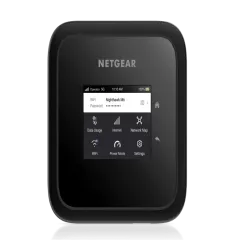
5. TP-Link TL-WR902AC — Ultra-Budget Option
Price: ~$35 | WiFi: WiFi 5 (AC750) | VPN: No built-in client | Power: Micro-USB | Weight: 86g
The TP-Link TL-WR902AC is the cheapest functional travel router available. At $35, it is less than half the price of the GL.iNet Slate AX. But the trade-offs are significant: WiFi 5 only, no built-in VPN client, Micro-USB power, and a dated TP-Link firmware without OpenWrt’s flexibility.
What It Does Well
The TL-WR902AC handles basic WiFi repeating competently. Connect to hotel WiFi, create your own private network, share it with your devices. It is tiny at 86 grams — the lightest router on this list by far — and the Micro-USB power requirement means almost any USB cable and charger will work.
In our tests, it delivered 50-120 Mbps in repeater mode on its 5GHz band, which is adequate for web browsing, email, and light video calls. Setup is straightforward through TP-Link’s web interface.
What It Lacks
The critical missing feature is a built-in VPN client. TP-Link’s firmware does not support WireGuard or OpenVPN natively. You can flash OpenWrt onto the device (which adds VPN support), but this requires technical knowledge and voids the warranty. Without VPN, the router is a convenience device (consistent WiFi, multi-device sharing) but not a security device.
Other limitations: WiFi 5 (no WiFi 6), no USB tethering support in stock firmware, single-band operation in repeater mode, and no ad blocking or DNS filtering.
Who Should Buy This
Travelers on the tightest budget who want basic WiFi repeating and multi-device sharing without VPN. Casual travelers who are not security-conscious and just want consistent WiFi. Anyone who wants to test the travel router concept before investing in a GL.iNet device.
Our honest take: For $25-30 more, the GL.iNet Slate AX at $65 adds WiFi 6, VPN support, USB tethering, and OpenWrt customization. That $25 upgrade is the single best value improvement on this list. We recommend the TP-Link only for travelers who genuinely cannot spend more than $35.
Check Price on AmazonFull Comparison Table
| Feature | GL.iNet Beryl AX | Peplink MAX BR1 Pro | GL.iNet Slate AX | Netgear Nighthawk M6 | TP-Link TL-WR902AC |
|---|---|---|---|---|---|
| Price | ~$90 | $500-700 | ~$65-70 | ~$300-400 | ~$35 |
| WiFi | WiFi 6 (AX3000) | WiFi 5 (802.11ac) | WiFi 6 (AX1800) | WiFi 6 | WiFi 5 (AC750) |
| VPN Client | WireGuard + OpenVPN | OpenVPN + IPsec | WireGuard + OpenVPN | No | No (unless OpenWrt flashed) |
| Cellular Modem | No | Cat-7 LTE (dual SIM) | No | 5G Sub-6 / LTE | No |
| USB Tethering | Yes | Yes | Yes | N/A (standalone) | No (stock firmware) |
| Battery | No (USB-C powered) | No (12V DC) | No (USB-C powered) | 13 hours (5,040mAh) | No (Micro-USB powered) |
| External Antennas | No | Yes (4 ports) | No | No | No |
| Max Devices | 12+ | 20+ | 8 | 32 | 5-6 |
| Weight | 215g | 400g | 205g | 240g | 86g |
| Best For | Most travelers | Van life / overlanding | Budget travelers | Standalone hotspot | Ultra-budget |
| Visit GL.iNet Beryl AX | Visit Peplink MAX BR1 Pro | Visit GL.iNet Slate AX | Visit Netgear Nighthawk M6 | Visit TP-Link TL-WR902AC |
Travel Router vs Mobile Hotspot: What’s the Difference?
This distinction trips up a lot of travelers, so let us be clear.
Travel Router
A travel router does not have its own cellular modem. It cannot connect to cell towers. Instead, it creates a WiFi network from an existing internet source:
- WiFi repeater mode: Connects to hotel/cafe WiFi and creates your own private network
- USB tethering: Takes internet from your phone (via USB cable) and broadcasts it as WiFi
- Ethernet bridge: Plugs into a wired ethernet port and creates a WiFi network
Travel routers excel at security (VPN at the router level), convenience (consistent WiFi credentials), and multi-device sharing. They are cheap ($65-100), small, and feature-rich. The GL.iNet Beryl AX and Slate AX are travel routers.
Mobile Hotspot
A mobile hotspot has its own cellular modem and SIM card slot. It connects directly to cell towers to provide internet. Most have built-in batteries for portable use. The Netgear Nighthawk M6 is a mobile hotspot. The Peplink MAX BR1 Pro is a hybrid (cellular router with advanced routing features).
Mobile hotspots are standalone — they do not need an existing internet source. But they are more expensive ($200-900), often lack VPN support, and require a SIM card with a data plan.
Which Should You Choose?
- You stay in hotels, Airbnbs, and cafes: Travel router (GL.iNet Beryl AX). WiFi is already available; the router secures and enhances it.
- You need internet in places without WiFi: Mobile hotspot or cellular router (Nighthawk M6 or Peplink BR1 Pro).
- You want the most flexible setup: Travel router + phone with eSIM. Your phone provides cellular data via USB tethering; the router creates a secure WiFi network from it.
How to Set Up a VPN on Your Travel Router
Router-level VPN is the single biggest reason to buy a travel router over using phone tethering directly. Here is the quick setup guide for GL.iNet routers with NordVPN .
WireGuard Setup (Recommended — Fastest)
- Log into the router admin panel (192.168.8.1)
- Navigate to VPN > WireGuard Client
- Click Add a New Configuration
- Select NordVPN from the provider template list
- Enter your NordVPN service credentials (found in your NordVPN dashboard under Manual Setup)
- Choose a server location (the country you want your traffic to appear from)
- Click Apply and toggle VPN On
Total time: under 5 minutes. Every device connected to the router is now protected.
What to Expect
In our testing, WireGuard VPN on GL.iNet routers adds only 5-10% overhead to connection speed. On a 100 Mbps hotel connection, expect 90-95 Mbps with VPN enabled. This is dramatically better than OpenVPN (20-30% overhead) and more than sufficient for video calls, streaming, and remote work.
Pro tip: The GL.iNet routers have a physical toggle switch that you can program to enable/disable VPN instantly. This is useful when VPN interferes with local services like banking apps or local streaming platforms.
For a complete guide, see our how to set up VPN on a travel router article.
Pair Your Router with an eSIM
The most flexible and cost-effective travel internet setup in 2026 is a travel router + phone with eSIM + router-level VPN. Here is how the three pieces work together:
The Complete Stack
- Install an eSIM on your phone before your trip. We recommend Saily for competitive pricing across 150+ countries, or Holafly for unlimited data plans in popular destinations.
- Connect your phone to the travel router via USB cable and enable USB tethering.
- The router broadcasts your phone’s eSIM data as WiFi for all your devices. Your phone charges simultaneously through the USB connection.
- Enable VPN on the router. All traffic from all connected devices is encrypted.
This setup gives you:
- Global cellular coverage via eSIM (no hunting for local SIM shops)
- VPN protection on every device without per-device apps
- Multi-device WiFi from a single phone connection
- Phone charging while tethering (no battery drain)
- Total cost under $150 (router + eSIM plan) for the first month
eSIM Data Costs
For a typical week of remote work (3-5 GB/day):
- Saily: Regional plans from $5-15 for 1-5 GB. Competitive pricing.
- Holafly unlimited: $27-47 for 5-10 days of unlimited data in popular countries
- Local SIM card: $5-15/month (cheapest, but requires finding a shop at each destination)
See our full best eSIM providers guide for detailed comparisons and pricing.
Bottom Line: How to Choose
Here is the decision tree based on your budget and use case.
By Budget
| Budget | Best Option | What You Get |
|---|---|---|
| Under $40 | TP-Link TL-WR902AC | Basic WiFi repeating, no VPN |
| $60-70 | GL.iNet Slate AX | WiFi 6, VPN, USB tethering — great value |
| $80-100 | GL.iNet Beryl AX | Best overall — WiFi 6, VPN, tethering, 12+ devices |
| $300-400 | Netgear Nighthawk M6 | Standalone 5G hotspot, 13hr battery |
| $500-700 | Peplink MAX BR1 Pro | Dual SIM, SpeedFusion, external antennas |
By Use Case
- Hotel/Airbnb digital nomad: GL.iNet Beryl AX ($90) + eSIM + NordVPN on router
- Backpacker on a budget: GL.iNet Slate AX ($65) + eSIM
- Business traveler, simplicity first: Netgear Nighthawk M6 ($300-400)
- Van lifer / overlander: Peplink MAX BR1 Pro ($500-700) + external antennas
- Just want to try it: TP-Link TL-WR902AC ($35), upgrade later if you like the concept
Our Top Recommendation
For 90% of digital nomads and remote workers, the GL.iNet Beryl AX at $90 is the right choice. Pair it with Saily for eSIM data and NordVPN for router-level security, and you have a complete travel connectivity and privacy stack for under $150 total.
Buy GL.iNet Beryl AX -- Best Overall Buy Peplink MAX BR1 Pro -- Best for Van Life Get NordVPN for Your Travel RouterRelated Reading
- Best Mobile Hotspots for Travel 2026 — Full comparison including standalone hotspots
- GL.iNet Beryl AX Review — 10-month detailed review of our top pick
- Peplink MAX BR1 Pro Review — Van life and overlanding review
- How to Set Up VPN on a Travel Router — Step-by-step guide
- Best VPN for Travel 2026 — VPN comparison for travelers
- Best eSIM Providers 2026 — Pair with your travel router for cellular data
- Best Internet for Digital Nomads — Complete connectivity guide
Frequently Asked Questions
What is a travel router?
A travel router is a compact, portable device that creates a private WiFi network from an existing internet source. It connects to hotel WiFi, your phone's tethering, or an ethernet cable, and rebroadcasts that connection as your own secure WiFi network. Travel routers are not standalone hotspots — they do not have built-in cellular modems. Their main advantages are VPN support (protecting all connected devices), consistent WiFi credentials, and the ability to extend weak WiFi signals.
Do I really need a travel router?
If you work remotely from hotels, cafes, or Airbnbs more than a few weeks per year, yes. A travel router solves three problems at once: it secures public WiFi with router-level VPN, it gives you consistent WiFi credentials so you never re-enter passwords on every device, and it lets you share a single internet connection with multiple devices. For casual vacationers who only use their phone, a travel router is optional.
What is the best travel router for digital nomads?
The GL.iNet Beryl AX (GL-MT3000) is the best travel router for digital nomads in 2026. It costs about $90, supports WiFi 6, has built-in VPN support (WireGuard and OpenVPN), USB tethering for sharing your phone's eSIM data, and runs on OpenWrt for advanced configuration. It is compact enough to fit in a jacket pocket and powers from USB-C.
Can I use a VPN on a travel router?
Yes, and this is one of the main reasons to buy a travel router. Most GL.iNet routers have built-in VPN client support for WireGuard and OpenVPN. You configure NordVPN, Surfshark, or any other VPN provider directly on the router. Every device connected to the router is then automatically protected without needing individual VPN apps. WireGuard typically adds only 5-10% speed overhead.
What is the difference between a travel router and a mobile hotspot?
A travel router creates a WiFi network from an existing internet source (hotel WiFi, phone tethering, ethernet). It does not connect to cell towers on its own. A mobile hotspot has a built-in cellular modem with a SIM card slot and battery — it connects directly to cell towers to provide internet. Travel routers are cheaper ($60-100) and offer VPN and advanced features. Mobile hotspots are more convenient but cost $200-500 and lack VPN support.
Can I use a travel router with an eSIM?
Not directly, since travel routers do not have SIM slots. But you can use a travel router with a phone running an eSIM. Connect your phone to the router via USB cable (USB tethering), and the router shares your phone's cellular data as WiFi for all your devices. The phone charges through the USB connection simultaneously. This is the setup we recommend for most digital nomads.
How much does a good travel router cost?
Good travel routers start at $60-70 (GL.iNet Slate AX) and go up to $90-100 (GL.iNet Beryl AX). Premium cellular routers like the Peplink MAX BR1 Pro cost $500-700 but include a built-in cellular modem. For most travelers, the $90 GL.iNet Beryl AX is the sweet spot — it delivers WiFi 6, VPN support, and USB tethering at a price that pays for itself within a few trips.
Is the GL.iNet Beryl AX better than the Slate AX?
Yes, for most users. The Beryl AX ($90) has a faster processor, WiFi 6 AX3000 (vs AX1800 on the Slate), better multi-device handling (12+ devices vs 8), and slightly better WiFi range. The Slate AX ($65-70) is the better choice only if you are on a tight budget or travel solo with 3-4 devices. Both run the same OpenWrt firmware with identical VPN and tethering features.