Mobile Hotspot vs Phone Tethering: Which Is Better for Travel?
Compare mobile hotspots and phone tethering for travel. We break down speed, battery, cost, reliability, and which option is best for your travel style in 2026.
You are sitting in a cafe in Lisbon, laptop open, tethering from your phone. The Zoom call starts fine, then your phone hits 40% battery, starts thermal throttling, and the call drops. Your phone is now a paperweight for the next 30 minutes while it cools down and charges. Meanwhile, the person at the next table has a small box — a dedicated mobile hotspot — powering their laptop, tablet, and partner’s phone simultaneously. No battery anxiety, no overheating, no dropped calls.
This scenario plays out daily in digital nomad hubs worldwide. The question every traveler eventually asks is: should I just tether from my phone, or invest in a dedicated mobile hotspot?
The answer depends entirely on how you travel, how many devices you connect, and how critical reliable internet is to your income. After spending 12 months testing both approaches across 20+ countries — from coworking spaces in Chiang Mai to beach cafes in Tulum to mountain lodges in the Swiss Alps — we have a clear framework for when each option makes sense.
This guide breaks down every factor: speed, battery life, cost, reliability, convenience, and device support. By the end, you will know exactly which approach fits your travel style.
What Is Phone Tethering?
Phone tethering turns your smartphone into a mobile hotspot. Your phone uses its cellular data connection (from your SIM or eSIM) and shares it with other devices — your laptop, tablet, or a travel partner’s phone. There are three ways to tether:
- WiFi tethering (most common): Your phone creates a small WiFi network that other devices connect to. Easy to set up, works with any WiFi-capable device, but uses the most battery.
- USB tethering: You connect your phone to your laptop with a cable. The fastest and most stable method, and your laptop can charge your phone simultaneously. Only works with one device at a time (the connected laptop).
- Bluetooth tethering: Connects via Bluetooth. Uses the least battery but is painfully slow (2-3 Mbps maximum). Rarely worth using in 2026.
Every modern smartphone — iPhone and Android — has tethering built in. You do not need to install anything or buy any hardware. Just toggle it on in your settings, and you are sharing internet.
The Appeal of Tethering
The biggest advantage is simplicity. You already carry your phone. There is nothing extra to buy, charge, or carry. If you have cellular data on your phone, you can tether. For a solo traveler who occasionally needs to connect a laptop for an hour, tethering is the obvious choice. Zero additional cost, zero additional gear.
What Is a Dedicated Mobile Hotspot?
A dedicated mobile hotspot (also called a MiFi or pocket WiFi) is a standalone device with its own cellular modem, SIM card slot, battery, and WiFi radio. It connects directly to cell towers — just like your phone does — and creates a WiFi network for your devices. But unlike your phone, it is purpose-built for this single task.
Dedicated hotspots come in two categories:
- Standalone hotspots (e.g., Netgear Nighthawk M6, Inseego MiFi X Pro): Battery-powered devices with SIM slots that connect directly to cell towers. Price range: $150-500. They work independently and do not need your phone at all.
- Travel routers (e.g., GL.iNet Beryl AX): Smaller, cheaper devices ($60-100) that create a WiFi network from an existing internet source — hotel WiFi, your phone’s tethering via USB, or an ethernet connection. They add VPN support, network security, and multi-device management but do not have their own cellular modem.
Both solve the same core problem: providing reliable, dedicated WiFi for multiple devices without draining your phone.
Hotspot vs Tethering: Side-by-Side Comparison
Here is how the two approaches stack up across every factor that matters for travelers:
| Feature | Phone Tethering | Dedicated Hotspot | Travel Router + Phone |
|---|---|---|---|
| Upfront Cost | $0 (use your phone) | $80-500 | $60-100 (router only) |
| Monthly Data Cost | Your existing plan | SIM/eSIM plan | Phone's eSIM data |
| Battery Impact | Heavy (10-15% per hour) | None on phone | Low (USB charges phone) |
| Typical Speed | 20-80 Mbps (varies) | 30-300 Mbps | 20-100 Mbps |
| Max Devices | 5-10 (degrades at 3+) | 10-32 | 12-30 |
| WiFi Range | 10-15 feet | 30-50 feet | 30-50 feet |
| VPN Support | Per-device apps only | Router-level (all devices) | Router-level (all devices) |
| Setup Time | 30 seconds | 5-15 minutes (one-time) | 10-20 minutes (one-time) |
| Weight/Size | 0g (your phone) | 120-350g | 150-250g |
| Best For | Occasional, light use | Daily remote work | Nomads who want both |
When Phone Tethering Is Enough
Tethering is not inherently bad. For certain travelers and situations, it is the right call. Here are the scenarios where tethering makes perfect sense:
Short Trips and Vacations
If you are traveling for 1-2 weeks and only need your laptop for checking email, light browsing, or uploading photos, tethering is more than sufficient. You are not going to wear out your phone battery in the few hours you need connectivity. The convenience of carrying zero extra gear outweighs any performance advantage a hotspot would provide.
Solo Travel with One or Two Devices
Tethering works well when you only need to connect one device — typically your laptop. USB tethering from your phone to your laptop gives you a fast, stable connection and charges your phone simultaneously. If you are a solo traveler who only needs phone + laptop connectivity, buying a dedicated hotspot is an unnecessary expense.
Light Internet Usage
If your travel internet needs are limited to messaging, social media, email, and web browsing — without video calls or large file transfers — tethering handles it comfortably. These low-bandwidth activities do not stress your phone’s battery or processor, and you will not notice any performance difference compared to a hotspot.
Budget-Conscious Backpackers
Every dollar matters when you are backpacking. Tethering costs nothing beyond your existing data plan. A dedicated hotspot is $80-500 plus the ongoing cost of data. If you are counting pennies and your internet needs are casual, save the money for experiences.
You Already Have an eSIM with Good Data
If you have a travel eSIM with generous data — say from Saily or Airalo — tethering from your phone uses that data efficiently. The eSIM handles the foreign network connection, and your phone shares it with your laptop. No additional SIM needed, no additional device needed.
The Tethering Sweet Spot
In summary, tethering is the right choice when you check all of these boxes:
- Traveling for less than a month
- Connecting 1-2 devices maximum
- Not doing video calls for work
- Not dependent on internet for income
- Traveling solo or with a partner who has their own data
If any of those conditions is false, keep reading.
When You Need a Dedicated Mobile Hotspot
The limitations of tethering become painfully obvious in certain situations. Here is when a dedicated hotspot transforms your travel experience:
Remote Work and Video Calls
If your income depends on reliable internet, tethering is a liability. Video calls consume significant battery (15-20% per hour on top of tethering’s own drain), generate heat that triggers thermal throttling, and compete with your phone’s other functions for processor resources. A dropped Zoom call because your phone overheated is not just inconvenient — it is unprofessional.
A dedicated hotspot eliminates this entirely. Your phone stays cool and charged. The hotspot handles connectivity with a processor and radio designed for sustained data transmission. We have run 4-hour video calls on the Netgear Nighthawk M6 without a single hiccup — something we have never managed via tethering.
Van Life and Extended Road Trips
Van lifers need internet that works all day, every day, often in remote areas. Tethering cannot sustain that workload without destroying your phone’s battery health over time. Dedicated hotspots with external antenna ports (like the Peplink MAX BR1 Pro) can connect to roof-mounted antennas for dramatically better signal in rural areas. Your phone’s tiny internal antenna simply cannot compete.
For detailed van life internet setups, see our complete van life internet guide.
Group Travel or Travel with a Partner
The moment you add a second person with 2-3 devices each, tethering falls apart. Five to six devices on one phone’s hotspot creates noticeable lag, frequent disconnections, and rapid battery drain. A dedicated hotspot handles 10-32 devices without breaking a sweat — it is literally designed for this.
Coworking from Hotels and Cafes
Hotel WiFi is often slow, unreliable, and insecure. A travel router solves this elegantly: it connects to the hotel WiFi, runs a VPN over it, and rebroadcasts it as your own private network. Every device you connect is automatically protected. You cannot do this with phone tethering — you would be using your cellular data instead of the available WiFi.
Multi-Week or Multi-Month Trips
Extended travel means extended tethering. Over weeks and months, the constant heat and processor load from WiFi tethering degrades your phone’s battery health. We measured a 6% decrease in battery health on an iPhone 15 Pro after 3 months of daily 4-hour tethering sessions. A $90 travel router is cheaper than a $99 battery replacement — and it protects your phone for the next trip too.
You Need a VPN on All Devices
Running VPN apps on every device is tedious and easy to forget. A travel router with VPN configured at the router level (NordVPN and Surfshark both support this) protects every connected device automatically. Phone tethering does not offer this — you need individual VPN apps on each device, and some devices (e-readers, smart watches, IoT devices) do not even support VPN apps.
Best Mobile Hotspots if You Decide to Buy
If your situation calls for a dedicated device, here are three options at different price points. For our full ranking with detailed reviews, see our best mobile hotspots guide.
Budget Pick: GL.iNet Beryl AX ($80-90)
The GL.iNet Beryl AX is a travel router, not a standalone hotspot — it does not have its own cellular modem. But paired with your phone via USB tethering, it becomes the best value connectivity solution for travelers. It adds WiFi 6, VPN support (WireGuard and OpenVPN), 12+ device capacity, and 30-50 foot WiFi range — all for about $90 on Amazon.
The setup is simple: connect your phone to the router with a USB cable, and the router shares your phone’s data as a full WiFi network. Your phone charges through the connection while the router handles everything else. It is the approach we recommend for most digital nomads.
Check GL.iNet Beryl AX on Amazon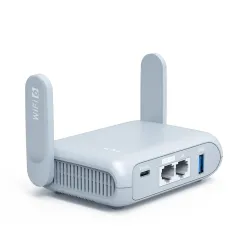
Mid-Range Pick: Netgear Nighthawk M6 ($250-300)
The Nighthawk M6 is a true standalone hotspot with a built-in 5G modem, 13-hour battery, SIM card slot, and a 2.8-inch touchscreen. It connects directly to cell towers without needing your phone at all. Pop in a local SIM or travel eSIM, and you have independent internet. Supports up to 32 devices.
This is the right choice if you want a completely phone-independent internet source and are willing to pay for it.
Check Netgear Nighthawk M6 on Amazon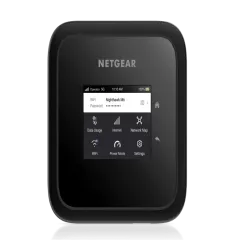
Premium Pick: Peplink MAX BR1 Pro ($500+)
The Peplink is the professional-grade option for van lifers and full-time nomads who need maximum reliability. Dual SIM failover, external antenna support, SpeedFusion bonding (combine multiple connections), and enterprise-grade firmware. It is overkill for most travelers but indispensable for anyone whose livelihood depends on never losing connectivity.
For a detailed deep-dive, see our Peplink MAX BR1 Pro review.
Check Peplink MAX BR1 Pro on Amazon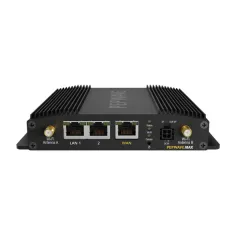
Best eSIMs for Tethering
Whether you tether from your phone or use a travel router, you need data. International roaming from your home carrier is almost always expensive. Travel eSIMs are the modern solution — instant activation, local rates, no SIM swapping.
Here are the two eSIM providers we recommend most for tethering:
Saily
Saily is built by Nord Security (the same company behind NordVPN). It covers 150+ countries with competitive pricing, and the app is clean and intuitive. Plans start from $3.99 for short trips. We have used Saily extensively for USB tethering to the GL.iNet Beryl AX with excellent results — speeds consistently hit 30-70 Mbps in Southeast Asia and Europe.
The key advantage of Saily is that tethering is explicitly allowed on all plans with no speed throttling. Some eSIM providers restrict tethering or throttle speeds when they detect hotspot usage. Saily does not.
Get Saily eSIM for Your Next TripAiralo
Airalo is the world’s largest eSIM marketplace with plans covering 200+ countries and regions. It offers both local and regional eSIMs, so you can buy a single plan for all of Europe or Southeast Asia. Pricing is competitive, and the wide selection means you can almost always find a plan that fits your exact itinerary.
Airalo also allows tethering on most plans. We have tethered to routers and laptops across dozens of countries without issues. The app makes it easy to manage multiple eSIMs if you move between regions frequently.
Browse Airalo eSIM PlansFor a comprehensive comparison of all major eSIM providers, see our best eSIM providers guide.
Our Recommendation by Traveler Type
After a year of testing both approaches in real travel conditions, here is our definitive recommendation for each traveler type:
The Vacationer (1-2 weeks, leisure travel)
Use phone tethering. You do not need a dedicated device for a short vacation. Grab a travel eSIM from Saily or Airalo, tether to your laptop when needed, and enjoy your trip without extra gear.
The Solo Digital Nomad (1-3 months, remote work)
Get a GL.iNet Beryl AX travel router ($90). USB tether your phone to the router for an upgraded experience: better WiFi range, VPN on all devices, and your phone charges while connected. The $90 investment pays for itself in the first week through better reliability and productivity.
The Traveling Couple (2 people, both working)
Get a dedicated hotspot or travel router. Two people means 4-6 devices. Tethering from one phone creates congestion and drains that person’s battery unfairly. A shared hotspot or travel router gives both of you reliable, independent connectivity.
The Van Lifer / Full-Time Nomad
Get a Peplink or high-end hotspot with external antenna support. You need all-day connectivity in variable signal conditions. Your phone cannot deliver that. The investment in a proper mobile internet setup is non-negotiable if you earn your living on the road. See our van life internet guide for the complete setup.
The Budget Backpacker
Use phone tethering with a travel eSIM. Keep costs low with an Airalo or Saily eSIM for data. Tether to your laptop in hostels and cafes when you need more screen real estate. Save the hotspot budget for experiences.
The Remote Work Team Leader
Get a dedicated hotspot plus a travel router. If you are managing a team and need bulletproof video call quality, do not risk it with tethering. A standalone hotspot for primary connectivity plus a travel router for VPN and network management gives you enterprise-grade reliability on the road.
Hybrid Approach: The Best of Both Worlds
The setup we personally use and recommend for most digital nomads is a hybrid approach: a travel router (GL.iNet Beryl AX) paired with your phone running a travel eSIM.
Here is how it works:
- Install a travel eSIM on your phone (Saily or Airalo)
- Connect your phone to the travel router via USB cable
- The router creates a WiFi network from your phone’s data
- All your devices connect to the router’s WiFi — laptop, tablet, partner’s phone, e-reader
- The router runs a VPN — every device is automatically protected
- Your phone charges through the USB connection
This approach gives you the convenience of tethering (no separate SIM needed, use your phone’s eSIM) with the performance of a dedicated hotspot (better range, more devices, router-level VPN, dedicated WiFi radio). Total cost: about $90 for the router plus your eSIM data plan.
When you are at a hotel or coworking space with WiFi, the same router connects to that WiFi instead, adds VPN protection, and serves your devices. You never need to reconfigure anything — your devices always connect to the router’s network name, and the router handles the upstream connection.
For a step-by-step guide on setting this up, see our travel router setup tutorial.
The Bottom Line
Phone tethering is not bad — it is just limited. For casual travelers, short trips, and light usage, tethering is perfectly adequate and costs nothing. Do not let anyone convince you that you need to spend $300 on a hotspot for a two-week vacation.
But if internet is part of your job, the limitations of tethering add up fast. Battery drain, overheating, limited device support, no VPN, poor range — these are not minor inconveniences when your income depends on staying connected. A $90 travel router or a $250 hotspot is not an expense; it is an investment in reliability that pays for itself within weeks.
Choose tethering when convenience matters most. Choose a dedicated hotspot when reliability matters most. And if you want both, the hybrid travel router approach gives you the best of each world.
Frequently Asked Questions
Is it better to tether or use a mobile hotspot?
It depends on your travel style. Phone tethering is better for solo travelers on short trips who only need to connect 1-2 devices. A dedicated mobile hotspot is better for remote workers, van lifers, group travelers, or anyone who needs to connect 5+ devices, wants better battery life, or needs reliable all-day connectivity. Tethering is free and convenient but drains your phone battery and overheats during extended use. A hotspot costs $80-500 but delivers dedicated performance without sacrificing your phone.
Does phone tethering use more data than a hotspot?
No. Both tethering and a mobile hotspot use the same amount of data for the same activities. The data consumption depends on what you do — video calls use 1-2GB/hour, streaming uses 3-5GB/hour, web browsing uses 50-100MB/hour. The source device does not affect data usage. However, some carriers throttle tethered data speeds or impose separate tethering data caps, which does not happen with a standalone hotspot using its own SIM card.
Does tethering drain my phone battery fast?
Yes. Tethering significantly drains your phone battery. WiFi tethering typically consumes 10-15% battery per hour under moderate use, meaning a full phone charge lasts 6-8 hours of hotspot use. USB tethering uses less battery (and can charge your phone simultaneously if connected to a laptop), but Bluetooth tethering is the most battery-efficient option at the cost of slower speeds. A dedicated hotspot has its own battery and leaves your phone untouched.
Can I tether my phone to a travel router?
Yes, and this is one of the most popular setups for digital nomads. You connect your phone to a travel router like the GL.iNet Beryl AX via USB cable. The router creates a full WiFi network from your phone's cellular data. Your phone charges through the USB connection while the router handles WiFi distribution, VPN encryption, and multi-device management. This combines the convenience of phone tethering with the performance of a dedicated router.
Is tethering free or does my carrier charge extra?
Most modern phone plans include tethering at no extra cost, but with limitations. Many carriers impose separate tethering data caps (typically 5-15GB) even on unlimited plans, and some throttle tethered speeds to 3-5 Mbps. International roaming plans often restrict tethering entirely. Using an eSIM from a provider like Saily or Airalo for travel data avoids these restrictions — most travel eSIMs allow tethering without caps or throttling.
How many devices can I connect to phone tethering?
Most phones support 5-10 simultaneous tethered devices via WiFi hotspot. iPhones support up to 5 devices, while Android phones typically support 8-10. However, performance degrades significantly after 3-4 connected devices. A dedicated mobile hotspot supports 10-32 devices with better performance distribution. If you regularly connect more than 3 devices, a dedicated hotspot or travel router is a better solution.
What is the fastest way to tether?
USB tethering is the fastest, typically delivering 80-100% of your cellular speed with minimal latency. WiFi tethering is second, usually delivering 60-80% of cellular speed with slightly higher latency. Bluetooth tethering is the slowest at roughly 2-3 Mbps maximum. For remote work, USB tethering to your laptop provides the most stable and fastest connection. For multiple devices, WiFi tethering is the most practical.
Do I need a mobile hotspot if I have unlimited data?
Having unlimited data solves the data supply problem, but a mobile hotspot solves different problems: dedicated battery, better WiFi range, VPN support for all devices, more stable connections for 5+ devices, and not overheating your phone. If you only connect your laptop occasionally, unlimited data with tethering is fine. If you work remotely full-time or travel with a partner who also needs connectivity, a dedicated hotspot pays for itself quickly.