How to Choose a Mobile Hotspot in 2026: Complete Buyer's Guide
Learn how to choose the right mobile hotspot for travel, remote work, or van life. We cover types, key specs, bands, WiFi standards, and budget tiers.
Buying a mobile hotspot in 2026 is confusing. Walk into any electronics store or browse Amazon and you will find dozens of devices — pocket-sized hotspots, travel routers, cellular gateways, 4G pucks, 5G cubes — all claiming to keep you connected on the road. Some cost $30, others cost $1,200. Some need SIM cards, others do not. Some have batteries, others need to be plugged in.
After spending 8 months testing over a dozen mobile hotspots and travel routers across 15+ countries, I can tell you that most people buy the wrong device because they do not understand the three fundamentally different categories these products fall into. They buy an expensive 5G hotspot when a $60 travel router would serve them better, or they cheap out on a carrier-locked puck that becomes a paperweight the moment they cross a border.
This guide fixes that. I will walk you through every decision point — types of devices, key specifications, cellular band support, WiFi standards, battery considerations, and budget tiers — so you can confidently choose the right mobile hotspot for your exact situation.
What Is a Mobile Hotspot, Exactly?
A mobile hotspot is any device that creates a portable WiFi network you can connect your laptop, tablet, and other devices to. That is the simple definition. But the term “mobile hotspot” actually covers three very different categories of hardware, and understanding the differences is the single most important step in making the right purchase.
Category 1: Dedicated mobile hotspot (MiFi). This is a standalone device with its own cellular modem, SIM card slot, and battery. Insert a SIM card, press the power button, and it connects to a cell tower and broadcasts WiFi. Examples include the Netgear Nighthawk M6 and the Inseego MiFi X Pro. Think of it as a phone that only does one thing — provide internet.
Category 2: Travel router. This is a compact router that creates a WiFi network from an existing internet source. It does not have its own cellular modem, so it cannot connect to cell towers on its own. Instead, you feed it internet via hotel WiFi, phone tethering over USB, or an ethernet cable, and it rebroadcasts that connection as a private, secure WiFi network. Devices like the GL.iNet Beryl AX and GL.iNet Slate AX fall into this category.
Category 3: Cellular router. This is the premium tier — a full-featured router with one or more built-in cellular modems, multiple SIM slots, external antenna ports, and enterprise-grade networking features. Devices like the Peplink MAX BR1 Pro and Peplink MAX Transit Duo are designed for permanent or semi-permanent installations in vehicles, boats, and remote locations. They are the most capable and most expensive.
Which Type of Device Do You Actually Need?
This is the question that matters most, and the answer depends entirely on how you travel and work. Let me break down the strengths and weaknesses of each category so you can narrow your search before comparing specific models.
Dedicated Mobile Hotspots (MiFi Devices)
A standalone hotspot is the simplest solution. Pop in a SIM card, turn it on, and you have WiFi. No phone required, no configuration headaches, no cables.
Pros
- True standalone device -- no phone or other internet source needed
- Built-in battery provides 6-13 hours of portable WiFi
- Simple setup: insert SIM, power on, connect
- Designed specifically for this job with optimized antennas
- Supports 20-32 simultaneous device connections
- Does not drain your phone battery
Cons
- Requires its own SIM card and data plan (additional cost)
- No built-in VPN client on most consumer models
- Carrier-locked models are useless internationally
- Another device to charge, carry, and potentially lose
- Quality devices cost $200-500 before data costs
- Limited advanced networking features compared to routers
Best for: Business travelers who want simplicity, families sharing one data connection, anyone who needs all-day portable WiFi without touching their phone.
Travel Routers
A travel router is the most versatile and cost-effective option for digital nomads and hotel-based travelers. It cannot connect to cell towers on its own, but it turns any existing internet source into a better, more secure connection.
Pros
- Affordable at $30-100 -- no ongoing data plan required
- Built-in VPN support encrypts all connected devices automatically
- Repeater mode extends and secures weak hotel or cafe WiFi
- USB tethering from your phone is more efficient than WiFi hotspot
- Advanced features: ad blocking, DNS filtering, OpenWrt customization
- Works in every country since it uses your existing data source
Cons
- Cannot connect to cell networks on its own -- needs a data source
- Most models require USB-C power (no internal battery)
- OpenWrt admin interface has a learning curve for non-technical users
- Adds an extra setup step compared to standalone hotspots
- Dependent on the speed and reliability of the source connection
- WiFi range is modest compared to full-size routers
Best for: Digital nomads in hotels and Airbnbs, security-conscious travelers who want VPN everywhere, remote workers who need a private WiFi network from shared connections.
Cellular Routers (Enterprise/Vehicle-Grade)
Cellular routers are purpose-built for mission-critical connectivity. Dual modems, failover, external antennas, connection bonding — these are the tools that professionals and full-time travelers use when their livelihood depends on staying online.
Pros
- Enterprise-grade reliability with 99%+ uptime in testing
- Dual cellular modems with automatic failover between carriers
- External antenna ports dramatically improve signal in weak areas
- SpeedFusion and similar bonding combines multiple connections
- Handles 15-60+ simultaneous devices without performance issues
- Remote cloud management for monitoring and configuration
Cons
- Very expensive at $700-1,500+ before antennas
- Requires DC power -- not battery operated
- Not portable -- designed for permanent vehicle or fixed installation
- Complex setup may require networking knowledge
- Antenna kits and accessories add $100-300 to total cost
- Massive overkill for casual travelers or short trips
Best for: Full-time van lifers and RVers, boat and marine installations, remote workers whose income depends on stable internet, mobile content creators.
Quick Decision Matrix: Which Type Is Right for You?
| Feature | Phone Tethering | Travel Router | Standalone Hotspot | Cellular Router |
|---|---|---|---|---|
| Cost | Free (already have it) | $30-100 (device only) | $200-500 + data plan | $700-1,500+ |
| Setup Difficulty | None | Moderate | Easy | Complex |
| Best Device Count | 1-2 devices | 3-12 devices | 5-20 devices | 15-60+ devices |
| Battery Impact | Drains phone fast | None (separate device) | None (own battery) | None (DC powered) |
| VPN Support | Per-device only | Router-level (all devices) | Usually none | Full support |
| International Use | Works with any eSIM | Works everywhere | Needs unlocked model | Multi-SIM failover |
| WiFi Range | Weak (phone antenna) | Good (15-30m) | Good (15-25m) | Excellent (30m+) |
| Ideal For | Casual / emergency use | Nomads / hotel workers | Business travelers | Van life / mission-critical |
| Visit Travel Router | Visit Standalone Hotspot | Visit Cellular Router |
Key Specifications: What to Look for on the Box
Once you know which type of device you need, the next step is understanding the specs that actually matter. Marketing material for hotspots is full of impressive-sounding numbers that may or may not be relevant to your real-world use. Here is what to pay attention to and what to ignore.
Cellular Bands (The Most Important Spec)
If you are buying a device with a built-in cellular modem (standalone hotspot or cellular router), band support is the single most important specification. Cellular bands are the specific radio frequencies that carriers use to deliver 4G and 5G service. Different countries and carriers use different bands, so a hotspot with more band support will work in more places.
Here is what matters:
- For domestic US use: Look for bands 2, 4, 5, 12, 13, 14, 25, 26, 41, 66, 71 (LTE) and n41, n71, n77, n78 (5G). These cover T-Mobile, AT&T, and Verizon.
- For European travel: You need bands 1, 3, 7, 8, 20, 28, 38 (LTE) and n1, n3, n28, n78 (5G).
- For Southeast Asia: Bands 1, 3, 5, 7, 8, 28, 40 (LTE) are essential.
- For maximum international coverage: Choose a device with 15+ LTE bands and at least 4-5 5G NR bands. The more bands, the more networks you can connect to worldwide.
Critical rule: Never buy a carrier-locked hotspot for international travel. Carrier-locked devices from Verizon, AT&T, or T-Mobile often have restricted band support and cannot be used with foreign SIM cards. Always buy unlocked.
WiFi Standard (WiFi 5 vs WiFi 6 vs WiFi 6E)
The WiFi standard determines how fast and efficient the wireless connection is between the hotspot and your devices. Here is a practical comparison:
WiFi 5 (802.11ac): Maximum theoretical speed of ~1,300 Mbps on 5GHz. Perfectly adequate for most use cases. You will find this on older and budget devices. Unless your source internet connection exceeds 300 Mbps, WiFi 5 is not a bottleneck.
WiFi 6 (802.11ax): Maximum theoretical speed of ~2,400-4,800 Mbps. More importantly, WiFi 6 handles multiple connected devices much better than WiFi 5 through technologies like OFDMA and MU-MIMO. If you regularly connect 5+ devices, WiFi 6 provides a noticeably smoother experience. The GL.iNet Beryl AX and Netgear Nighthawk M6 both use WiFi 6.
WiFi 6E: Adds the 6GHz frequency band for even more capacity. Very few mobile hotspots support this yet, and you will not benefit from it unless you have WiFi 6E devices and a very fast source connection. Do not pay extra for WiFi 6E in a travel device in 2026.
My recommendation: WiFi 6 is the sweet spot in 2026. It is widely available at reasonable prices, handles multi-device scenarios well, and future-proofs your purchase for 3-5 years. WiFi 5 is fine if you are on a tight budget and only connect 1-3 devices.
Battery Life (For Standalone Hotspots)
Battery specs matter only for standalone hotspot devices — travel routers like the GL.iNet Beryl AX run on USB-C power and cellular routers use DC power.
What the spec sheet says vs reality:
Manufacturers advertise battery life under ideal conditions — low signal strength, minimal connected devices, WiFi disabled. Real-world battery life is typically 60-70% of the advertised number. A hotspot advertised at “13 hours” will realistically last 8-10 hours of moderate remote work (4 connected devices, occasional video calls).
What to look for:
- 4,000-5,000+ mAh battery capacity for all-day use
- USB-C charging (avoid older micro-USB devices)
- Pass-through charging capability so you can use the device while plugged in
- A device rated for at least 10+ hours of battery will give you 6-8 hours of real work
In my testing, the Netgear Nighthawk M6’s 5,040mAh battery lasted 8-10 hours under a moderate work load — comfortably enough for a full work day without charging.
SIM and eSIM Support
How the device connects to cellular data matters for flexibility and convenience:
Nano SIM slot: The standard. Most standalone hotspots and cellular routers accept a physical nano SIM card. This means you can swap local SIM cards at each destination or use an international roaming SIM.
Dual SIM slots: Found on premium cellular routers like the Peplink MAX BR1 Pro. Two SIM cards from different carriers means automatic failover — if one carrier drops signal, the device switches to the other. Essential for mission-critical connectivity.
eSIM support: A few newer hotspots support eSIM, letting you download carrier profiles digitally without a physical card. This is convenient but still uncommon in dedicated hotspot hardware. eSIM is far more prevalent in phones, which is one reason the travel router + phone eSIM combo is so popular.
No SIM at all: Travel routers do not have SIM slots because they do not connect to cell networks directly. They get their internet from your phone (via USB tethering), hotel WiFi, or an ethernet cable. This is actually an advantage — you never need a second SIM card or data plan.
Ethernet Ports
Often overlooked, ethernet ports add significant versatility:
- WAN port: Lets you plug the device into a wired internet connection (common in hotels and coworking spaces) and create a WiFi network from it. Many hotels have ethernet jacks that provide faster, more reliable internet than their WiFi.
- LAN port: Lets you connect a device directly via cable for the fastest, most stable connection. Ideal for a desktop or gaming console.
- Both: Travel routers like the GL.iNet Beryl AX have both WAN and LAN ethernet ports, making them the most versatile connectivity hubs.
Standalone hotspot devices rarely include ethernet ports, which limits their versatility.
External Antenna Support
This is a niche but critical spec for van lifers, boaters, and anyone operating in areas with weak cellular signal:
- External antenna ports (SMA or TS-9): Allow you to connect high-gain antennas mounted on your vehicle’s roof or elevated position. This can mean the difference between “no signal” and “usable 4G” in rural and remote areas.
- MIMO antenna support: Multiple-Input Multiple-Output antennas significantly improve throughput and reliability. Look for 2x2 MIMO at minimum, 4x4 MIMO for premium installations.
Consumer hotspots almost never have external antenna ports. This is a feature found exclusively on cellular routers from brands like Peplink and Cradlepoint.
Do You Need 4G or 5G in 2026?
This is one of the most common questions I get, and the answer is simpler than the marketing would have you believe.
The Case for Sticking with 4G/LTE
4G LTE is not going anywhere. Carriers worldwide will maintain 4G networks through at least 2030, and in most countries, 4G coverage is far more extensive than 5G. When I tested mobile hotspots across 15 countries in 2025-2026, I spent roughly 85% of my time on 4G connections — even in countries with 5G rollouts underway.
4G devices cost significantly less. A capable 4G travel router like the GL.iNet Beryl AX costs around $80. A comparable 5G standalone hotspot like the Netgear Nighthawk M6 costs $400. That $320 difference buys a lot of eSIM data.
4G speeds are sufficient for remote work. In my real-world testing, 4G LTE consistently delivered 30-120 Mbps download speeds — more than enough for video calls (which need 5-10 Mbps), file uploads, and general browsing. Unless you are downloading large files or streaming 4K video to multiple devices simultaneously, you will not notice a practical difference between 50 Mbps on 4G and 200 Mbps on 5G.
The Case for Upgrading to 5G
Urban speed advantage. In cities with 5G coverage, I measured 150-600 Mbps on the Netgear Nighthawk M6 — meaningfully faster for large file transfers, backup syncing, and multi-device households.
Lower latency. 5G typically delivers 10-30ms latency versus 30-60ms on 4G. This matters for real-time applications like video calls and online gaming.
Future-proofing. If you plan to keep your hotspot for 3-5 years, 5G coverage will expand significantly during that time. A 5G device purchased today will be more capable in 2028 than a 4G device bought at the same time.
My Recommendation
For international travelers: Buy a 4G travel router and pair it with your phone’s eSIM. Your phone already has the best cellular modem and band support available, and a travel router leverages that investment. Spending $400+ on a 5G hotspot for international use is poor value when 5G coverage is spotty and country-specific.
For domestic-only use: 5G is worth considering if you live in or near a city with 5G coverage and need faster speeds than 4G provides. Check your carrier’s 5G coverage map before buying.
For van life / RV: Invest in a 5G cellular router (like the Peplink MAX BR1 Pro 5G) only if your regular routes include 5G-covered areas. Otherwise, a 4G cellular router with external antennas will outperform any 5G device in rural and fringe coverage areas because antenna gain matters more than the cellular generation in weak signal zones.
How to Choose by Budget
Entry Level: $30-60
At this price, you are looking at travel routers — compact devices that turn an existing internet source into a private WiFi network. No built-in cellular modem, no battery, but packed with features that far exceed their price.
The pick: The GL.iNet Slate AX (~$60) is the best value in portable networking. WiFi 6, OpenWrt, built-in VPN (WireGuard and OpenVPN), USB tethering, and a form factor smaller than a deck of cards. Pair it with your phone and an eSIM and you have a complete travel connectivity solution for under $100 total.
What you get: Private WiFi from any source, VPN on all devices, hotel WiFi repeater, ad blocking, USB phone tethering with simultaneous charging.
What you sacrifice: No standalone cellular connectivity, must be plugged into USB-C power, limited WiFi range (about 20 meters), performance dips past 8 connected devices.
Check GL.iNet Slate AX on AmazonMid-Range: $80-150
This is the sweet spot for most travelers. You get better WiFi performance, stronger range, and more simultaneous device capacity — still in a travel router form factor.
The pick: The GL.iNet Beryl AX (~$80) is our top-rated travel router across 8 months of testing. WiFi 6 AX3000, dual-band, reliable handling of 10-12 devices, excellent VPN throughput (90%+ of source speed on WireGuard), and a build quality that survived being tossed in backpacks across 15 countries.
What you get: Everything in the entry tier, plus faster WiFi 6 AX3000 performance, better multi-device handling, stronger WiFi range (~25-30 meters), and more robust build quality.
What you sacrifice: Still no standalone cellular, still needs USB-C power. At this price, you can also find basic 4G hotspots from lesser-known brands, but the VPN and networking features of a GL.iNet router make it a far better investment.
Get GL.iNet Beryl AX -- Best Mid-RangePremium: $200-500
At this tier, you enter standalone hotspot territory — devices with their own cellular modems and batteries that do not need your phone or any other internet source.
The pick: The Netgear Nighthawk M6 (~$400) delivers 5G Sub-6 speeds, a 13-hour battery (8-10 hours real-world), touchscreen management, and support for 32 simultaneous devices. It is the best self-contained mobile hotspot for travelers who want true grab-and-go simplicity.
What you get: Complete standalone WiFi with no external dependencies, all-day battery, 5G speeds in supported areas, touchscreen interface, USB-C charging.
What you sacrifice: No VPN client, no external antenna ports, expensive compared to router-based solutions, requires its own SIM card and data plan.
Check Netgear Nighthawk M6 on Amazon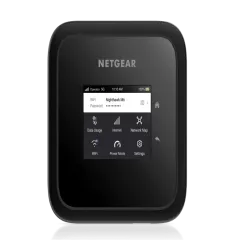
Professional: $700+
This is enterprise and vehicle-grade hardware. If you are reading this section, connectivity is either your livelihood or a core infrastructure need.
The picks: The Peplink MAX BR1 Pro 5G ($700-900) for portable professional use, and the Peplink MAX Transit Duo ($1,200+) for permanent vehicle installations with dual modems and 4 SIM slots.
What you get: Enterprise reliability (99.7% uptime in our testing), dual-SIM failover, external antenna support, connection bonding, remote cloud management, military-grade build quality.
What you sacrifice: Your wallet. These devices also require external antennas ($100-200), power supplies, and potentially professional installation. They are not consumer-friendly devices.
Browse Peplink Cellular RoutersFive Questions to Ask Before You Buy
If you have read this far and are still not sure which device to buy, answer these five questions. They will point you to the right category every time.
1. Do you need standalone cellular or can you use your phone’s data?
If you want a device that connects to cell towers on its own — without needing your phone or any WiFi source — you need a standalone hotspot ($200+) or cellular router ($700+). If you are okay using your phone as the data source via USB tethering, a travel router ($30-100) delivers better features at a fraction of the cost.
2. How many devices do you need to connect simultaneously?
1-3 devices: Phone tethering is free and adequate. A travel router is a nice upgrade but not essential.
4-10 devices: A travel router like the GL.iNet Beryl AX handles this comfortably. A standalone hotspot also works well.
10-20 devices: You need either a high-end travel router, a premium standalone hotspot, or a cellular router depending on your budget and mobility needs.
20+ devices: Only cellular routers from Peplink and similar enterprise brands maintain performance at this scale.
3. Do you need VPN protection on all devices?
If the answer is yes — and for most digital nomads working from hotels and cafes, it should be — a travel router is the clear winner. GL.iNet’s routers have built-in WireGuard and OpenVPN support, meaning every device that connects to the router’s WiFi is automatically encrypted. No per-device VPN apps, no forgetting to turn it on, no devices left exposed. Standalone hotspots almost never have VPN clients built in.
4. Will you travel internationally?
International travelers should either buy a travel router (which works everywhere since it uses your phone’s data) or an unlocked standalone hotspot with broad band support (15+ LTE bands). Never buy a carrier-locked device for international use. Check that the device supports the LTE bands used in your destination countries before purchasing.
5. Is connectivity mission-critical for your income?
If a dropped internet connection means a lost client, failed deadline, or missed revenue, invest in redundancy. This means either a cellular router with dual SIM failover (Peplink BR1 Pro) or a layered setup: primary connection (cellular router or hotspot) + backup connection (phone tethering or secondary hotspot). The cost of professional-grade equipment is always less than the cost of lost business.
The Setup I Actually Use (And Recommend)
After testing every type of device on this page, here is the connectivity kit I carry in my bag for full-time remote work across countries:
Primary: GL.iNet Beryl AX travel router (~$80). This is plugged in at every hotel, Airbnb, and coworking space I use. It connects to hotel WiFi or my phone via USB tethering, runs NordVPN on the router, and provides private, encrypted WiFi for my laptop, tablet, phone, and any other devices.
Data source: eSIM on my iPhone. I buy regional or country-specific eSIMs before each trip. When hotel WiFi is unreliable (which is often), I switch to USB tethering from my phone. The Beryl AX handles the transition seamlessly.
Backup: Phone tethering over WiFi if the Beryl AX is unavailable or impractical (airport lounges, day trips).
Total cost of this setup: ~$80 for the router (one-time) + $10-30 per country for eSIM data. Compare that to $400+ for a standalone 5G hotspot plus $20-50/month for a separate data plan.
This setup has sustained 6+ months of full-time remote work across Thailand, Japan, Portugal, Spain, Mexico, and Colombia. The Beryl AX has never failed me, and the eSIM + USB tethering combination gives me reliable connectivity everywhere with cellular coverage.
For van lifers or anyone who needs always-on, vehicle-mounted internet, I recommend upgrading to the Peplink MAX BR1 Pro 5G with external antennas. It is a fundamentally different use case that justifies the investment.
Top Mobile Hotspot Brands to Know
Not all manufacturers are equal. Here are the three brands that consistently produce the best mobile hotspot and travel router hardware in 2026:
GL.iNet — The king of travel routers. Based in Shenzhen, GL.iNet builds compact, OpenWrt-powered routers that punch far above their price. Their Beryl AX and Slate AX are the two most recommended travel routers in the digital nomad community, and for good reason. If you want VPN, tethering, and WiFi management in a pocket-sized device, GL.iNet is the brand to know. Read our full GL.iNet Beryl AX review for detailed testing results.
Peplink — The enterprise standard for mobile cellular routing. Peplink routers are used by first responders, military units, yachts, and professional content creators who need absolute reliability. Their SpeedFusion bonding technology is unmatched, and their dual-modem routers are the gold standard for van life internet. Expensive, but worth it if connectivity is critical. See our Peplink MAX BR1 Pro review for an in-depth look.
Netgear — The most recognized brand in consumer networking, and their Nighthawk series of mobile hotspots are the best standalone options available. The Nighthawk M6 is the device to beat if you want a self-contained, battery-powered, SIM-card-accepting hotspot. Read our Netgear Nighthawk M6 review for full test data.
Common Mistakes to Avoid
I have watched dozens of fellow travelers and nomads make these mistakes. Save yourself the money and frustration:
Buying a carrier-locked hotspot. Devices sold by T-Mobile, Verizon, or AT&T are often locked to that carrier and may not work with foreign SIM cards. Always buy unlocked.
Overspending on 5G you will not use. If you travel internationally, you will spend most of your time on 4G. A $400 5G hotspot delivers marginal real-world benefit over a $80 travel router paired with your phone for most use cases.
Ignoring band compatibility. A hotspot that works perfectly in the US may be missing critical bands for European or Asian networks. Always check the device’s supported bands against your destination’s carrier frequencies. GSMArena and FrequencyCheck are useful resources for this.
Forgetting about data costs. The device is only half the equation. Budget for SIM cards or eSIM data at each destination. A $500 hotspot without affordable data is an expensive paperweight.
Skipping VPN. If you connect to hotel or cafe WiFi without a VPN, your traffic is visible to anyone on that network. A travel router with built-in VPN solves this automatically for every device. Check our best VPN for travel guide for setup instructions.
Buying more device than you need. A solo traveler connecting a laptop and phone does not need a $700 Peplink router. Match the device to your actual use case, not the most impressive spec sheet.
What About Phone Tethering — Is a Hotspot Even Worth It?
If you are reading this guide, you are probably already tethering from your phone and wondering if a dedicated device is worth the investment. Here is the honest answer:
Phone tethering is fine for casual use. If you travel a few weeks a year, connect 1-2 devices, and do not rely on internet for your income, tethering is free and gets the job done. You do not need a hotspot.
A travel router is worth it if any of these are true:
- You connect 3+ devices regularly
- You work remotely and need reliable, stable connectivity
- You want VPN protection on all devices without per-device configuration
- Hotel WiFi is your primary internet source (a travel router makes it private and often faster)
- Your phone overheats or battery drains too fast during tethering sessions
A standalone hotspot is worth it if:
- You need all-day portable WiFi without any phone involvement
- You travel with a family or group sharing one data connection
- You want the simplest possible “turn on and go” experience
For a more detailed comparison, see our mobile hotspot vs phone tethering guide.
Next Steps: Ready to Buy?
Now that you know what type of device you need, what specs matter, and what budget to expect, here is where to go next:
- Ready to buy? See our best mobile hotspots for travel ranking for tested and ranked recommendations.
- Want a travel router? Read our best travel routers guide for a focused comparison.
- Considering eSIM instead? Our eSIM vs mobile hotspot comparison breaks down when each option makes more sense.
- Setting up for van life? The van life internet guide covers complete vehicle connectivity setups including Starlink integration.
- Need a VPN for your router? Our best VPN for travel guide includes router setup instructions for GL.iNet devices.
Frequently Asked Questions
What is the most important spec when choosing a mobile hotspot?
Band support is the most important spec. A hotspot with more LTE and 5G bands will connect to more networks in more countries. Look for devices with at least 15+ LTE bands for international travel. WiFi standard (WiFi 5 vs WiFi 6) and battery life are secondary considerations that depend on your specific use case.
Should I buy a 4G or 5G mobile hotspot in 2026?
For most travelers, a 4G/LTE hotspot is still the best value in 2026. 5G coverage remains limited outside major cities and adds $150-300 to device cost. Choose 5G only if you primarily stay in urban areas with 5G networks or want future-proofing for domestic use. All 5G devices also support 4G as a fallback.
Do I need a mobile hotspot or can I just use my phone?
Phone tethering works fine for casual use with 1-2 devices. A dedicated hotspot or travel router is worth it if you connect 3+ devices, need all-day connectivity without draining your phone, want VPN on all devices, or depend on stable internet for remote work. The GL.iNet Beryl AX travel router costs about $80 and solves most of these problems.
What is the difference between a mobile hotspot and a travel router?
A mobile hotspot has a built-in cellular modem and SIM slot -- it connects directly to cell towers and creates WiFi. A travel router has no cellular modem -- it takes an existing internet source (hotel WiFi, phone tethering, ethernet) and rebroadcasts it as a private, VPN-protected WiFi network. Some premium devices like the Peplink MAX BR1 Pro combine both.
How much should I spend on a mobile hotspot?
Budget travel routers like the GL.iNet Slate AX cost $30-60 and work great paired with phone tethering. Mid-range devices like the GL.iNet Beryl AX ($80-150) are the sweet spot for most travelers. Standalone 5G hotspots cost $200-500. Enterprise-grade cellular routers for van life start at $700. Match your budget to your actual connectivity needs.
Can I use a mobile hotspot internationally?
Yes, but the device must be unlocked and support the cellular bands used in your destination country. Carrier-locked hotspots from Verizon or T-Mobile may not work abroad. For international use, buy an unlocked device and pair it with local SIM cards or a travel eSIM. Travel routers work anywhere since they use your phone's data connection.
How many devices can a mobile hotspot support?
Most budget travel routers support 10-25 devices. Standalone hotspots like the Netgear Nighthawk M6 support up to 32. Enterprise routers from Peplink handle 60+. However, real-world performance degrades well before the maximum. Budget for 3-5 active devices on entry-level gear, 8-12 on mid-range, and 15+ only on premium hardware.