Best Portable Keyboards & Mice for Digital Nomads 2026: Lightweight Picks
We tested 10+ portable keyboards and mice across cafes, coworking spaces, and flights. The best compact, wireless options for remote work on the road.
TLDR: Best keyboard for most nomads: Logitech K380 ($40) — 2-year battery, multi-device Bluetooth, lightweight. Best premium: MX Keys Mini ($99). Best mouse: Logitech Pebble Mouse 2 ($25) for value, MX Anywhere 3S ($80) for precision. Best combo: K380 + Pebble at $65 total.
A laptop stand without an external keyboard is like headphones without music — technically functional, but you are missing the point. You have raised your screen to eye level for proper ergonomics (you have, right?), and now your built-in keyboard sits at chin height while your wrists crane upward at an angle that makes your physiotherapist wince.
The fix is simple: a compact wireless keyboard and a travel mouse. Together they weigh under a pound, cost $50-180 depending on your choices, and complete the ergonomic travel workstation that keeps your neck, back, and wrists healthy through years of cafe-to-coworking nomad life.
We have tested over a dozen portable keyboards and mice across Lisbon coworking spaces, Chiang Mai cafes, Mexico City Airbnbs, and more than a few airplane tray tables. Here is what actually works — and what is not worth the weight in your pack.
Heading to one of those destinations? Our Thailand internet guide and Portugal internet guide cover coworking connectivity so you can plan your setup before you arrive.
Already have a laptop stand? Perfect. If not, start with our best portable laptop stands guide — a stand plus an external keyboard is the single biggest ergonomic upgrade you can make.
Quick Comparison: Best Portable Keyboards
| Feature | Logitech MX Keys Mini | Logitech K380 | iClever BK08 | Arteck HB030B | NuPhy Air60 V2 |
|---|---|---|---|---|---|
| Weight | 17.9 oz (506g) | 14.3 oz (423g) | 7.1 oz (200g) | 5.9 oz (167g) | 16 oz (454g) |
| Connectivity | Bluetooth (3 devices) | Bluetooth (3 devices) | Bluetooth (3 devices) | Bluetooth | BT / 2.4GHz / USB-C |
| Battery | 10 days (5mo w/o backlight) | 2 years | 60 days | 6 months | 30-90 hours |
| Charging | USB-C | 2x AAA batteries | USB-C | USB-C | USB-C |
| Backlit | Yes — smart proximity | No | No | Yes — 7 colors | Yes — RGB |
| Price | ~$99 | ~$40 | ~$40 | ~$20 | ~$130 |
| Our Pick | Best Overall | Best Value | Best Foldable | Best Budget | Best Mechanical |
| Visit Logitech MX Keys Mini | Visit Logitech K380 | Visit iClever BK08 | Visit Arteck HB030B | Visit NuPhy Air60 V2 |
Quick Comparison: Best Travel Mice
| Feature | Logitech MX Anywhere 3S | Logitech Pebble Mouse 2 | Apple Magic Mouse | Logitech MX Master 3S |
|---|---|---|---|---|
| Weight | 3.5 oz (99g) | 2.6 oz (76g) | 3.5 oz (99g) | 5.0 oz (141g) |
| Connectivity | BT / Logi Bolt | BT / Logi Bolt | Bluetooth | BT / Logi Bolt |
| Battery | 70 days | 2 years | ~1 month | 70 days |
| Charging | USB-C | 1x AA battery | USB-C (on bottom) | USB-C |
| DPI | 8,000 | 4,000 | 1,300 | 8,000 |
| Quiet Clicks | Yes | Yes | Yes | Yes |
| Price | ~$80 | ~$25 | ~$79 | ~$80 |
| Our Pick | Best Overall | Best Value | Best for Mac | Best Full-Size |
| Visit Logitech MX Anywhere 3S | Visit Logitech Pebble Mouse 2 | Visit Apple Magic Mouse | Visit Logitech MX Master 3S |
How We Tested
We evaluated each keyboard and mouse across six criteria specific to the nomad workflow:
- Key feel and travel depth. How does it feel typing 3,000+ words in a single session? Shallow, mushy keys cause fatigue. Responsive keys do not.
- Weight and packability. Does it fit in a daypack alongside a laptop, stand, and charger without adding noticeable bulk?
- Battery life. Can you leave the charging cable at home for a week-long trip? A month? A year?
- Connectivity and switching. Does it pair quickly with your laptop, tablet, and phone? Can you switch between devices without re-pairing?
- Noise level. Can you type in a quiet Lisbon cafe without drawing glares? The click-clack of a loud keyboard in a shared space is a social crime.
- Surface tracking (mice). Does the mouse track accurately on glass cafe tables, dark wood, and the wobbly bamboo desks common in Bali coworking spaces?
Each device was used as a primary input device for a minimum of two weeks.
Best Portable Keyboards for Travel
1. Logitech MX Keys Mini — Best Overall
The Logitech MX Keys Mini is the keyboard we reach for every morning. The sculpted key caps cradle your fingertips, the scissor mechanism delivers satisfying tactile feedback with quiet actuation, and the smart backlighting illuminates when your hands approach and dims when they leave. Typing on it feels remarkably close to a premium laptop keyboard — except with better key travel and none of the ergonomic compromises.
At 17.9 oz (506g), it is not the lightest keyboard on this list. But that weight comes from a solid metal top plate that prevents flex and gives the keyboard a premium, planted feel on any surface. We have never had the MX Keys Mini slide or wobble on a desk, which is more than we can say for lighter plastic alternatives that skitter across polished cafe tables.
Multi-device switching is seamless. Three Bluetooth buttons along the top row switch between your laptop, tablet, and phone instantly. We routinely jump between MacBook and iPad without missing a beat. USB-C charging takes about two hours for a full charge that lasts roughly 10 days with backlighting on, or up to five months with backlighting off.
The trade-off: At $99, it costs 2-5 times more than the alternatives below. And at just over a pound, weight-obsessed ultralight packers will notice it in the bag. But for writers, developers, and anyone who types as their primary work, the comfort difference over a full work day is significant enough to justify both the cost and the weight. Keep your gear organized with a travel tech organizer — the MX Keys Mini, a mouse, and a couple cables fit neatly into the BAGSMART Large or Bellroy Tech Kit.
Pros
- Best key feel of any compact wireless keyboard we tested
- Smart backlighting with proximity sensor
- Multi-device Bluetooth — switch between 3 devices instantly
- USB-C rechargeable with excellent battery life
- Metal build feels premium and stays planted on desks
Cons
- Heaviest keyboard on this list at 17.9 oz
- Premium price at $99
- No 2.4GHz wireless option — Bluetooth only
- Not foldable or collapsible for transport
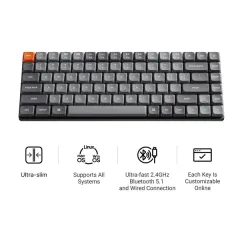
2. Logitech K380 — Best Value
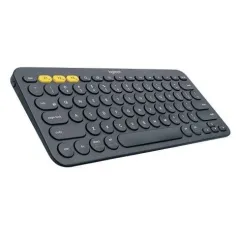
The Logitech K380 is the keyboard we recommend to every digital nomad who asks. At roughly $40, it delivers 80% of the MX Keys Mini experience at less than half the price and two-thirds the weight.
The round keys look unusual but feel natural within minutes. Key travel is adequate for all-day typing — not as satisfying as the MX Keys Mini, but noticeably better than most tablet keyboards and foldable options. The three-device Bluetooth switching works identically to its pricier sibling, and the two AAA batteries last an astonishing two years, which means you never think about charging.
Why we love it for travel: At 14.3 oz (423g) with batteries, it is lighter than a can of soda. The compact, rounded design slides into a daypack easily and survives the daily battering of backpack life. We have used one across 15+ countries over two years and the only sign of wear is slightly shiny key caps.
Where it falls short: No backlighting means you are typing blind in dim Airbnbs and red-eye flights. The round keys and slightly smaller layout take a day to adjust to if you are coming from a standard keyboard. And the plasticky build, while lightweight, does not feel as confidence-inspiring as the MX Keys Mini’s metal chassis.
Pros
- Excellent value at $40
- 2-year battery life on AAA batteries — never worry about charging
- Multi-device Bluetooth switching between 3 devices
- Compact and lightweight at 14.3 oz
- Available in multiple colors
Cons
- No backlighting
- Round keys take a short adjustment period
- Plastic build feels less premium than MX Keys Mini
- AAA batteries add a tiny ongoing cost
3. iClever BK08 — Best Foldable
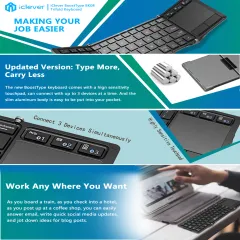
The iClever BK08 is the keyboard for minimalists who want something they can fold up and slip into a pocket. It folds into thirds, collapsing to roughly 6.2 x 3.6 x 0.7 inches — slightly smaller than a large smartphone. At 7.1 oz (200g), it is one of the lightest options on this list and includes a built-in touchpad on the right panel, which means you can leave the mouse at home for light tasks.
The tri-fold hinge mechanism is satisfying — snap it open and it auto-powers on, fold it closed and it shuts off. Three-device Bluetooth pairing covers your laptop, tablet, and phone. USB-C charging provides about 60 days of battery life, which is excellent for a keyboard this small.
The reality check: The key caps are roughly 80% the size of a standard keyboard, and the key travel is noticeably shallow. If you type professionally for 6+ hours a day, you will feel the compromise by mid-afternoon. The touchpad is functional for cursor movement but lacks the precision of a real mouse. Think of the BK08 as a capable secondary keyboard for travel days, plane sessions, and tablet work — not a full-time replacement for a proper keyboard.
Best for: Nomads who prioritize packability above all else, tablet-first workers, and anyone who wants a keyboard they can genuinely fit in a jacket pocket.
Pros
- Folds to pocket size — 6.2 x 3.6 inches
- Built-in touchpad eliminates the need for a mouse
- Extremely light at 7.1 oz
- USB-C charging with 60-day battery
- Multi-device Bluetooth (3 devices)
Cons
- Smaller key caps — not comfortable for all-day typing
- Shallow key travel causes fatigue during long sessions
- Touchpad is basic — not a substitute for a real mouse
- Hinge creates a gap in the middle of the keyboard layout
4. Arteck HB030B — Best Budget
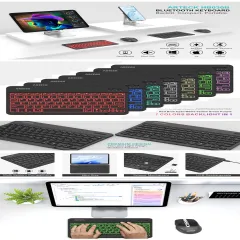
The Arteck HB030B costs around $20 and has no business being this good at that price. It is a thin, full-layout compact keyboard with 7-color backlighting, USB-C charging, and a battery that lasts six months between charges. At 5.9 oz (167g), it is the lightest non-foldable keyboard on this list — lighter than most phones.
The key feel is adequate. It is not going to compete with the MX Keys Mini or even the K380, but for $20, the typing experience is perfectly acceptable for emails, Slack messages, short documents, and general work tasks. The backlight is a genuine advantage over the K380 at a fraction of the price — useful for dim cafe corners and late-night work sessions.
The catch: Bluetooth 3.0 means the connection is slightly less stable and slightly slower to reconnect than the Bluetooth 5.x on the Logitech options. It supports only one device at a time — no multi-device switching. And the ultra-thin plastic construction feels flimsy compared to heavier keyboards. But at $20, you could buy five of these for the price of one MX Keys Mini. As a backup keyboard, a tablet companion, or a budget entry into the external keyboard world, it is hard to beat.
Pros
- Outstanding value at around $20
- 7-color backlighting — rare at this price
- Lightest non-foldable option at 5.9 oz
- 6-month battery life on a single charge
- Full-layout compact design
Cons
- Bluetooth 3.0 — slower reconnection than BT 5.x
- Single device pairing only — no multi-device switching
- Thin plastic build feels less durable
- Key feel is adequate, not great
5. NuPhy Air60 V2 — Best Mechanical
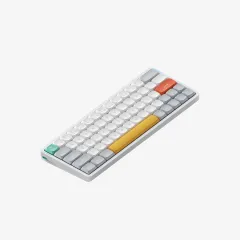
The NuPhy Air60 V2 is for the keyboard enthusiasts among us — the nomads who refuse to compromise on key feel just because they are working from a cafe in Canggu. It is a 64-key low-profile mechanical keyboard with hot-swappable switches, RGB backlighting, tri-mode connectivity (Bluetooth 5.1, 2.4GHz wireless, and USB-C wired), and a 1000Hz polling rate that makes it responsive enough for gaming.
The typing experience is in a different league from everything else on this list. The Gateron low-profile switches deliver real mechanical feedback with a satisfying thock that membrane keyboards simply cannot match. The double-shot PBT keycaps feel premium and will not develop shine from heavy use. QMK/VIA support means you can remap every key to your exact workflow.
The travel compromise: At 16 oz (454g) and $130, this is the heaviest and most expensive keyboard on the list. It is also not quiet — the mechanical switches produce audible clicks that will turn heads in a silent library or a small cafe. Coworking spaces are fine. Airplane tray tables and shared Airbnb living rooms may generate complaints. Battery life of 30-90 hours (depending on backlight usage) also means you will need to charge weekly rather than monthly.
Best for: Developers, writers, and power users who type 8+ hours daily and consider keyboard feel a non-negotiable quality-of-life factor. If you know what hot-swappable switches are, this keyboard is calling your name.
Pros
- Best typing experience — real mechanical key feel
- Hot-swappable switches for customization
- Tri-mode connectivity (BT, 2.4GHz, USB-C)
- QMK/VIA programmable keymaps
- Premium PBT keycaps and build quality
Cons
- Heaviest option at 16 oz
- Most expensive at $130
- Audible clicks — not cafe-friendly
- Shortest battery life at 30-90 hours
- 60% layout requires adjustment if used to full-size
Honorable Mention: Apple Magic Keyboard
The Apple Magic Keyboard ($99, 8.6 oz) is excellent for Mac users who want seamless integration with macOS and iPadOS. The ultra-low profile, USB-C charging, and month-long battery life make it a strong travel companion. But it only pairs with Apple devices, offers no backlighting on the standard model, and the key travel is polarizing — some love the ultra-shallow feel, others find it fatiguing. If you are deep in the Apple ecosystem, it is worth considering. For everyone else, the MX Keys Mini is the better universal choice.
Best Travel Mice
1. Logitech MX Anywhere 3S — Best Overall
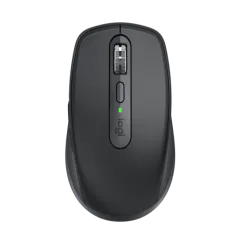
The Logitech MX Anywhere 3S is the travel mouse we have carried across 20+ countries. At 3.5 oz (99g), it fits in any pocket. The 8K DPI sensor tracks on literally any surface — glass cafe tables, dark wood, textured stone, even your jeans in a pinch. We have used it on a wobbly bamboo desk in Ubud, a polished marble counter in Lisbon, and the fold-down tray of a Thai Airways 777. It worked flawlessly on all of them.
Quiet clicks eliminate the machine-gun clicking sound that drives neighbors insane in shared spaces. The MagSpeed scroll wheel handles both precise line-by-line scrolling and fast free-spinning through long documents. USB-C charging gives 70 days of battery life, and a one-minute quick charge provides three hours of use when you are in a bind.
Multi-device Bluetooth connects to three devices simultaneously, and you switch between them with a button on the bottom. Pair it with the MX Keys Mini and you have a Logitech ecosystem where cursor and keyboard follow you across devices.
At $80, is it worth it? Yes, if you use a mouse daily. The tracking accuracy, quiet clicks, and build quality are substantially better than budget mice. The difference is subtle in a five-minute demo but obvious after a full work day.
Pros
- Tracks on any surface including glass
- Quiet clicks — essential for shared spaces
- 70-day battery with USB-C quick charge
- Multi-device Bluetooth (3 devices)
- Compact 3.5 oz and pocketable
Cons
- Premium price at $80
- Small size may not suit large hands for extended use
- No USB receiver included — Logi Bolt sold separately
- Right-handed design only
2. Logitech Pebble Mouse 2 M350s — Best Value
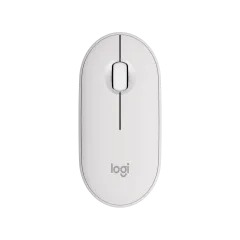
The Logitech Pebble Mouse 2 M350s is the mouse we recommend to anyone on a budget. At roughly $25 and 2.6 oz (76g), it is the lightest and cheapest mouse worth buying. The flat, rounded pebble shape slides into any pocket or bag compartment. Silent clicks are 90% quieter than standard mice — genuinely inaudible in a quiet room.
A single AA battery lasts up to two years. Two years. You buy this mouse, drop in a battery, and forget about charging or replacing for longer than most nomad trips last. Bluetooth and Logi Bolt dual connectivity covers both modern and legacy devices.
Where it compromises: The 4,000 DPI sensor is perfectly fine for general work but will not satisfy gamers or designers who need pinpoint precision. There is no scroll wheel tilt for horizontal scrolling. The plastic build is functional but uninspiring compared to the MX Anywhere 3S. And the flat shape, while pocketable, is less ergonomic for extended sessions than a contoured mouse.
The verdict: For 90% of digital nomads — writers, marketers, project managers, consultants — the Pebble Mouse 2 does everything you need at a price that barely registers. It is the mouse equivalent of the Logitech K380: unglamorous, affordable, and quietly excellent.
Pros
- Outstanding value at $25
- Lightest mouse on this list at 2.6 oz
- 2-year battery life on a single AA
- Silent clicks — 90% noise reduction
- Ultra-flat profile slips into any bag
Cons
- 4,000 DPI sensor — fine for office work, not precision tasks
- Flat shape is less ergonomic than contoured mice
- No horizontal scroll
- Plastic build feels budget
3. Apple Magic Mouse — Best for Mac Users
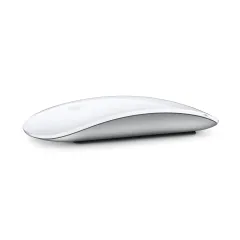
The Apple Magic Mouse ($79, 3.5 oz) is a divisive product that Mac users either love or cannot stand. The glass Multi-Touch surface supports gestures — swipe between desktops, scroll in any direction, zoom with a pinch — that integrate beautifully with macOS. The ultra-low profile and aluminum build look stunning on a desk.
We find it genuinely useful for browsing, document work, and gesture-heavy workflows. The scroll-anywhere surface is especially good for spreadsheets and design apps. Battery life lasts about a month on a USB-C charge.
The infamous flaw: When the battery dies, you charge it via a USB-C port on the bottom. While charging, you cannot use the mouse. Apple has persisted with this design through multiple generations and it remains baffling. Keep the battery topped up and it is not a daily issue, but it will catch you at the worst possible moment at least once.
The deeper issue for travel: The flat profile offers zero palm support. Extended use causes more hand fatigue than any contoured mouse on this list. We use the Magic Mouse for 2-3 hour sessions comfortably but switch to the MX Anywhere 3S for full work days.
Pros
- Multi-Touch gestures integrate seamlessly with macOS
- Ultra-sleek aluminum design at 3.5 oz
- Scroll in any direction on the glass surface
- USB-C charging on current model
- Excellent for gesture-heavy workflows
Cons
- Cannot use while charging — port is on the bottom
- Flat design offers zero ergonomic palm support
- Only works with Apple devices
- No quiet-click technology — audible in silent spaces
4. Logitech MX Master 3S — Best Full-Size
The Logitech MX Master 3S is not technically a travel mouse. At 5.0 oz (141g), it is the heaviest option here and too large for a jeans pocket. But many digital nomads — ourselves included — carry it anyway because the ergonomics are that good. The sculpted, contoured shape supports your entire hand in a natural position that eliminates the wrist strain flat and compact mice cause over long sessions.
The 8K DPI sensor tracks on glass. The MagSpeed scroll wheel shifts between precision and free-spin modes automatically. The thumb wheel handles horizontal scrolling. Quiet clicks and 70-day USB-C battery life match the MX Anywhere 3S. And the programmable buttons turn this into a genuine productivity tool — we have gesture buttons mapped to window management, copy/paste, and app switching.
Should you carry it? If you work 6-8 hours daily and have a daypack (not an ultralight sling), yes. The 2 oz weight penalty over the MX Anywhere 3S is barely noticeable in a bag but the comfort difference over a full work day is significant. If you are minimizing every gram, the MX Anywhere 3S is the better trade-off.
Pros
- Best ergonomics of any mouse on this list
- 8K DPI tracks on any surface including glass
- MagSpeed scroll wheel with auto-shift
- Thumb wheel for horizontal scrolling
- 70-day battery, USB-C quick charge
Cons
- Heaviest option at 5.0 oz — not pocketable
- Largest footprint — needs bag space
- Right-handed design only
- Overkill for casual laptop use
Best Keyboard + Mouse Combos
Buying a keyboard and mouse separately gives you the best options, but matching them simplifies the setup. Here are our recommended pairings at three price points:
Budget Combo — $45 Total
Arteck HB030B + Logitech Pebble Mouse 2 — The cheapest setup worth using. Combined weight: 8.5 oz (241g). The keyboard handles daily typing adequately and the Pebble handles everything else. Combined cost is less than a single MX Keys Mini. Best for nomads who want to try an external keyboard setup without a significant investment.
Mid-Range Combo — $65 Total
Logitech K380 + Logitech Pebble Mouse 2 — Our recommended setup for most digital nomads. Combined weight: 16.9 oz (499g). The K380’s multi-device switching and 2-year battery life pair perfectly with the Pebble’s silent clicks and all-day comfort. Both are Logitech, so the design language matches. This is the sweet spot of price, weight, and daily usability.
Premium Combo — $179 Total
Logitech MX Keys Mini + Logitech MX Anywhere 3S — The best portable setup money can buy. Combined weight: 21.4 oz (605g). Premium key feel, premium tracking, multi-device switching on both, USB-C charging on both. The Logitech Options+ software lets you configure both devices together with per-app settings and cross-device workflow automation. For professional typists and power users, this is the endgame.
The “I Refuse to Compromise” Combo — $179 Total
Logitech MX Keys Mini + Logitech MX Master 3S — For nomads who work 8+ hours daily from a fixed desk or coworking space and want the absolute best ergonomics. The full-size Master 3S eliminates wrist fatigue that compact mice cause over extended sessions. Heavier at 22.9 oz (649g) combined, but if you have a 30L+ daypack, the weight is trivial.
How to Choose a Portable Keyboard
Size vs. Comfort
This is the fundamental trade-off. Smaller keyboards save weight and pack space but compromise key size, key travel, and typing comfort. Our general rule:
- All-day professional typing (6+ hours): Get a full-size compact keyboard — MX Keys Mini or K380.
- Mixed use (2-4 hours typing, some tablet work): The K380 or iClever BK08 hits the sweet spot.
- Occasional use (emails, notes, plane sessions): A foldable like the BK08 or ultra-budget Arteck is fine.
Battery Life Matters More Than You Think
Running out of keyboard battery during a deadline in a cafe with no outlets is a uniquely frustrating experience. The K380’s two-year AAA battery and the Arteck’s six-month rechargeable are genuinely set-and-forget. The MX Keys Mini’s 10-day backlit battery is manageable but requires periodic charging. The NuPhy Air60 V2’s 30-90 hour battery demands weekly attention.
Noise Level for Shared Spaces
If you work primarily in cafes, coworking spaces, and libraries, keyboard noise is not optional — it is a social contract. Membrane keyboards (MX Keys Mini, K380, Arteck) are inherently quiet. Mechanical keyboards (NuPhy Air60 V2) are inherently audible. There is no such thing as a truly silent mechanical keyboard, regardless of what the marketing says. Linear switches reduce the noise, but any mechanical keyboard produces more sound than a membrane alternative.
One more thing for shared-space workers: public WiFi in coworking spaces and cafes is a security risk. Using a travel VPN keeps your traffic encrypted whether you are typing at a Lisbon cafe table or a Chiang Mai coworking space.
How to Choose a Travel Mouse
Compact vs. Ergonomic
Flat, compact mice (Pebble, Magic Mouse) are easier to carry but less comfortable for extended use. Contoured mice (MX Anywhere 3S, MX Master 3S) are more comfortable but take up more space. If you work under 4 hours daily with a mouse, go compact. Over 4 hours, the ergonomic difference is worth the extra weight.
Surface Tracking
If you frequently work on glass or glossy surfaces, prioritize mice with Darkfield or high-DPI sensors — the MX Anywhere 3S and MX Master 3S track on glass, while budget mice often require a mouse pad or textured surface. This matters more than you think when your cafe table is polished stone or lacquered wood.
Final Verdict
For most digital nomads, the Logitech K380 + Pebble Mouse 2 combo at $65 total is the right starting point. It is light, affordable, reliable, and solves the core problem of ergonomic typing and mousing when using a laptop stand. Combined weight under a pound. Combined battery life measured in years. Zero daily maintenance.
If you type professionally — writing, coding, data entry — upgrade the keyboard to the MX Keys Mini. The difference in typing comfort over a full work day is worth the $60 premium. And if you use a mouse intensively for design, spreadsheets, or anything requiring precision, the MX Anywhere 3S justifies its $80 price tag with glass tracking and quiet clicks.
Whatever you choose, pair it with a portable laptop stand and you have a complete ergonomic workstation that weighs under 2 lbs and fits in any daypack. Your neck, back, and wrists will thank you.
Get the Logitech K380 — Our Top Value Pick Get the MX Keys Mini — Best for Serious TypistsRelated Reading
- Digital Nomad Tech Packing List 2026 — The complete gear guide for remote workers
- Best Portable Laptop Stands — Pair with your keyboard for proper ergonomics
- Best Portable Monitors for Travel — Add a second screen to your setup
- Best Tech Organizer Cases — Keep your keyboard, mouse, and cables tidy
- Best eSIM Providers 2026 — Stay connected at every coworking space and cafe
- Best Travel VPN — Protect your work on shared networks
- Best Travel Insurance for Digital Nomads — Cover your gear against theft and accidental damage abroad
Frequently Asked Questions
Do I need an external keyboard if I have a laptop?
Yes, if you use a laptop stand — and you should be using a laptop stand. When your screen is raised to eye level for proper ergonomics, the built-in keyboard sits too high for comfortable typing. Your wrists angle upward, which causes strain within hours and real damage over weeks. An external keyboard lets your hands rest at the correct height while your screen sits at eye level. It is also smart insurance: if your laptop keyboard fails while you are abroad (spilled coffee, sticky keys, dead key), a $20-40 Bluetooth keyboard keeps you working while you figure out repairs.
Bluetooth vs 2.4GHz wireless — which is better for travel?
Bluetooth wins for travel, hands down. It connects directly to your laptop, tablet, or phone without requiring a USB receiver — meaning no tiny dongle to lose in the bottom of your bag or leave plugged into a coworking space monitor. Most Bluetooth keyboards also support multi-device pairing, letting you switch between laptop and tablet with a single button press. The trade-off is that 2.4GHz wireless offers slightly lower latency and more reliable connections in crowded WiFi environments, which matters for gaming but not for typing emails in a cafe. For digital nomads, Bluetooth is the clear winner.
Can I use a keyboard on a plane?
Yes. Bluetooth keyboards work in flight once you have enabled airplane mode on your device — most airlines now allow Bluetooth accessories during the flight. Pair a compact keyboard with a tablet or phone propped up on a tray table, and you have a surprisingly functional writing setup for long-haul flights. The iClever BK08 and Arteck HB030B are particularly good for this because they are small enough to use comfortably in economy-class seat space.
What is the best foldable keyboard for travel?
The iClever BK08 is our top pick for a foldable keyboard. It folds into thirds to roughly the size of a large smartphone, weighs just 7 oz, and includes a built-in touchpad so you do not need to carry a mouse for light tasks. The key travel is shallow and the keys are smaller than a standard keyboard, so it is best for occasional use — emails, notes, short writing sessions — rather than all-day typing. If you type professionally for 6+ hours daily, skip the foldable and get a Logitech K380 or MX Keys Mini instead.
Is the Logitech MX Keys Mini worth it for travel?
Yes, if typing is your primary work. The MX Keys Mini has the best key feel of any compact wireless keyboard we have tested — the sculpted keys, satisfying travel depth, and smart backlighting make it genuinely pleasant to type on for hours. USB-C charging, multi-device Bluetooth, and a sturdy build round out the package. At $99 it costs 2-5 times more than budget alternatives. But if you are a writer, developer, or anyone who types thousands of words daily, the comfort difference is worth every dollar.
Should I get a travel mouse or use the trackpad?
A trackpad is fine for casual browsing and basic tasks, but a dedicated mouse significantly improves speed and comfort for spreadsheets, design work, photo editing, and extended work sessions. The precision difference is noticeable the moment you switch. A travel mouse like the Logitech Pebble Mouse 2 weighs under 3 oz and costs about $25 — that is an incredibly low investment for a meaningful daily comfort improvement. If you work more than 3-4 hours per day on a laptop, a travel mouse is worth carrying.