Best Travel Desk Setup 2026: Portable Workstation for Nomads
We tested 9 portable desks, lap desks, and standing desk converters for remote work on the road. The best travel desk setup for digital nomads in 2026.
The dining table at a Chiang Mai Airbnb. A cafe counter in Lisbon that is exactly the wrong height. A hostel common room in Medellin with chairs designed for someone a foot shorter. A van parked in Joshua Tree with no flat surface wider than a cutting board.
These are the “desks” we have worked from over the past two years. And after spending eight-hour days hunched over a laptop on surfaces never designed for work, we started taking our workspace setup seriously. Not because we wanted a perfect home office — we wanted to stop ending every work day with a stiff neck and aching wrists.
We tested nine portable desk setups across four continents — lap desks, folding tables, standing desk converters, and lightweight laptop stands — evaluating each for ergonomics, portability, build quality, and how well they transform a random surface into a real workstation. Here is what actually works for remote work on the road.
🏆 Quick Picks
Amazon
Cushioned base, built-in mouse pad, device slot. Perfect for couch and bed work.
From $35
Amazon
5.6 oz, adjusts to standing height. The most packable ergonomic upgrade.
From $65
Amazon
Full portable workstation that folds flat. Ideal for van life and long-term stays.
From $60
Quick Comparison
| Feature | LapGear Home Office Pro | Roost Laptop Stand V3 | Portable Folding Desk | Nexstand K2 Laptop Stand | Rain Design iLevel 2 | LapGear Designer Lap Desk |
|---|---|---|---|---|---|---|
| Type | Lap Desk | Laptop Stand | Folding Table | Laptop Stand | Laptop Stand | Lap Desk |
| Weight | 3.5 lbs | 5.6 oz | 7.5 lbs | 8 oz | 1.4 lbs | 2.5 lbs |
| Surface | 21.1 x 12 in | N/A (stand only) | 23.6 x 15.7 in | N/A (stand only) | N/A (stand only) | 17.3 x 13.3 in |
| Height Adjust | No | 6-12 inches | 3 heights | 8 positions | Adjustable angle | No |
| Mouse Pad | Built-in | No | No | No | No | Built-in |
| Fits Laptop | Up to 15.6 in | Up to 15 in | Any | Up to 15.6 in | Up to 15 in | Up to 15.6 in |
| Price | ~$35 | ~$65 | ~$60 | ~$30 | ~$50 | ~$25 |
| Best For | Couch / bed work | Ultra-portable ergonomics | Van life / Airbnb | Budget stand | Desk-based ergonomics | Budget lap desk |
| Visit LapGear Home Office Pro | Visit Roost Laptop Stand V3 | Visit Portable Folding Desk | Visit Nexstand K2 Laptop Stand | Visit Rain Design iLevel 2 | Visit LapGear Designer Lap Desk |
Why Your Travel Desk Setup Matters
Working from a laptop directly on your lap or a low coffee table for eight hours creates compounding ergonomic problems:
- Neck strain. Looking down at a screen positioned 12-18 inches below eye level forces your neck into forward flexion. Over weeks, this becomes chronic cervical strain.
- Wrist strain. Without a flat, stable surface at the correct height, your wrists bend at awkward angles while typing. This is how repetitive strain injuries start.
- Back pain. Couches and beds offer zero lumbar support. Without a proper desk height, you hunch forward to see the screen, rounding your thoracic spine.
- Laptop overheating. Soft surfaces (beds, couches, laps) block ventilation. Your laptop thermal throttles, performance drops, and component lifespan shortens.
A proper travel desk setup solves all four problems. The question is how much weight and bulk you are willing to carry.
Best Travel Desk Setups
1. LapGear Home Office Pro Lap Desk — Best Overall Lap Desk
The LapGear Home Office Pro is the lap desk we use daily when working from couches, beds, and floors in Airbnbs and hostels. The cushioned base conforms to your lap, the 21.1 x 12 inch surface fits a 15.6-inch laptop with room for a mouse, and the built-in mouse pad means you do not need a separate one.
What makes this our top pick is the combination of features you actually use: a device slot for propping up your phone or tablet (second screen), a wrist rest along the front edge, and a flat, stable MDF surface that stays cool. The cushioned base keeps the desk from sliding and provides airflow underneath the laptop.
At 3.5 lbs, it is not ultralight — you would not carry it in a daypack. But it fits in a carry-on suitcase and weighs less than most laptops. For nomads who spend time in accommodation (Airbnbs, house sits, long-term rentals), it transforms any seating surface into a viable workspace.
Pros
- Large 21.1 x 12 inch surface -- fits 15.6 inch laptop plus mouse
- Built-in mouse pad and phone/tablet slot
- Cushioned base for comfort and airflow
- Wrist rest reduces typing fatigue
- Flat MDF surface prevents laptop overheating
- Fits in carry-on suitcase
Cons
- 3.5 lbs -- too heavy for a daypack
- No height adjustment
- Not suitable as a standing desk surface
- Bulky shape does not pack flat
- Not ideal for very small laptops (surface feels oversized)
Best for: Airbnb and accommodation-based nomads, couch and bed workers, anyone who wants a stable laptop surface with a mouse pad.
Check Price on Amazon2. Roost Laptop Stand V3 — Best Ultra-Portable Ergonomic Stand
The Roost Laptop Stand V3 is the single best ergonomic investment a digital nomad can make. At 5.6 oz (lighter than a phone) and collapsing to 13 inches long, it disappears into any bag. But when deployed, it raises your laptop screen 6-12 inches — to eye level on a table or standing height on a counter.
We have carried the Roost through 15 countries over 18 months. It has been used on cafe tables in Lisbon, kitchen counters in Mexico City, coworking desks in Bali, and a picnic table at a national park in Colorado. The folding mechanism is fast (three seconds to deploy) and the rubber grips hold laptops securely, including a 16-inch MacBook Pro.
The trade-off: The Roost is a stand, not a desk. You need a surface to put it on. And because it elevates the laptop keyboard, you need an external keyboard to type comfortably. Budget for a compact Bluetooth keyboard like the Logitech K380 ($40) or Keys-To-Go 2 ($80) to pair with it.
This combination — Roost stand plus external keyboard — weighs under a pound total and provides the same ergonomic benefit as a $300 desk riser. It is the setup we recommend to every new nomad. For a complete keyboard breakdown, see our best portable keyboard and mouse guide.
Pros
- 5.6 oz -- lighter than a phone
- Adjustable height (6-12 inches above surface)
- Works as sitting stand or standing stand on counters
- Collapses to 13 inches -- fits any bag
- Holds laptops up to 15 inches securely
- Durable aluminum construction
- Deploys in 3 seconds
Cons
- $65 is premium for a laptop stand
- Requires a surface underneath (not a lap desk)
- Must use external keyboard -- cannot type on elevated laptop
- Does not work as a standalone workstation
- Laptop feels elevated and exposed in windy outdoor settings
Best for: Ultralight nomads, backpackers, anyone who wants the maximum ergonomic benefit at minimum weight and bulk.
Check Price on Amazon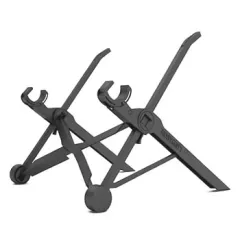
3. Portable Folding Desk — Best for Van Life and Long-Term Stays
For van lifers, long-term Airbnb stays, and nomads who stay put for weeks at a time, a portable folding desk provides a proper work surface where none exists. This aluminum folding table adjusts to three heights (10, 19, and 25 inches for floor, couch, and chair heights), folds completely flat for storage, and weighs 7.5 lbs.
We used a folding desk for two months of van life in the western US. The van had no built-in desk surface — just a bed platform, a small kitchen counter, and the driver/passenger seats. The folding desk set up in three seconds and gave us a stable, flat surface at the right height for seated work on the bed platform. When work was done, it folded flat and slid between the bed and the wall.
The 23.6 x 15.7 inch surface fits a 15-inch laptop and a full-size mouse with room to spare. For more on building a complete van life workstation, see our van life internet guide and internet setup for van life.
Pros
- Three height settings -- adapts to floor, couch, or chair work
- Folds completely flat for storage
- Large 23.6 x 15.7 inch surface
- Aluminum frame is lightweight but rigid
- Non-slip feet and surface
- Great for van life where no desk exists
Cons
- 7.5 lbs -- not suitable for backpack travel
- Takes up storage space even when folded
- No built-in mouse pad or device slot
- Legs can wobble on uneven surfaces
- Not practical to carry through airports
Best for: Van life, long-term stays, accommodation without a desk, stationary nomads who need a full work surface.
Check Price on Amazon
4. Nexstand K2 Laptop Stand — Best Budget Stand
The Nexstand K2 delivers 90% of the Roost’s functionality at half the price. At 8 oz and $30, it is the budget laptop stand we recommend for nomads who want to try an elevated setup before committing to the Roost’s premium price.
The K2 adjusts to eight height positions, holds laptops up to 15.6 inches, and folds to about the size of a water bottle. The plastic construction is lighter than the Roost’s aluminum but feels less premium. In our six months of parallel testing, the K2 developed minor flex at the joints that the Roost did not — it still works fine, but it does not inspire the same confidence with heavy laptops.
Our verdict: If you are not sure whether you will use a laptop stand daily, start with the Nexstand K2. If you know you want one and plan to use it for years, invest in the Roost.
Pros
- $30 -- half the price of the Roost
- 8 oz -- still ultralight
- Eight height positions for fine adjustment
- Holds up to 15.6 inch laptops
- Folds compactly for travel
Cons
- Plastic construction develops flex over time
- Less stable than Roost with heavy laptops
- Rubber grips wear down faster
- Build quality reflects the lower price point
Best for: Budget-conscious nomads, first-time laptop stand users, backup travel stand.
Check Price on Amazon5. Rain Design iLevel 2 — Best for Desk-Based Work
The Rain Design iLevel 2 is the stand you choose when you have a reliable desk surface and want a premium, adjustable-angle platform for your laptop. The aluminum construction is solid, the height adjusts via a thumb screw, and the non-slip silicone pads hold your laptop securely at any angle.
At 1.4 lbs, it is heavier than the Roost or Nexstand but still travel-friendly. We found it best suited for nomads who work primarily from coworking spaces and desks rather than cafes and couches. The angle adjustment is finer-grained than folding stands, which matters for finding the exact eye-level position on different desk heights.
Pros
- Premium aluminum build quality
- Infinitely adjustable angle via thumb screw
- Non-slip silicone pads hold laptop securely
- Stable and wobble-free on desks
- Attractive design that looks professional
Cons
- 1.4 lbs -- heavier than folding stands
- Does not fold flat like Roost or Nexstand
- Not suitable for lap or couch use
- Requires a desk surface to be useful
- Does not reach standing desk height
Best for: Coworking space regulars, desk-based remote workers, anyone who wants premium build quality.
Check Price on Amazon6. LapGear Designer Lap Desk — Best Budget Lap Desk
The LapGear Designer Lap Desk strips the Home Office Pro down to essentials: a flat MDF surface, cushioned base, built-in mouse pad, and not much else. At $25 and 2.5 lbs, it is the cheapest functional lap desk that we can actually recommend.
The 17.3 x 13.3 inch surface fits a 15.6-inch laptop without the extra room for a phone slot or wrist rest that the Home Office Pro provides. The cushion is thinner and less supportive. But for the core job — providing a flat, stable, ventilated surface for your laptop while you work from a couch or bed — it works.
Pros
- $25 -- cheapest functional lap desk
- 2.5 lbs -- lighter than the Home Office Pro
- Built-in mouse pad
- Cushioned base for comfort and ventilation
- Multiple color and pattern options
Cons
- Smaller surface -- tight fit with mouse
- No phone/tablet slot
- No wrist rest
- Thinner cushion than premium options
- Surface can bow slightly under heavy laptops
Best for: Budget-conscious nomads, occasional couch workers, travelers who want a lap desk without the bulk.
Check Price on AmazonThe Complete Travel Desk Kit
After two years of experimentation, here is the desk setup kit we actually carry:
Ultralight Kit (Under 1 lb)
For backpackers and carry-on-only travelers:
- Roost Laptop Stand V3 ($65, 5.6 oz) — raises screen to eye level on any surface
- Logitech K380 Bluetooth keyboard ($40, 14 oz) — compact multi-device keyboard
- Logitech Pebble 2 mouse ($30, 3 oz) — quiet, compact wireless mouse
- Total weight: ~1.5 lbs. Total cost: ~$135.
This kit transforms any cafe table, hotel desk, or Airbnb kitchen counter into an ergonomic workstation. It is the setup we recommend to most digital nomads. For a full breakdown of peripheral options, see our best portable keyboard and mouse guide.
Mid-Range Kit (Under 5 lbs)
For nomads in Airbnbs and longer stays:
- Everything in the Ultralight Kit
- LapGear Home Office Pro ($35, 3.5 lbs) — for couch and bed work sessions
- Total weight: ~5 lbs. Total cost: ~$170.
Van Life / Stationary Kit
For van lifers and slow travelers:
- Everything in the Mid-Range Kit
- Portable Folding Desk ($60, 7.5 lbs) — creates a desk where none exists
- Portable monitor (see our best portable monitors guide) — dual-screen productivity
- Total weight: ~14 lbs. Total cost: ~$400+.
How to Set Up an Ergonomic Workspace Anywhere
Regardless of which desk setup you carry, follow these principles to protect your body during long work sessions:
Screen Height
Your screen should be at eye level. When you look straight ahead, your eyes should meet the top third of the screen. A laptop stand achieves this on tables. A lap desk improves the angle on couches but will not reach true eye level — supplement with external keyboard use.
Keyboard Position
Your elbows should be at 90 degrees with forearms parallel to the floor. If the desk surface is too high, lower your chair. If it is too low, raise the keyboard with books or a laptop stand. External keyboards placed at the desk surface with the laptop elevated on a stand create the ideal separation.
Chair and Seating
The weakest link in most travel workstations. Hotel chairs and cafe seats are rarely ergonomic. Roll up a towel or hoodie for lumbar support. Keep feet flat on the floor. If the chair is too high, rest your feet on a bag or footrest.
Take Breaks
No desk setup compensates for sitting in one position for eight hours straight. The 20-20-20 rule (every 20 minutes, look at something 20 feet away for 20 seconds) reduces eye strain. Stand up and move for five minutes every hour. This matters more than any gear purchase.
For a comprehensive ergonomic travel setup, see our best ergonomic travel gear guide.
Travel Desk vs. Coworking Space
The question is not really “which desk setup should I buy?” — it is “should I carry a desk setup or just pay for coworking?”
Carry your own desk setup if:
- You work from accommodation (Airbnbs, house sits, hostels) most days
- You travel in areas with limited or expensive coworking options
- You value flexibility and spontaneous work sessions
- You are a van lifer or RVer (no coworking available on the road)
Use coworking spaces if:
- You thrive in social work environments
- You stay in cities with affordable coworking ($5-15/day in Southeast Asia, $15-30/day in Europe)
- You need reliable high-speed internet and monitor setups
- You prefer zero gear overhead
Our approach: We carry the Ultralight Kit everywhere and use coworking spaces 2-3 days per week in cities that have them. The Ultralight Kit covers the other days when we work from accommodation, cafes, or outdoor spots. For coworking recommendations, see our best coworking memberships guide.
Pairing Your Desk with the Right Connectivity
The best desk setup is useless without reliable internet. Pair your workstation with:
- An eSIM for instant data in any country — see our best eSIM providers guide
- A travel router for creating your own secure WiFi network — see our best travel WiFi extenders guide
- A VPN for securing public WiFi connections at cafes and coworking spaces — see our remote work security guide
Final Verdict
For most digital nomads, the Roost Laptop Stand V3 plus a compact Bluetooth keyboard ($105 total, under 1.5 lbs) is the best travel desk investment. It is the highest impact ergonomic upgrade at the lowest weight penalty. You will use it every single day, it fits in any bag, and it transforms any table-height surface into a proper workstation.
Add a LapGear Home Office Pro ($35) if you work from couches and beds regularly. Add a folding desk ($60) if you are in a van or accommodation without a desk.
Skip the bulky standing desk converters and desktop risers. A Roost on a kitchen counter gives you standing desk functionality at a fraction of the weight. Focus on lightweight, packable solutions that you will actually bring with you rather than heavy solutions that stay in your closet.
Get the Roost Laptop Stand V3 on Amazon Get the LapGear Home Office Pro on AmazonRelated Reading
- Best Ergonomic Travel Gear — Full ergonomic setup for digital nomads
- Best Portable Laptop Stand — Detailed laptop stand comparison
- Remote Work Productivity Setup — Optimize your entire remote workflow
- Best Portable Monitors — Add a second screen on the road
- Best Portable Keyboard and Mouse — Essential peripherals for nomads
- Van Life Internet Guide — Complete connectivity for life on the road
Frequently Asked Questions
What is the best portable desk for a digital nomad?
For most digital nomads, a lap desk with a built-in mouse pad and wrist rest (like the LapGear Home Office Pro) is the best balance of portability, ergonomics, and work surface. It weighs under 4 lbs, fits in a carry-on, and turns any couch, bed, or park bench into a functional workstation. For standing work, the Roost Laptop Stand ($65) paired with a compact Bluetooth keyboard is lighter and more packable than any portable standing desk converter.
Is a lap desk worth it for remote work?
Yes, if you work outside of traditional desks more than a few hours per week. Working on a laptop directly on your lap causes neck strain (looking down), wrist strain (no support), and overheating (laptop vents blocked by your legs). A lap desk raises the screen by 2-3 inches, provides a flat stable surface, and includes ventilation channels that prevent thermal throttling. After six months of testing, we found that a good lap desk reduced our end-of-day neck pain noticeably compared to bare-lap work.
Do I need a standing desk as a digital nomad?
Not necessarily. A full standing desk converter is heavy and bulky -- impractical for travel. Instead, most nomads achieve standing work by using a laptop stand on a kitchen counter, hotel dresser, or tall cafe table. A compact laptop stand like the Roost or Nexstand weighs under 6 oz and raises your screen to standing height on any elevated surface. This gives you 90% of the ergonomic benefit of a standing desk at 5% of the weight and cost.
What is the most portable standing desk?
The most portable option for standing work is the Roost Laptop Stand V3 (5.6 oz, collapses to 13 inches) placed on top of any counter-height surface. For a self-contained standing desk, the SideTrak portable standing desk converter folds flat and weighs about 7 lbs, but it is bulky for true travel. The practical approach for nomads is to carry a lightweight laptop stand and use hotel dressers, kitchen counters, or tall cafe tables as your standing surface.
How do I set up an ergonomic workstation in a hotel room?
Use the hotel desk as your base and add three things: a laptop stand to raise the screen to eye level (reducing neck strain), an external keyboard placed at elbow height (reducing wrist strain), and if possible, an external monitor or tablet as a second screen. Position the desk chair so your feet are flat on the floor and your elbows are at 90 degrees. If the desk chair is terrible (most are), a rolled-up towel behind your lower back provides basic lumbar support. If the desk is too low, stack books or luggage underneath your laptop stand.
What desk accessories should a digital nomad carry?
The essentials are: a laptop stand (Roost or Nexstand, under 6 oz), a compact Bluetooth keyboard (Logitech Keys-To-Go 2 or K380), a wireless mouse (Logitech Pebble 2), and a USB-C hub for connecting peripherals. Optional but valuable additions include a portable monitor for dual-screen productivity, a lap desk for couch and bed work, and a webcam for better video call quality than the built-in laptop camera. Keep the total weight of your desk accessories under 3 lbs to stay packable.